MP3
1
Press [CD 6] and then [STOP 7].
2
Press [PROGRAM].
3
Press [ALBUM or ] to select your desired
album.
4
Press [3/FF/¢] once and then numeric buttons to
select your desired track.
Example:
Album number
Track number
5
Press [ENTER] to store the program.
Repeat steps 3 to 5 to program other tracks.
6
Press [CD 6] to start play.
To Action
cancel program
mode
Press [PROGRAM] in the stop mode.
replay the program Press [PROGRAM] then [CD 6].
check program
contents
Press [4/REW/4] or [3/FF/¢] when
“PGM” is displayed in the stop mode.
To check while programming, press
[PROGRAM] twice after “PGM” appears,
then press [4/REW/4] or [3/FF/¢].
add to the program Repeat step 3 in the stop mode for CD-DA.
Repeat steps 3 to 5 in the stop mode for
MP3.
clear the last track Press [DEL] in the stop mode.
clear all
programmed tracks
Press [CLEAR] in the stop mode.
“PGM CLEAR” is displayed.
• When you try to programme more than 24 tracks “PGM FULL”
appears.
• During program pla
y for CD-DA, you can search backward or forward
only within the current track.
• The program memory is cleared when you open the CD tray
.
INTRO function (Album scan)
MP3
This function allows you to find an album by listening
to the first track of all albums in the current disc for
10 seconds each.
1
Press [CD 6] and then [STOP 7].
2
Press [INTRO] to start the intro function.
3
While your desired album is playing, press [CD 6].
Intro mode cancelled and the playback continues.
INTRO function is cancelled after playing the first track in the last
album.
To
stop during the process, press [INTRO] or [STOP 7].
• This function does not work during any random/program mode.
CDs and MP3 – Play (Continued)
Basic play
1
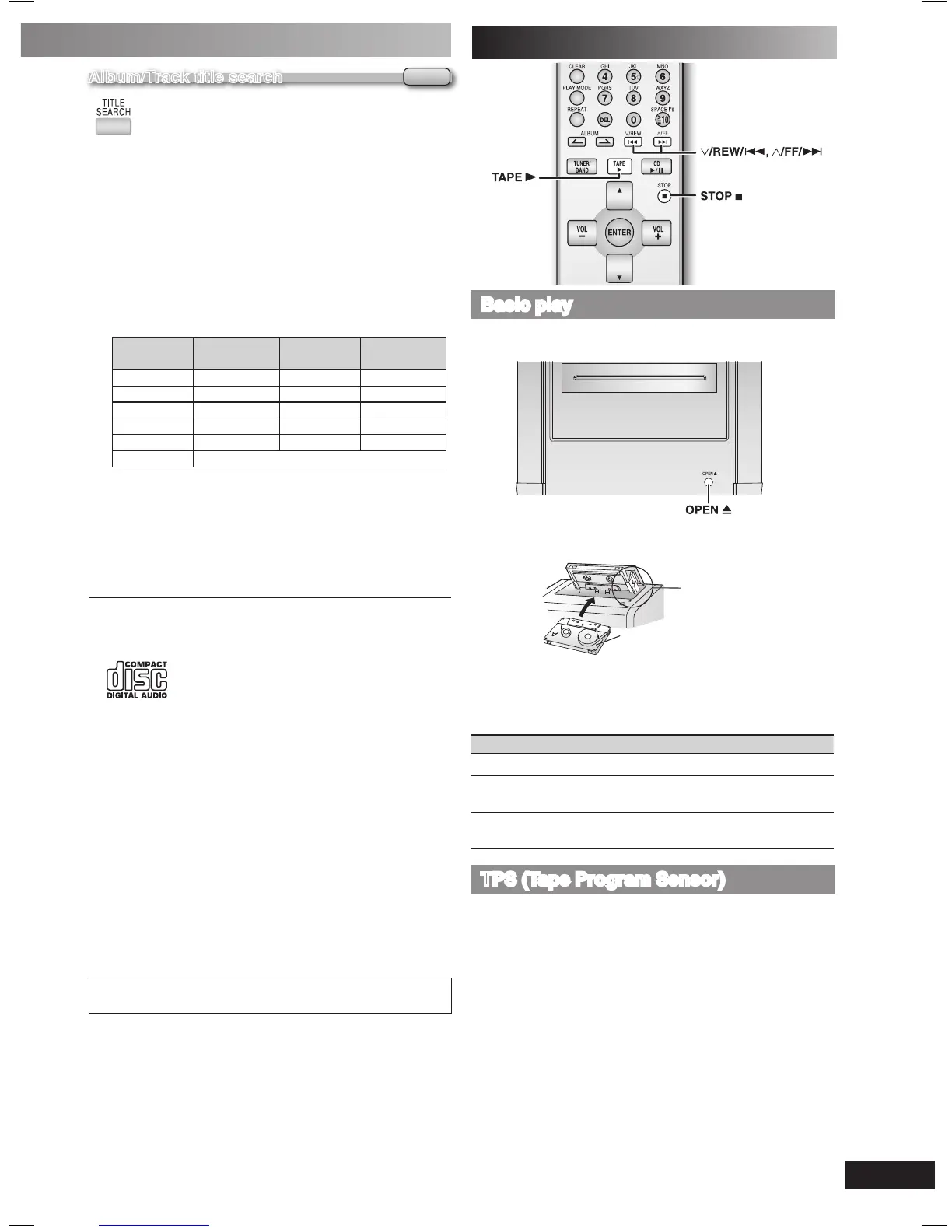
Press [OPEN 0] on top of the unit.
2
Insert a cassette.
Insert inside the
guides
Forward side
3
Close the lid by hand.
4
Press [TAPE 3] to start play.
To play the other side of the cassette, turn the cassette over.
To Action
stop tape playback Press [STOP 7].
start one touch play
Press [TAPE
3] when the unit is OFF with
the cassette loaded.
fast-forward and
rewind
Press [4/REW/4] or [3/FF/¢] in the
stop mode.
TPS (Tape Program Sensor)
This function enables you to search the beginning of a track,
up to a maximum of 9.
Press [4/REW/4] or [3/FF/¢] during play.
Play resumes from the track found.
TPS may not function properly with:
• Short silent parts
• Noise occurs between tunes
• Silent parts found within tunes
Album/Track title search
MP3
Enable you to search your desired album or track.
1
Press [CD 6] and then [STOP 7].
2
For album title search, press [TITLE SEARCH] once.
For track title search, press [TITLE SEARCH] twice.
3
Press the numeric buttons repeatedly to select your
desired character then press [3/FF/¢] to key in the
next character.
• You can enter up to 9 characters.
• To edit, press [4/REW/4] or [3/FF/¢] to revise any
characters.
• To delete, move the cursor over the character and then
press [DEL].
Numbered
buttons
Characters Numbered
buttons
Characters
1 1 6 M N O 6
2 A B C 2 7 P Q R S 7
3 D E F 3 8 T U V 8
4 G H I 4 9 W X Y Z 9
5 J K L 5 0 0
h
10
sp ac e
!“#$ %&’()∗+,– ./:;=?_
8
4
Press [ENTER].
Press [4/REW/4] or [3/FF/¢] to search for
previous or next match.
5
Press [CD 6] to start play from the album/track
found.
• “NOT FOUND” is displayed when there is no match.
• This function does not work during any random/program mode.
NOTE on CDs
• This unit can access up to 99 tracks.
• Choose CD with this mark.
• This unit can play MP3 files and CD-DA format audio CD-R/RW
that have been finalized.
• It may not be able to play some CD-R/RW due to the condition of
the recording.
• Do not use irregular shaped disc.
• Do not use disc with labels and stickers that are coming off or with
adhesive exuding from under labels and stickers.
• Do not attach extra labels or stickers on the disc.
• Do not write anything on the CD.
NOTE on MP3
• Files are treated as tracks and folders are treated as albums.
• This unit can access up to 999 tracks, 255 albums and 20 sessions.
• Disc must conform to ISO9660 level 1 or 2 (except for extended
formats).
• To play in a certain order, prefix the folder and file names with 3-digits
numbers in the order you want to play them.
MPEG Layer-3 audio decoding technology licensed from
Fraunhofer IIS and Thomson multimedia.
Cassette tape – Play











 To Next Page