Before use
6
RQT7357
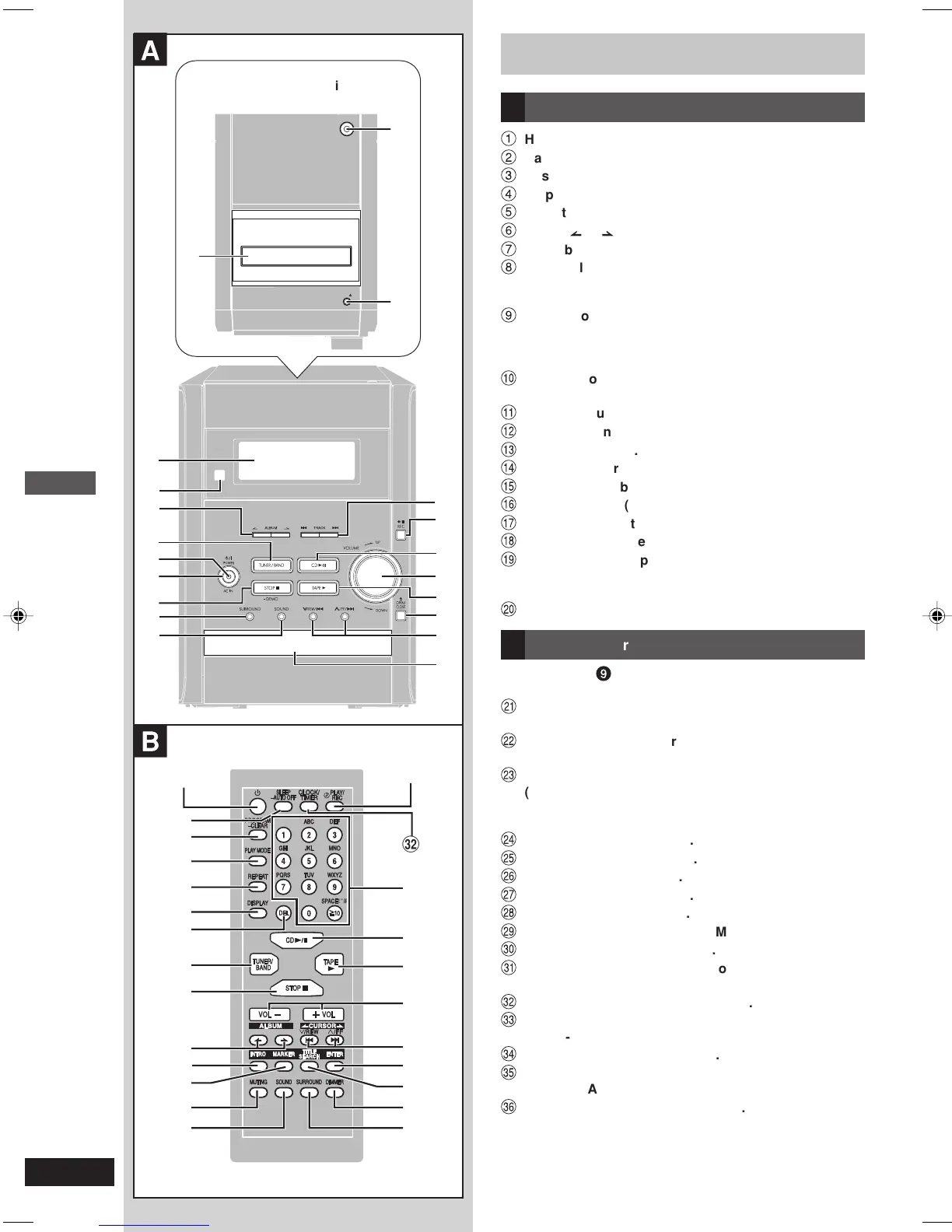
Front panel controls
A Main unit
1
Headphone jack (PHONES) ........................................ 19
2
Cassette lid
3
Cassette deck open button (OPEN 0) ...................... 16
4
Display
5
Remote control signal sensor
6
Album or .............................................................. 13
7
Tuner/band select button (TUNER/BAND) .................. 8
8
AC supply indicator (AC IN)
This indicator lights when the unit is connected to the AC
outlet.
9
Standby/on switch (y¥I POWER)
Press to switch the unit from on to standby mode or vice
versa. In standby mode, the unit is still consuming a small
amount of power.
Ä
Stop, demonstration button
(STOP 7, –DEMO) ................................................... 7, 10
Å
Surround button (SURROUND) ................................. 19
Ç
Sound button (SOUND) .............................................. 19
É
Track 4 or ¢ ......................................................... 13
Ñ
Recording start/pause button (¶/8 REC) ................. 18
Ö
CD play/pause button (CD 3/8) ................................ 10
Ü
Volume control (VOLUME DOWN, UP) ........................ 8
á
Cassette play button (TAPE 3) ................................. 16
à
CD tray open/close button (0 OPEN/CLOSE) .......... 10
â
CD skip/search, tape fast-forward/rewind/TPS, tune/
preset channel select, time adjust buttons
(4/REW/4, 3/FF/¢) ................................. 7, 8, 10, 16
ä
CD tray
B Remote Control
Buttons such as
9
function in exactly same way as the buttons
on the main unit.
ã
Sleep timer, auto off button
(SLEEP, –AUTO OFF) ............................................ 19, 21
å
CD program/clear, tuner preset button
(PROGRAM, –CLEAR) ............................................ 9, 12
ç
Play mode select button
(PLAY MODE) ................................................................ 8
Use this for selecting CD play mode, tune mode and FM
mode.
é
Repeat button (REPEAT) ............................................ 11
è
Display button (DISPLAY) .......................................... 12
ê
Delete button (DEL) .................................................... 12
ë
Stop button (STOP 7) ................................................. 11
í
Intro button (INTRO) ................................................... 14
ì
Marker memory/recall button (MARKER) ................. 15
î
Muting button (MUTING) .............................................. 7
ï
Play timer/recording timer button
(˚PLAY/REC) .............................................................. 20
ñ
Clock/timer button (CLOCK/TIMER) ............................ 7
ó
Numeric, character buttons
(
h
10, 1-9, 0, A-Z, SPACE!”#) ......................................... 9
ò
Enter button (ENTER) ................................................. 14
ô
Title search select button
(TITLE SEARCH) ......................................................... 14
ö
Dimmer button (DIMMER) ............................................ 7
A
PHONES
OPEN
5
4
3
1
2
7
!
"
9
8
#
&
(
~
)
$
+
6
%
,
B
9
7
=
6
-
.
[
\
]
{
_
"
&
)
+
(
<
#
/
:
;
>
?
@
^
Top of the unit
RQT7357-C_04-07_EN 12/1/04, 6:50 pm6


 To Next Page