11
Simple setup
RQT7700
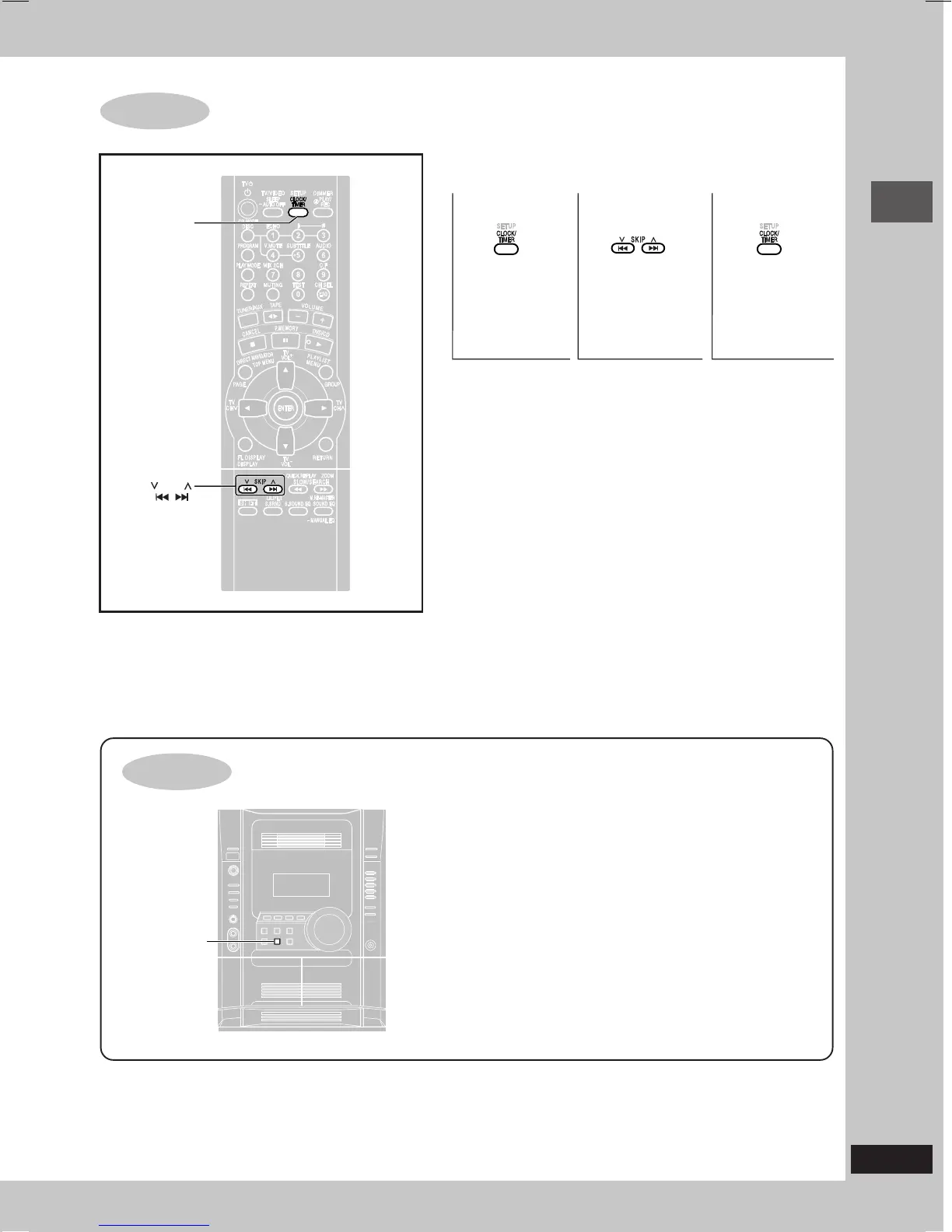
Setting the time
When the unit is first plugged in, a demonstration of its functions
may be shown on the display.
If the demo setting is off, you can show a demonstration by turning
on the demo.
Press and hold [–DEMO].
The display changes each time the button is held down.
NO DEMO (off) ↔ DEMO ON (on)
You can reduce the power consumed in standby mode by
turning the demonstration off.
STEP7
This is a 24-hour clock.
•
The time is shown for about 5 seconds when you select “CLOCK” again.
•
Reset the clock regularly to maintain accuracy.
DEMO function
SKIP
CLOCK/TIMER
– DEMO
12 3
Select
“CLOCK”.
Set the time
(press within 7
seconds or so).
Press to finish
setting the time.
RQT7700(06-11)2 5/14/04, 8:50 AM11




 To Next Page