Disc operations
RQT7700
14
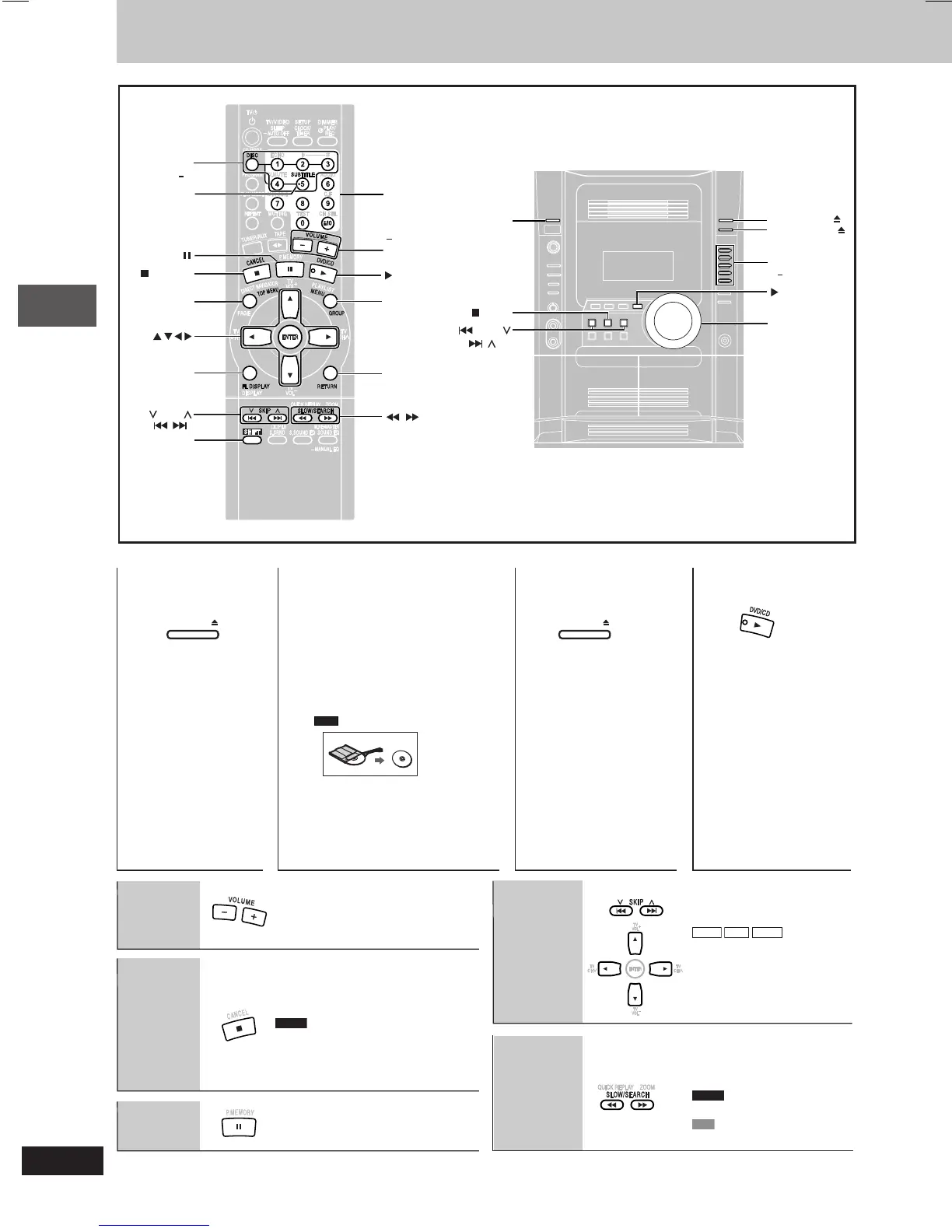
Discs — Basic play
Stop
RAM
Skip
Pause
Volume
adjustment
Search
(during play)
Slow-motion
(during pause)
OPEN/CLOSE OPEN/CLOSE
Open the disc
tray.
•
The unit turns on
automatically and
a tray opens.
The stopped play position is
memorized when “RESUME” is
displayed.
•
Press [:, DVD/CD] to resume.
DVD-V
To review the previous
chapters
(A page 16, Position memory).
•
Press [L] to clear the position.
•
Press [:, DVD/CD] to start play.
•
WMA
MP3
JPEG
[
88
88
8,
99
99
9]: Group skip
during play.
[
;;
;;
;,
::
::
:]: Content skip
during play.
•
Up to 5 steps.
•
Press [:, DVD/CD] to
start play.
•
DVD-A
Motion picture parts
only.
•
VCD
Slow motion, forward
direction only.
12 3 4
Place a disc in the disc
tray.
•
Load double-sided discs so
the label for the side you
want to play is facing up.
(A page 35, Tray/disc
handling procedure)
•
Remove TYPE 2 and 4 discs
from their cartridges before
use.
Read the instructions for the
disc carefully.
Close the disc
tray.
Start play.
SUBTITLE
RETURN
SHIFT
MENU
GROUP
SLOW/SEARCH
FL DISPLAY
SKIP
ENTER
TOP MENU
, CANCEL
DISC
1 5
SUBTITLE
, DVD/CD
, DVD/CD
VOLUME
DOWN, UP
DVD/CD
DIRECT PLAY
1 5
OPEN/CLOSE
, +
VOLUME
Numbered
buttons
REW/,
, /FF
, STOP
DISC CHANGE
DISC CHECK
RQT7700(14-19)7 5/6/04, 11:11 AM14



 To Next Page