English
24
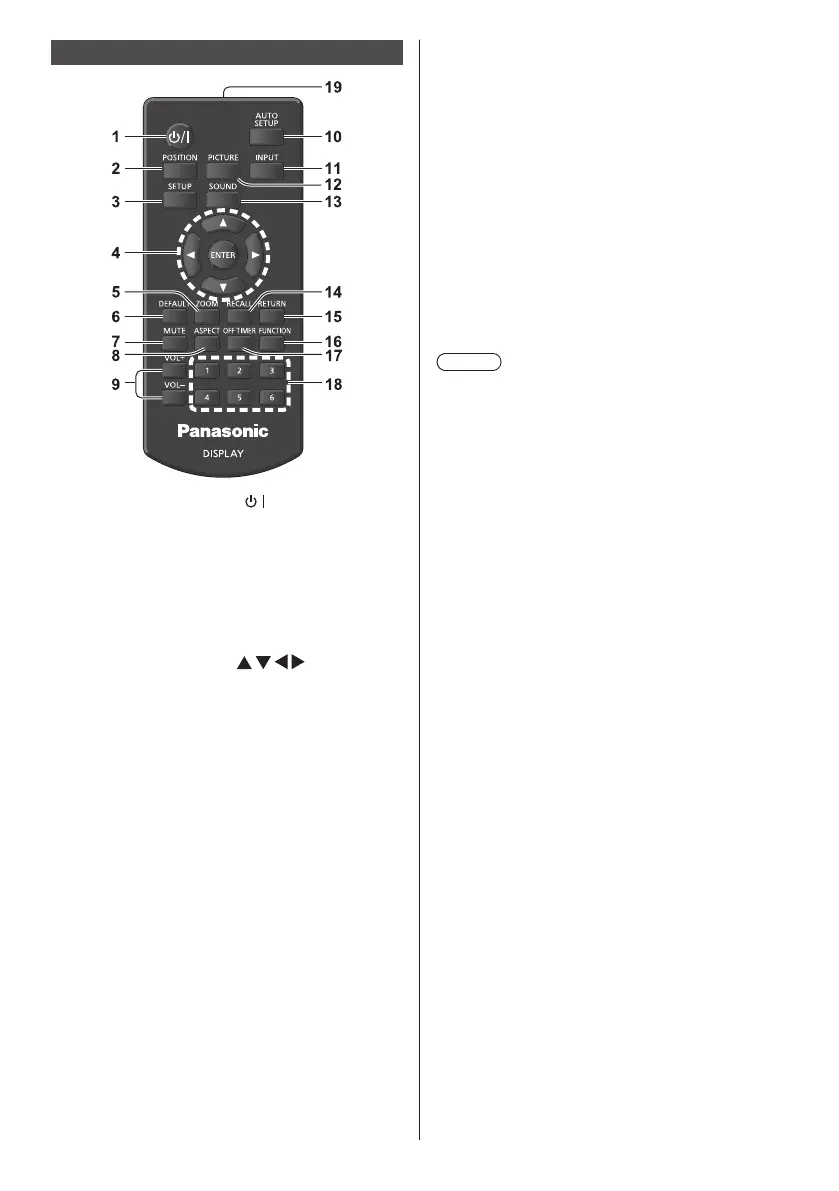
Remote Control Transmitter
1 Standby (ON/OFF) button ( / )
●
Turns the power on or off when the Display is
turned on at the <Main Power On / Off button>.
(see page 25)
2 POSITION
(see page 33)
3 SETUP
(see page 41)
4 ENTER / Cursor buttons (
)
●
Used to operate the menu screens. (see page 31)
5 ZOOM
Enters the digital zoom mode. (see page 30)
6 DEFAULT
●
Resets the settings of picture, sound, etc., to
defaults. (see page 33, 35, 36)
7 MUTE
●
Sound mute on / off. (see page 28)
8 ASPECT
●
Adjusts the aspect. (see page 29)
9 VOL + / VOL -
●
Adjusts sound volume level. (see page 28)
10 AUTO SETUP
●
Automatically adjusts the position/size of the
screen. (see page 33)
11 INPUT
●
Switches input to display on the screen. (see page
27)
12 PICTURE
(see page 36)
13 SOUND
(see page 35)
14 RECALL
●
Displays the current setting status of Input mode,
Aspect mode, etc. (see page 27)
15 RETURN
●
Used to return to the previous menu. (see page 31)
16 FUNCTION
●
Displays [Function button guide].
(see page 51)
17 OFF TIMER
●
Switches to stand-by after a fixed period. (see
page 28)
18 Numeric buttons (1 - 6)
●
Used as shortcut buttons by assigning frequently
used operations. (see page 51)
19 Signal emission
Note
●
In this manual, buttons of the remote control and the
unit are indicated as < >.
(Example: <INPUT>.)
The operation is mainly explained indicating the
remote control buttons but you can also operate with
the buttons on the unit when there are the same
buttons.













 To Next Page