47
English
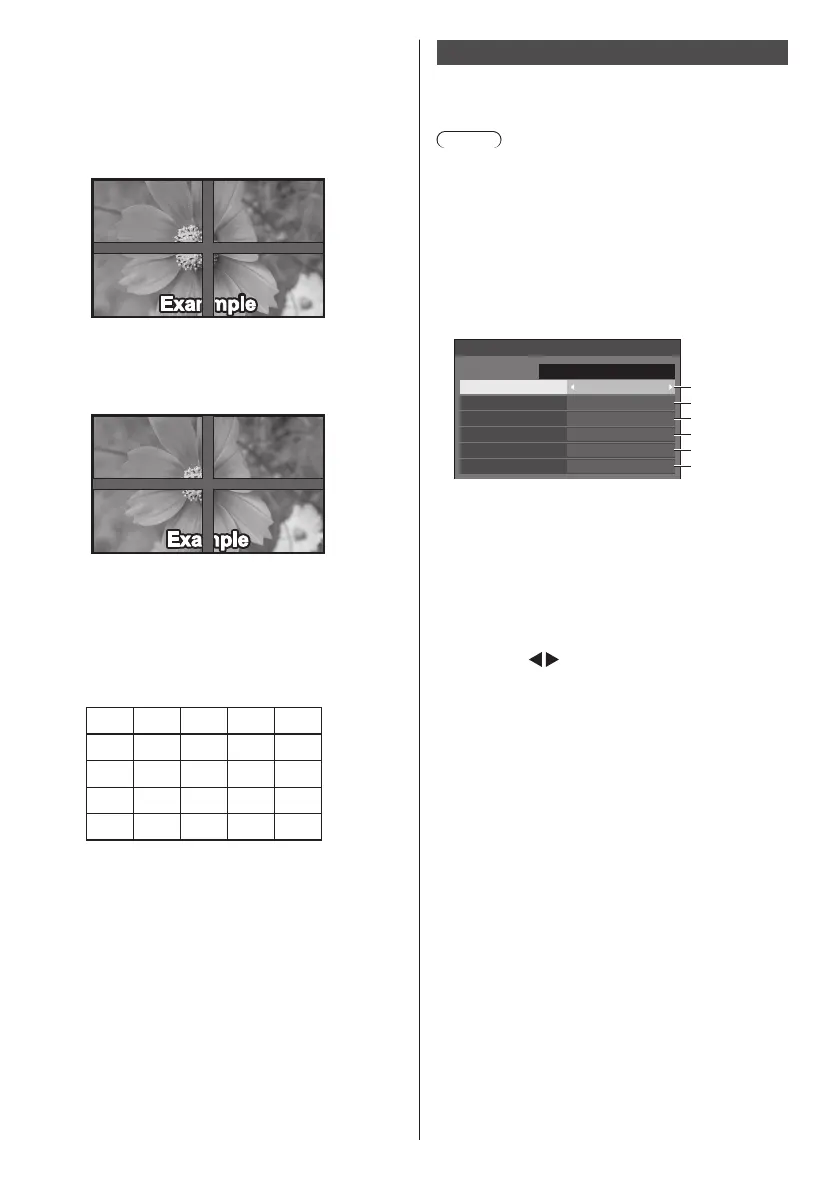
■ [Bezel H adjustment], [Bezel V adjustment]
Adjust the area of image hidden in the joint
horizontally and vertically respectively.
0 ‒ 100
Display example
Setting value: 0
Displays the entire image including the joint area.
(Suitable when displaying character information
on PC.)
Setting value: 100
Does not display the image of the joint area.
(Suitable when displaying motion pictures.)
■ [Location]
Assign the multi display position.
Example:
[Horizontal scale] [5], [Vertical scale] [5]
A1 A2 A3
B1 B2 B3
C1 C2 C3
A4
B4
C4
E1 E2 E3 E4
D1 D2 D3 D4
A5
B5
C5
D5
E5
Select from A1 to A5, B1 to B5, C1 to C5, D1 to D5,
E1 to E5.
●
The displayed content for setting changes
according to the settings for the [Horizontal scale]
and [Vertical scale].
●
By setting [Multi display setting] to [Off], it is
possible to check the location on the screen while
the setting menu is displayed.
Set up timer
Sets the program to turn the power on/off or switch video
inputs at the specified time. Up to 20 programmes can
be set.
Note
●
Set [Date and time] before setting [Set up timer]. (see
page 48)
●
When multiple programs are set at the same time,
the program with the smallest program number is
enabled.
[Set up timer] - submenu screen
Setting Example
Program 1, Every Monday, 12:00,
Power On, Input: HDMI1
12:00
Set up timer
Program
Timer function
1
On
Power on
HDMI1
Day
Time
Power mode
Input
MONDAY
1
2
3
4
5
6
10:00
FRIDAY
2016/01/01
1
Set the program number.
2
To execute the program, set to [On].
The program is disabled when [Off] is set.
3
Set the day.
The program is executed every day when
[Everyday] is set.
4
Set the power On/Off.
5
Set the time.
Pressing
once changes time 1 minute.
Pressing continuously changes time by 15
minutes.
6
Set the input.













 To Next Page