49
English
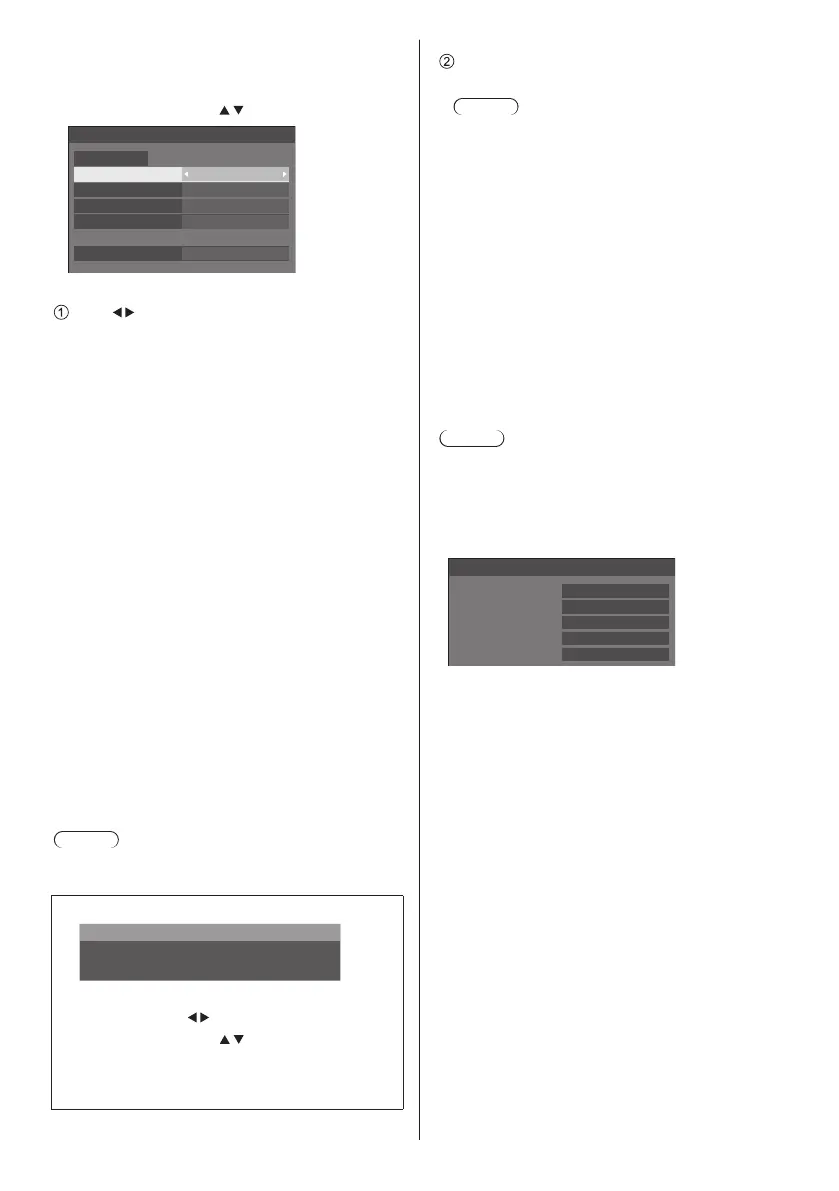
■ [LAN setup]
Detailed network settings for the LAN established via
the LAN terminal of the Display can be configured.
Select [LAN setup] with
and press <ENTER>.
192.168. 0. 8
255.255.255. 0
192.168. 0. 1
1024
LAN setup
Save
DHCP Off
IP address
Subnet mask
Gateway
Port
[DHCP], [IP address], [Subnet mask], [Gateway]
Press to set [On] / [Off] of [DHCP] and press
<ENTER>.
When [Off] is selected, IP address and other settings
can be set manually.
[DHCP]:
(DHCP client function)
[On]:
Obtains an IP address automatically when a
DHCP server exists in the network the Display is
going to be connected.
[Off]:
When a DHCP server does not exist in the
network the Display is going to be connected,
set [IP address], [Subnet mask] and [Gateway]
manually.
[IP address]:
(IP address display and setting)
Enter an IP address when DHCP server is not
used.
[Subnet mask]:
(Subnet mask display and setting)
Enter a Subnet mask when DHCP server is not
used.
[Gateway]:
(Gateway address display and setting)
Enter a gateway address when DHCP server is not
used.
Note
●
When [DHCP] is set to [On], the IP address, etc. will
be displayed in grey.
Entering numbers
I
192.168. 0. 8
IP address
1. Select the address and press <ENTER>.
2. Select digits with
.
3. Change numbers with
.
4. Press <ENTER>.
You can cancel the change by pressing
<RETURN>.
Select [Save] and press <ENTER>.
Save the current network Setup.
Note
●
To use a DHCP server, make sure the DHCP
server is started.
●
Contact your network administrator for details on
[IP address], [Subnet mask] and [Gateway].
●
Shipping condition
[DHCP]: Off
[IP address]: 192.168.0.8
[Subnet mask]: 255.255.255.0
[Gateway]: 192.168.0.1
[Port]
Set the port number used for command control.
Select [Port] and press <ENTER> to set the number.
●
Theavailablesettingrangeis1024‒65535.
●
Entering numbers (see page 49)
Note
●
When the PJLink protocol is used, the port setting is
not necessary.
■ [Network status]
Checks the current Network settings status.
192. 168. 0. 1
255. 255. 255. 0
192. 168. 0. 8
12:34:56:78:9A:BC
Network status
DHCP
IP address
Subnet mask
Gateway
MAC address
Off
■ [AMX D. D.]
Set whether to allow the Display to be detected by AMX
Device Discovery.
[On]:
Enables detection by AMX Device Discovery.
[Off]:
Disables detection by AMX Device Discovery.
●
For more details, visit the following web site.
http://www.amx.com/













 To Next Page