English
110
Data Cloning
Menu settings and adjusted values of a single display
can be copied to multiple displays via LAN or using a
USB memory.
■ Data that can be copied
Settings and set values of [Picture], [Sound], [Setup],
[Position] and [Options] menus
User image registered in [Setup] - [Image settings]
●
The following data cannot be copied. Setting is
required for each display.
[Date and time]
Setting for [Network settings] - [LAN setup]
[Synchronize display setting]
[Time zone]
[NTP synchronization]
NTP server name
DNS server
Display ID in [Display ID]
■ Supported device
●
Commercially available USB memory devices are
supported. (Those with security functions are not
supported.)
●
USB memory devices other than those formatted in
FAT16 or FAT32 cannot be used.
●
Up to 32 GB of USB memory in size are supported.
●
Only single partition configuration is supported.
Note
●
If the sizes of the displays are different, the cloning
function does not operate. Use the common sized
displays.
●
Set the input to something other than [USB] or
[MEMORY VIEWER], and perform the data cloning.
●
[USB data cloning] menu can also be displayed using
the main unit buttons.
Operate in the same way as described in “Options
Adjustments” - “Unit” (see page 67).
●
The remote control is necessary to operate [LAN data
cloning].
Copying data to other display via
LAN
1
Display [Setup] menu pressing
<SETUP>.
2
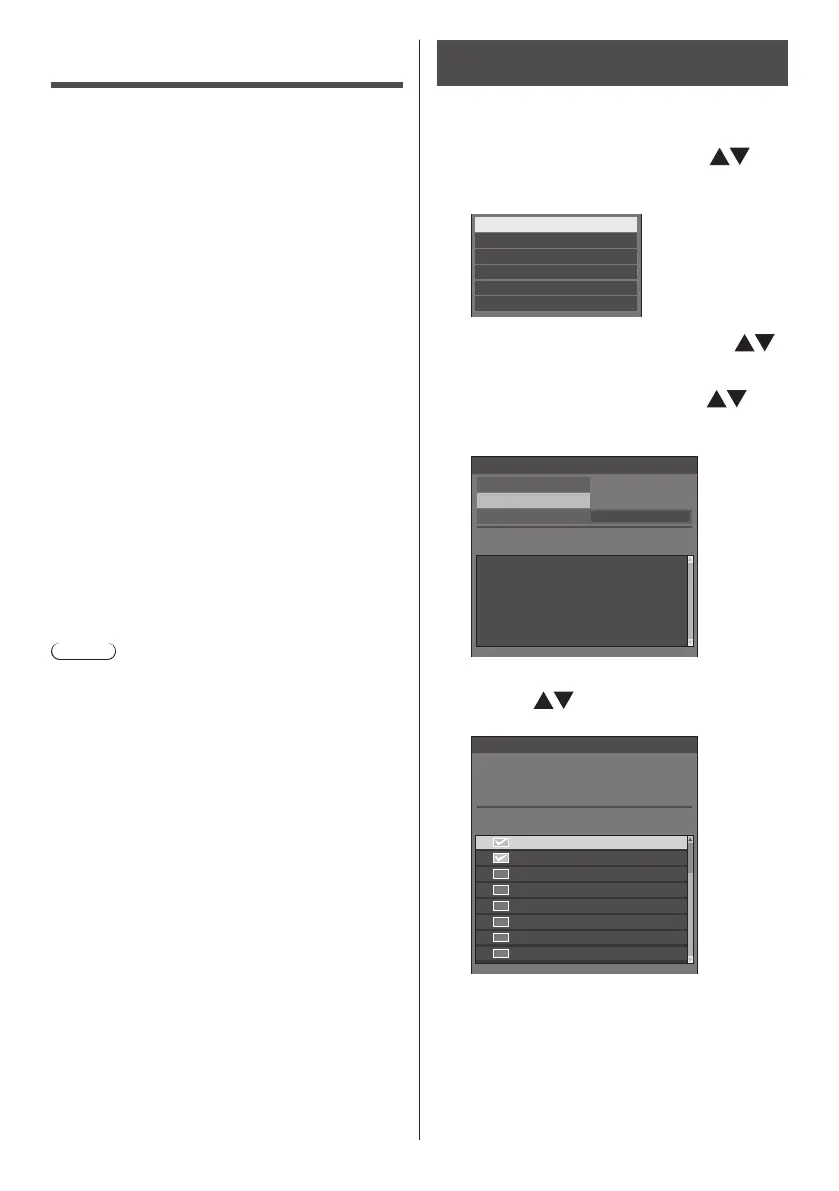
Select [OSD language] with and
press <ENTER> for over 3 seconds.
The following display appears.
Options
Display software information
LAN data cloning
USB data cloning
Software licenses
Shipping
3
Select [LAN data cloning] with
and press <ENTER>.
4
Select [Select display] with and
press <ENTER>.
Displays on the same subnet are listed.
Status Display name IP address
LAN data cloning
Execute
Write protect Off
Select display
5
Select the display to copy the data
to with and press <VOL +>.
Select all the displays to copy the data to.
SF2-001
Please check the display to register.
Check Display name IP address
192.168. 0. 1
192.168. 0. 2
192.168. 0. 4
192.168. 0. 25
192.168. 0. 31
192.168. 0. 7
192.168. 0.124
192.168. 0.211
SF2-002
SF2-004
SF2-005
SF2-014
SF2-006
SF2-041
SF2-009
Select display
6
Press <ENTER>.










 To Next Page