37
Rear sockets
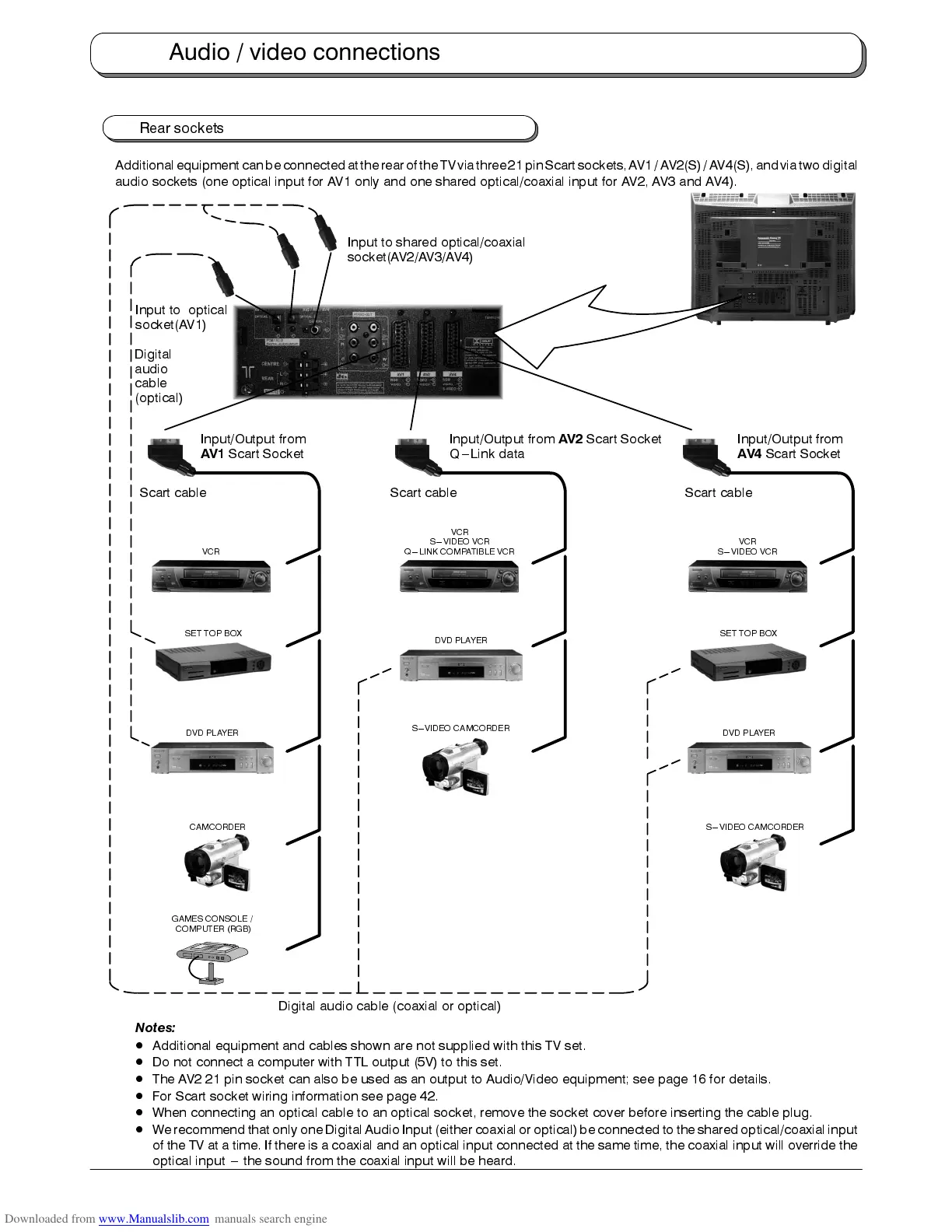
Additionalequipment canbe connectedatthe rearof theTVvia three21pinScart sockets,AV1/AV2(S) /AV4(S),andvia twodigital
audio sockets (one optical input for AV1 only and one shared optical/coaxial input for AV2, AV3 and AV4).
DVD PLAYER
Input/Output from
AV2
Scart Socket
Q---Link data
Input/Output from
AV1
Scart Socket
VCR
S---VIDEO VCR
Q---LINK COMPATIBLE VCR
Scart cable Scart cable
VCR
GAMES CONSOLE /
COMPUTER (RGB)
SET TOP BOX
Input/Output from
AV4
Scart Socket
Scart cable
VCR
S---VIDEO VCR
CAMCORDER
S---VIDEO CAMCORDER
SET TOP BOX
S---VIDEO CAMCORDER
Digital audio cable (coaxial or optical)
DVD PLAYER
DVD PLAYER
Input to shared optical/coaxial
socket(AV2/AV3/AV4)
Digital
audio
cable
(optical)
Input to optical
socket(AV1)
Notes:
D
Additional equipment and cables shown are not supplied with this TV set.
D
Do not connect a computer with TTL output (5V) to this set.
D
The AV2 21 pin socket can also be used as an output to Audio/Video equipment; see page 16 for details.
D
For Scart socket wiring information see page 42.
D
When connecting an optical cable to an optical socket, remove the socket cover before inserting the cable plug.
D
We recommend that only one Digital Audio Input (either coaxial or optical)be connected to the shared optical/coaxial input
of the TV at a time. If there is a coaxial and an optical input connected at the same time, the coaxial input will override the
optical input --- the sound from the coaxial input will be heard.
Audio / video connections










 To Next Page