38
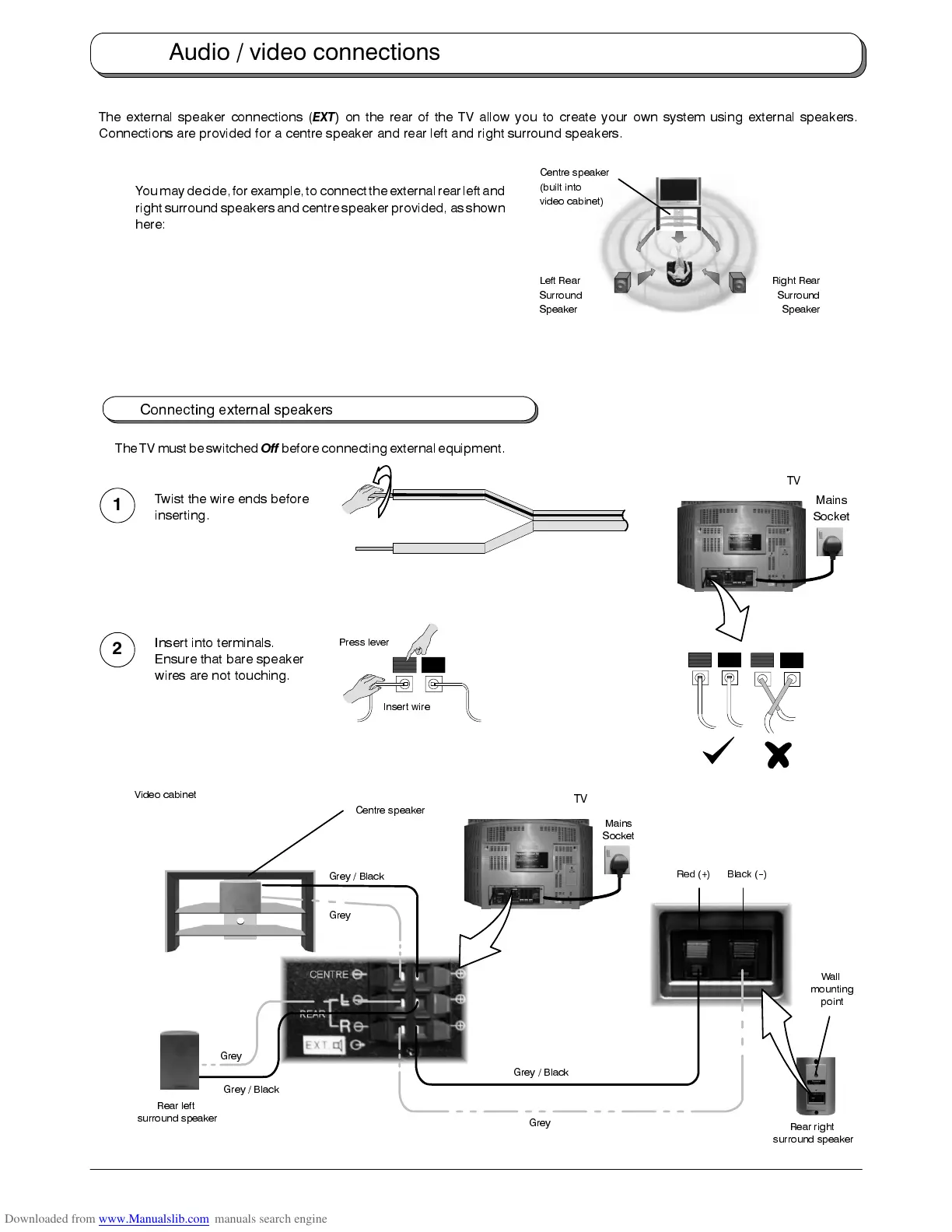
The external speaker connections (
EXT
) on the rear of the TV allow you to create your own system using external speakers.
Connections are provided for a centre speaker and rear left and right surround speakers.
Youmaydecide,for example,toconnect theexternalrear leftand
right surround speakersand centre speaker provided, as shown
here:
Connecting external speakers
The TVmust beswitched
Off
beforeconnecting externalequipment.
Wall
mounting
point
Grey / Black
Grey
Black (--)Red (+)
Rear right
surround speaker
Rear left
surround speaker
Centre speaker
Grey
Grey
Grey / Black
Grey / Black
Mains
Socket
TV
Video cabinet
Press lever
Insert wire
Twist the wire ends before
inserting.
Insert into terminals.
Ensure that bare speaker
wires are not touching.
1
2
Mains
Socket
TV
Audio / video connections
Right Rear
Surround
Speaker
Left Rear
Surround
Speaker
Centre speaker
(built into
video cabinet)










 To Next Page