40
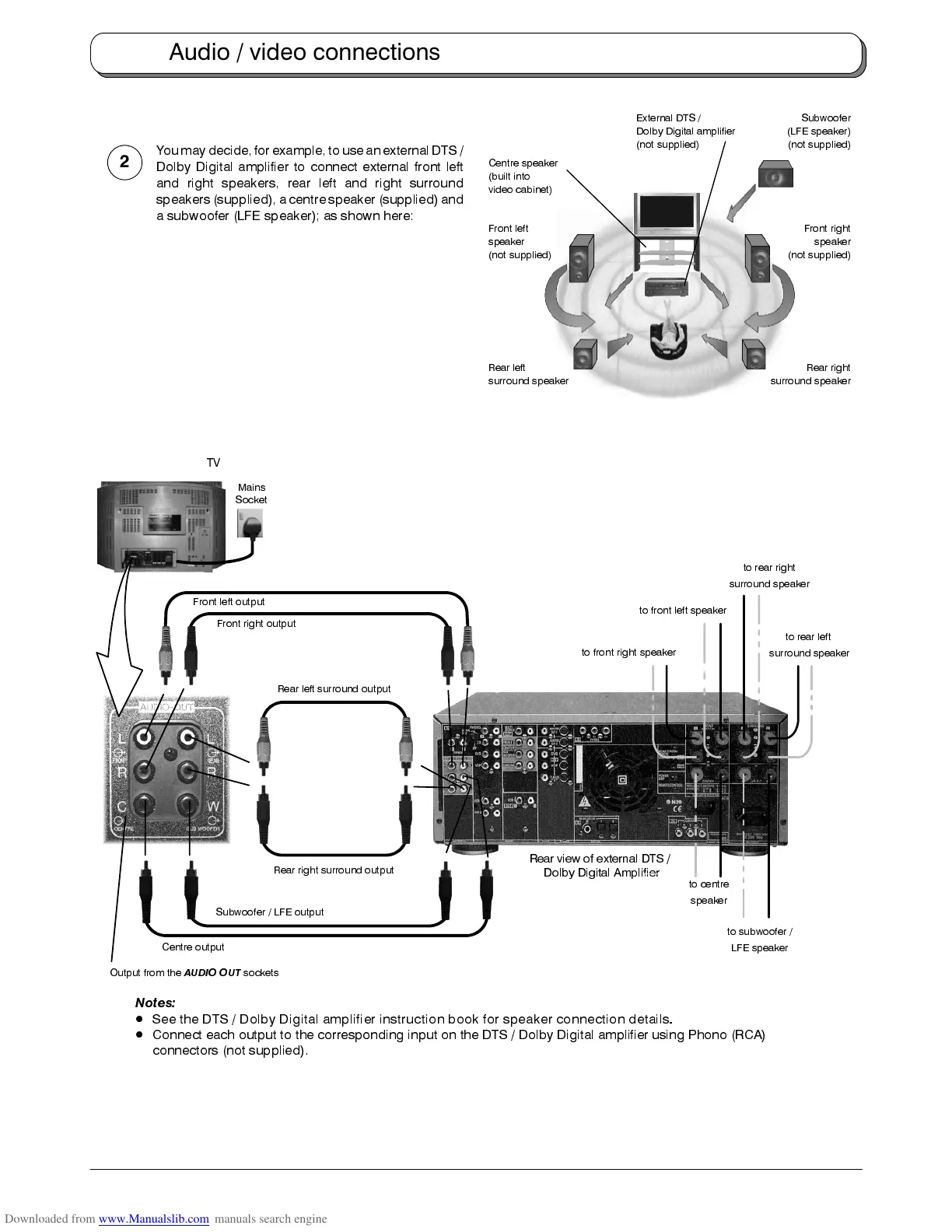
Youmay decide, forexample, to usean external DTS/
Dolby Digital amplifier to connect external front left
and right speakers, rear left and right surround
speakers (supplied), a centre speaker (supplied) and
a subwoofer (LFE speaker); as shown here:
Frontleftoutput
Front right output
Rear view of external DTS /
Dolby Digital Amplifier
Centre output
Rear left surround output
Rear right surround output
Subwoofer / LFE output
to front left speaker
to front right speaker
to centre
speaker
to rear left
surround speaker
to rear right
surround speaker
to subwoofer /
LFE speaker
Output from the
AUDIO OUT
sockets
Mains
Socket
TV
Notes:
D
See the DTS / Dolby Digital amplifier instruction book for speaker connection details
.
D
Connect each output to the corresponding input on the DTS / Dolby Digital amplifier using Phono (RCA)
connectors (not supplied).
Audio / video connections
2
Rear right
surround speaker
Rear left
surround speaker
Centre speaker
(built into
video cabinet)
Front right
speaker
(not supplied)
Front left
speaker
(not supplied)
External DTS /
Dolby Digital amplifier
(not supplied)
Subwoofer
(LFE speaker)
(not supplied)










 To Next Page