EasyManua.ls Logo

Panasonic TX-86PW100A - Page 38

Panasonic TX-86PW100A
48 pages
Print Icon
To Next Page IconTo Next Page
To Previous Page IconTo Previous Page
Loading...
When
using
a
VCR
with
the
television
always
connect
the
Aerial
to
the
VCR
and
connect
an
RF
Cabi
(not
supplied)
between
the
VCR
RF-Out
and
the
television
RF-ln.
You
can
watch
videos
by
either
tuning
the
television
to
the
VCR
(see
page
29}
or
by
connecting
the
VCR
to
the
rear
AV
terminals.
RF
Cable
Note:
When
connecting
a
mono
VCR
through
the
RF-!n,
please
switch
the
TV
to
morso.
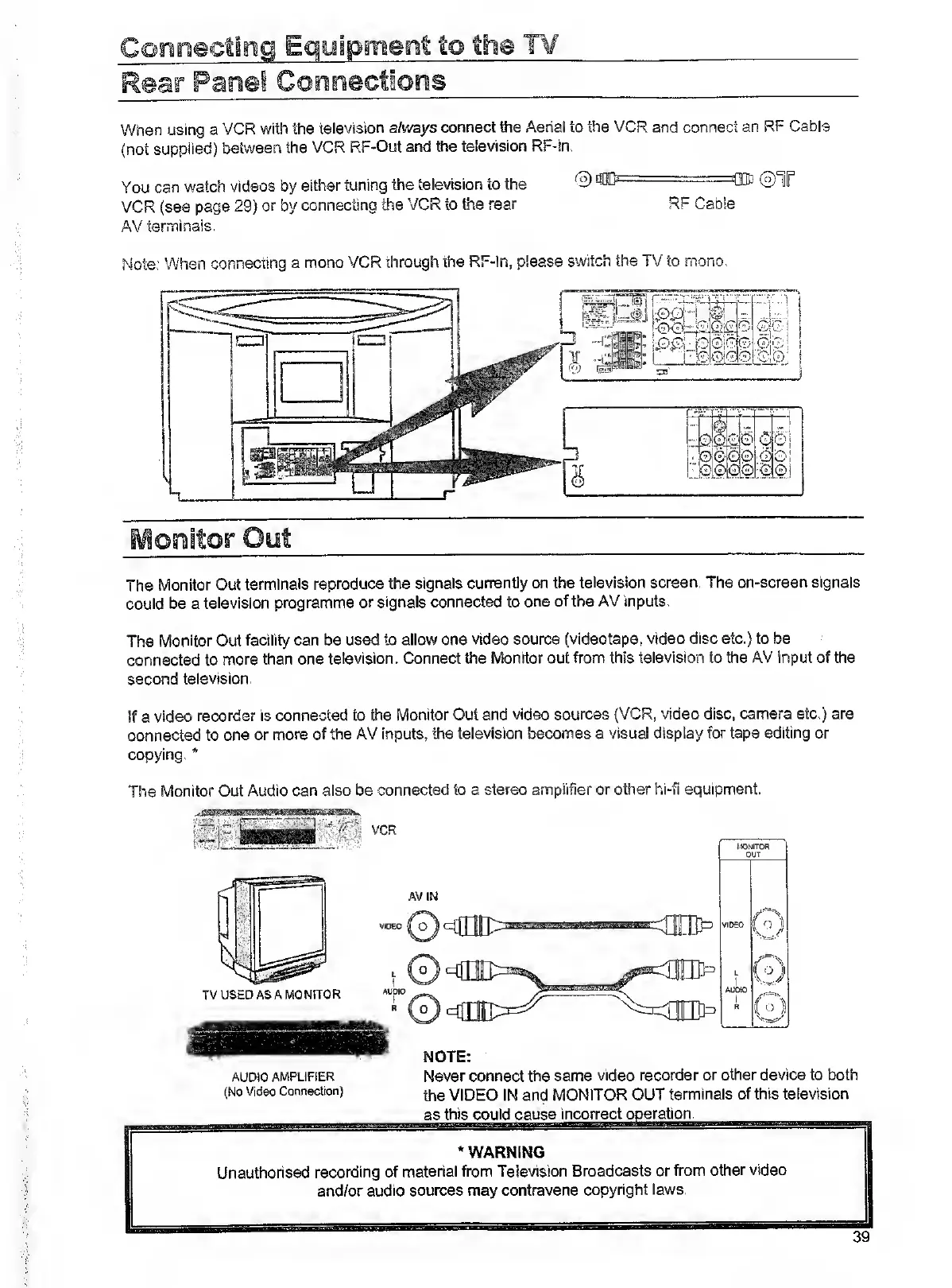
The
Monitor
Out
terminals
reproduce
the
signals
currently
on
the
television
screen.
The
on-screen
signals
could
be
a
television
programme
or
signals
connected
to
one
of
the
AV
inputs.
The
Monitor
Out
facility
can
be
used
to
allow
one
video
source
(videotape,
video
disc
etc.)
to
be
connected
to
more
than
one
television.
Connect
the
Monitor
out
from
this
television
to
the
AV
input
of
the
second
television.
If
a
video
recorder
is
connected
to
the
Monitor
Cut
and
video
sources
(VCR,
video
disc,
camera
etc.)
are
connected
to
one
or
more
of
the
AV
inputs,
the
television
becomes
a
visual
display
for
taps
editing
or
copying.
*
The
Monitor
Out
Audio
can
also
be
connected
to
a
stereo
amplifier
or
other
hi-fi
equipment.
AUDIO
AMPLIFIER
Never
connect
the
same
video
recorder
or
other
device
to
both
(No
Video
Connection)
the
VIDEO
IN
and
MONITOR
OUT
terminals
of
this
television
as
this
could
cause
incorrect
operation.
*
WARNING
Unauthorised
recording
of
material
from
Television
Broadcasts
or
from
other
video
and/or
audio
sources
may
contravene
copyright
laws.
39

Related product manuals