EasyManua.ls Logo

Panasonic TX-86PW100A - Surround Sound Operation (TX-86 PW100 A & TX-76 PW100 A Only)

Panasonic TX-86PW100A
48 pages
Print Icon
To Next Page IconTo Next Page
To Previous Page IconTo Previous Page
Loading...
Surround
Sound
Operation
(TX-86PW100A
&
TX‘76PW100A)
Dolby
Digital
and
Pro
Logic
modes
For
Dolby
Digital
Input
or
Pro
Logic
selected
in
Surround
mode,
the
following
three
modes
of
operation
are
available
as
the
speaker
setting:
Normal,
Phantom,
and
3
Stereo.
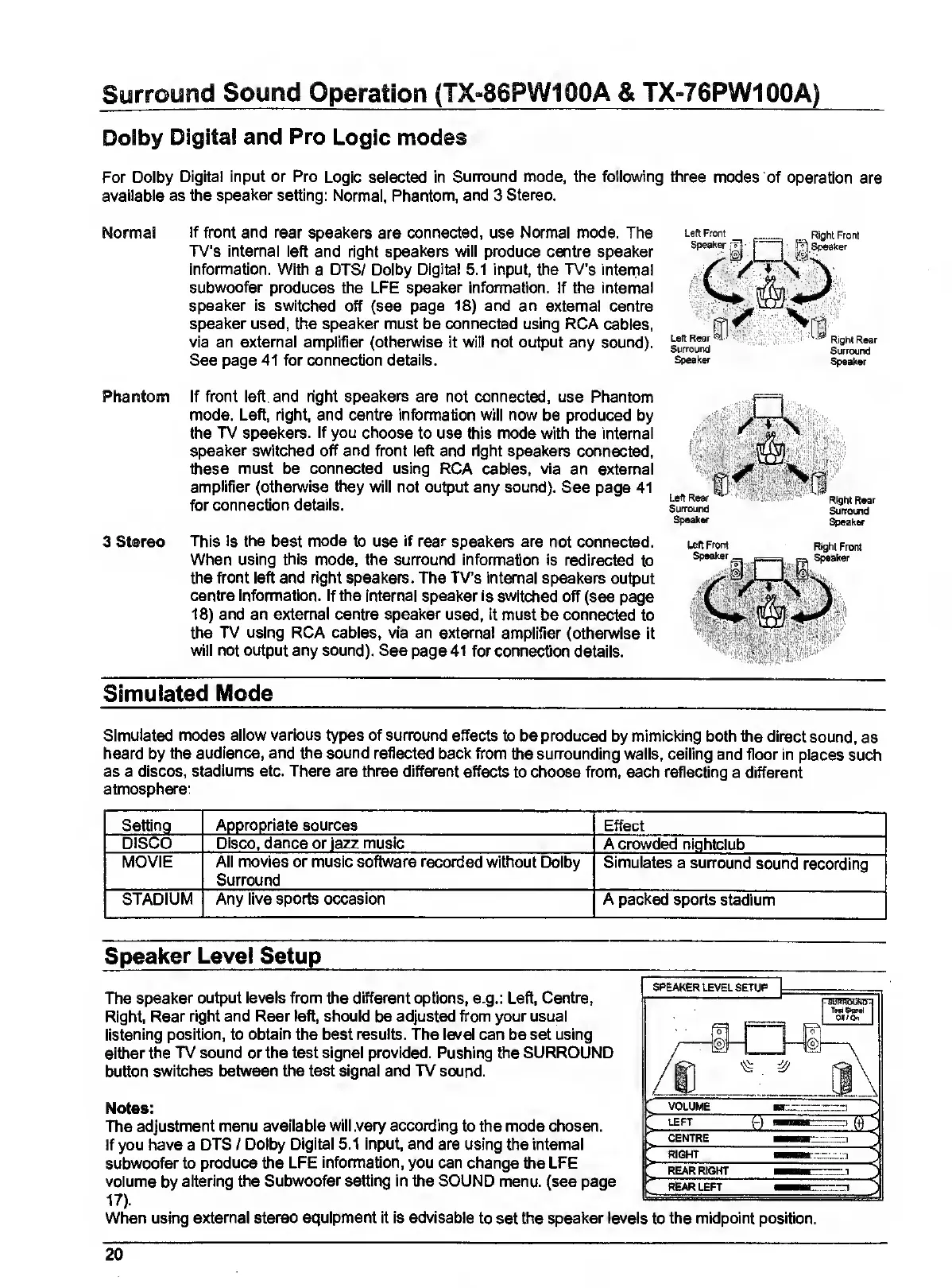
Normal
If
front
and
rear
speakers
are
connected,
use
Normal
mode.
The
TV’s
internal
left
and
right
speakers
will
produce
centre
speaker
information.
With
a
DTS/
Dolby
Digital
5.1
input,
the
TV’s
internal
subwoofer
produces
the
LFE
speaker
information.
If
the
internal
speaker
is
switched
off
(see
page
18)
and
an
external
centre
speaker
used,
the
speaker
must
be
connected
using
RCA
cables,
via
an
external
amplifier
(otherwise
it
will
not
output
any
sound).
See
page
41
for
connection
details.
Left
Front
Speaker
r:
Right
Front
jg
Speaker
Vin
Left
Rear
Surround
^leaker
Right
Rear
Surrourtd
Speaker
Phantom
3
Stereo
If
front
left
and
right
speakers
are
not
connected,
use
Phantom
mode.
Left,
right,
and
centre
information
will
now
be
produced
by
the
TV
speakers.
If
you
choose
to
use
this
mode
with
the
internal
speaker
switched
off
and
front
left
and
right
speakers
connected,
these
must
be
connected
using
RCA
cables,
via
an
external
amplifier
(otherwise
they
will
not
output
any
sound).
See
page
41
for
connection
details.
This
is
the
best
mode
to
use
if
rear
speakers
are
not
connected.
When
using
this
mode,
the
surround
information
Is
redirected
to
the
front
left
and
right
speakers.
The
TV’s
internal
speakers
output
centre
information.
If
the
internal
speaker
is
switched
off
(see
page
18)
and
an
external
centre
speaker
used,
it
must
be
connected
to
the
TV
using
RCA
cables,
via
an
external
amplifier
(othen/vise
it
will
not
output
any
sound).
See
page
41
for
connection
details.
SpMkw
Speaker
Left
Front
Right
Front
Simulated
Mode
Simulated
modes
allow
various
types
of
surround
effects
to
be
produced
by
mimicking
both
the
direct
sound,
as
heard
by
the
audience,
and
the
sound
reflected
back
from
the
surrounding
wails,
ceiling
and
floor
in
places
such
as
a
discos,
stadiums
etc.
There
are
three
different
effects
to
choose
from,
each
reflecting
a
different
atmosphere:
Effect
A
crowded
nightclub
Appropriate
sources
DISCO
I
Disco,
dance
or
Jazz
music
MOVIE
All
movies
or
music
software
recorded
without
Dolby
Simulates
a
surround
sound
recording
Surround
STADIUM
Any
live
sports
occasion
A
packed
sports
stadium
Speaker
Level
Setup
The
speaker
output
levels
from
the
different
options,
e.g.:
Left,
Centre,
Right,
Rear
right
and
Rear
left,
should
be
adjusted
ftx>ni
your
usual
listening
position,
to
obtain
the
best
results.
The
level
can
be
set
using
either
the
TV
sound
or
the
test
signal
provided.
Pushing
the
SURROUND
button
switches
between
the
test
signal
and
TV
sound.
Notes:
The
adjustment
menu
available
will
vary
according
to
the
mode
chosen.
If
you
have
a
DTS
/
Dolby
Digital
5.1
input,
and
are
using
the
internal
subwoofer
to
produce
the
LFE
Information,
you
can
change
the
LFE
volume
by
altering
the
Subwoofer
setting
In
the
SOUND
menu,
(see
page
17).
When
using
external
stereo
equipment
it
is
advisable
to
set
the
speaker
levels
to
the
midpoint
position.
20

Related product manuals