29
LSQT1040
Setup
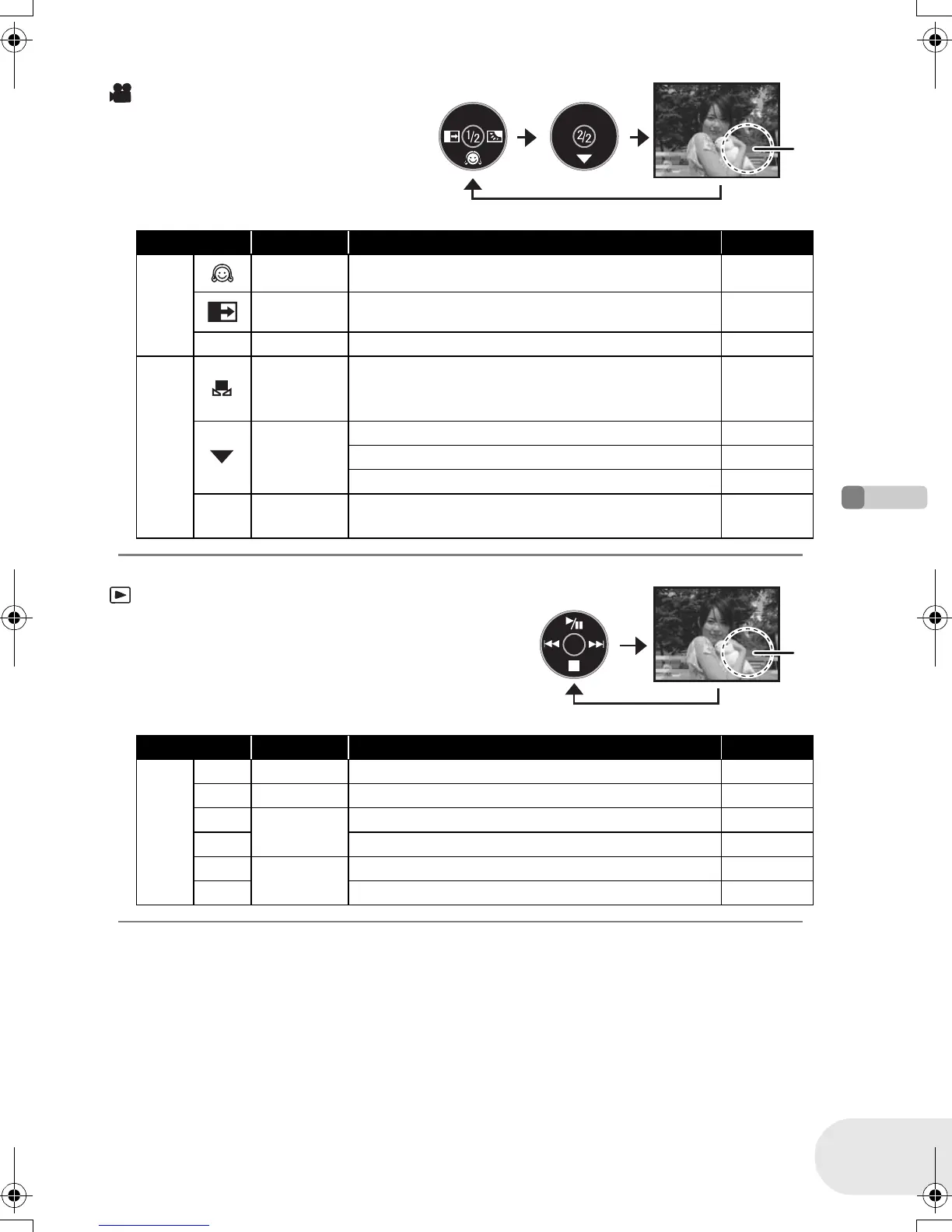
How to use the joystick
Disc recording mode
(AUTO/MANUAL/FOCUS switch is set
to MANUAL)
A: The operation icon is off.
Icon Direction Function Page
(1/2)
4 Soft skin mode 40
2 Fade 41
ª 1 Backlight compensation 43
(2/2)
3
Manual white balance set
(Only when manual white balance adjustment
mode is selected)
51
4
White balance 50
Shutter speed 52
Iris or gain value 52
s
r
21
White balance mode selection, manual
adjustments
49, 50, 52
Disc playback mode
A: The operation icon is off.
Icon Direction Function Page
—
1/;3Playback/pause 53
∫4Stop playback and show thumbnails 53
:
2
Rewind, skip (during playback) 53
2; Reverse slow/frame playback (during pause) 54
9
1
Fast forward, skip (during playback) 53
;1 Forward slow/frame playback (during pause) 54
A
A
D105(P)eng.book 29 ページ 2006年1月16日 月曜日 午後4時1分




 To Next Page