28
LSQT1040
Setup
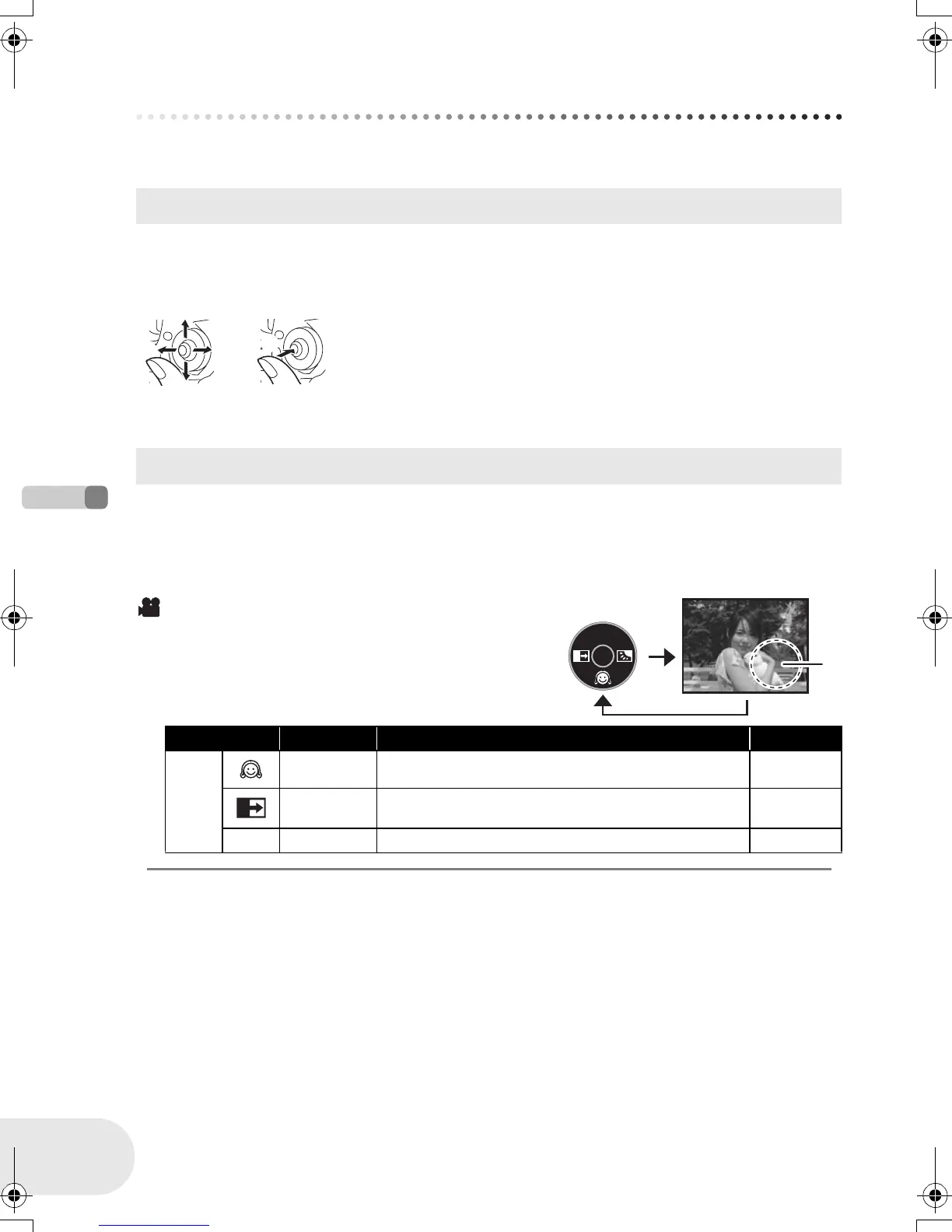
How to use the joystick
How to use the joystick
This unit has a joystick for selecting functions, performing operations, etc. so it is easy to operate
this unit with one hand.
Operations on the menu screen and selection of files on the thumbnail view screen, etc.
Move the joystick up, down, left, or right to select an item or file, and then
press the joystick to set it.
≥ Menu screen operations (l 31)
Press the center of the joystick, and icons will be displayed on the screen. Each press switches the
display as follows depending on the mode.
(In the disc playback mode, the icons will be automatically displayed on the screen.)
Basic operations
1 Select by moving up.
2 Select by moving down.
3 Select by moving left.
4 Select by moving right.
5 Press the joystick to select the item.
Joystick and screen display
Disc recording mode
(AUTO/MANUAL/FOCUS switch is set to AUTO)
A: The operation icon is off.
Icon Direction Function Page
—
4 Soft skin mode 40
2 Fade 41
ª 1 Backlight compensation 43
1
3 4
2
5
A
D105(P)eng.book 28 ページ 2006年1月16日 月曜日 午後4時1分











 To Next Page