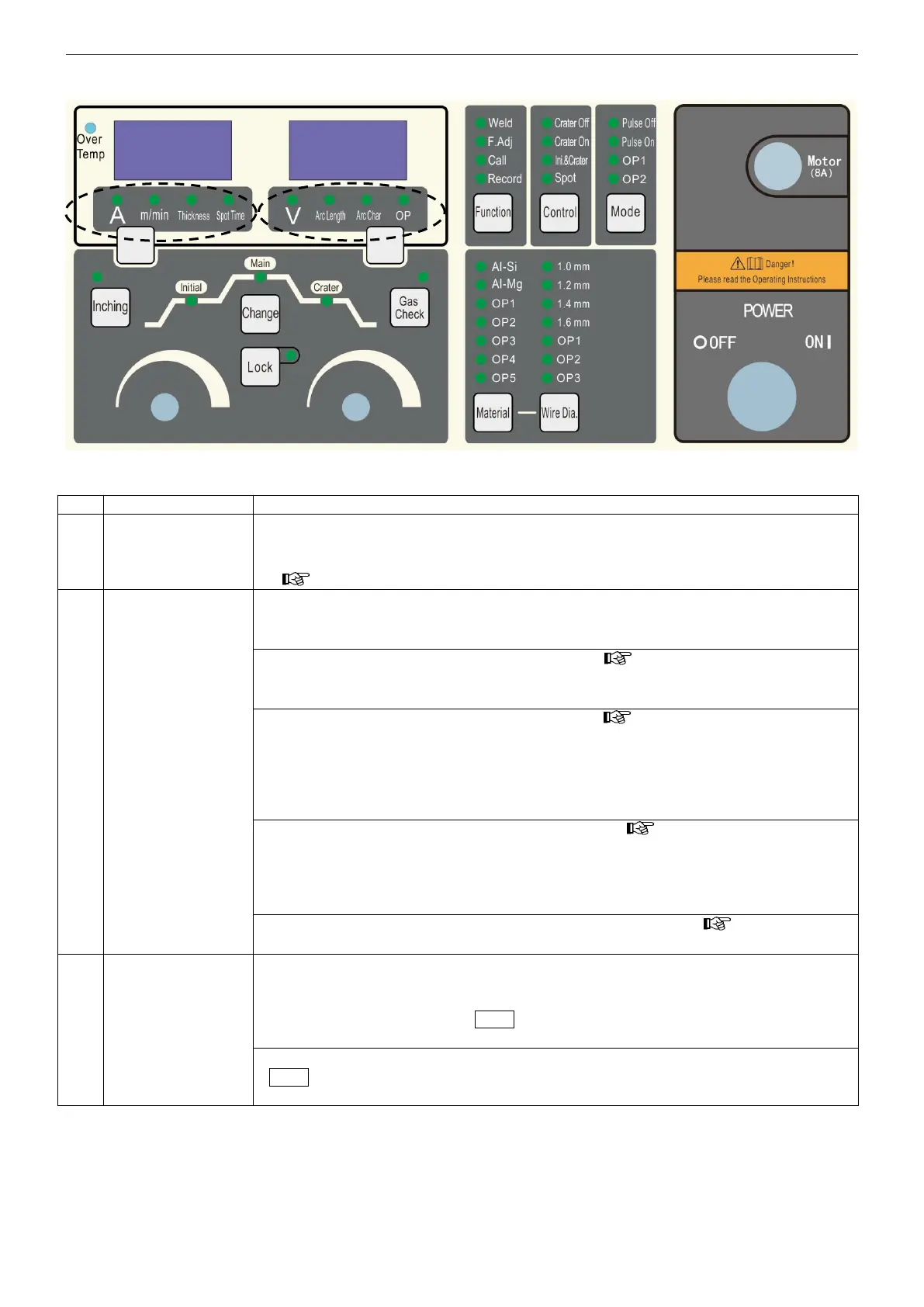
Names and functions
15
5.3 Front panel
Note:
for robot welding, be sure to set the machine on “ crater OFF ” status.
temperature
abnomal indicator
●
When abnormal rise in important components temperature occurs, temperature
abnomal alarm is sent, this lamp blinks and the welding operation stops. Welding
operation cannot be restarted unless this lamp is turned off. ( For troubleshooting:
Section 13.1).
current display
7-segment LED
●
When Mode selection key ○
12
is set to“ Weld ”
・ On stand-by status,, it shows the current value set in ○
3
・ During welding, it shows the current value of the actual output.
●
When Mode selection key
○
12
is set to“F. Adj” ( Section 5.4)
・ It shows fine adjusting setting items PXX(XX stands for 00->29), default display
CH-OFF( voltage display LED○
5
shows its specific set value ).
●
When Mode selection key
○
12
is set to “ Call ” ( Section 5.6)
・ The default display CH-OFF. By turning the Jog-dial ○
7
, select channel number,
LED shows “CH” channel. If welding parameters are available, the channel can be
selected, else the corresponding channel can NOT be selected. When the channel
stored with data is selected, the channel and parameters are displayed alternately
and welding can start.
●
When Mode selection key ○
12
is set to “ Record ” ( Section 5.6)
・ By turning the Jog-dial
○
7
, channel number can be selected. LED shows “CH”
setting current and voltage. Flashing means welding parameters are being stored.
・ Press selection key
○
12
to return to “ Weld ” from “ Record ” and the corresponding
parameters are recorded in the channel being selected.
●
When a self-diagnosable error occurs, ( For troubleshooting: Section 13.1)
・ it shows Err( voltage display LED
○
3
shows alarm signal number ).
setting
“ current ”
“ wire feeding
speed ”
“ plate thickness ”
“ spot welding
time ”
function select
●
When “ current ” / “ wire feeding speed ” function is selected, the setting method of
the corrosponding selection number is decided by P11 of “F. Adj” function menu.
When P11 is 0, it is adjusted by wire feeder potentiometer; when P11 is 1, it can
be changed by Jog-dial ○
4
. Note “ plate thickness ” can be displayed only instead
of being changed.
●
“ spot welding time ” function is adjusted by Jog-dial ○
4
.
Note To change“ spot welding time ”, welding control ○
13
is to be selected as “ spot
welding ” function.



 To Next Page