with account balance information to your phone.
To end session, hang up the phone.
Tow truck mode
This mode is intended for car transportation with preservation of arming function. Tow truck
mode can be activated only when armed, it will be deactivated automatically when disarming.
1. Call the system’s number. If the system is in PANIC mode, receive emergency call. Wait for answer.
2. Dial 15* to enable Tow truck mode, the system will disable motion, shock and tilt sensors.
3. To disable this mode, disarm the system.
To end session, hang up the phone.
Similarly any other system command can be entered.
Changing core settings via phone
To enter settings programming mode:
Option 1. Disarm, call the system’s number, wait for answer, then press and hold
button on
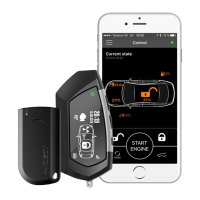
LCD remote for 3 seconds. The system will switch into settings programming mode.
Option 2. Disarm, call the system’s number, wait for answer, switch ignition on for 1-3 seconds
then off. The system will switch into settings programming mode.
WARNING!
THE CAR SHOULD BE DISARMED BEFORE ADJUSTING VIA A PHONE.


 To Next Page