20
Getting Started
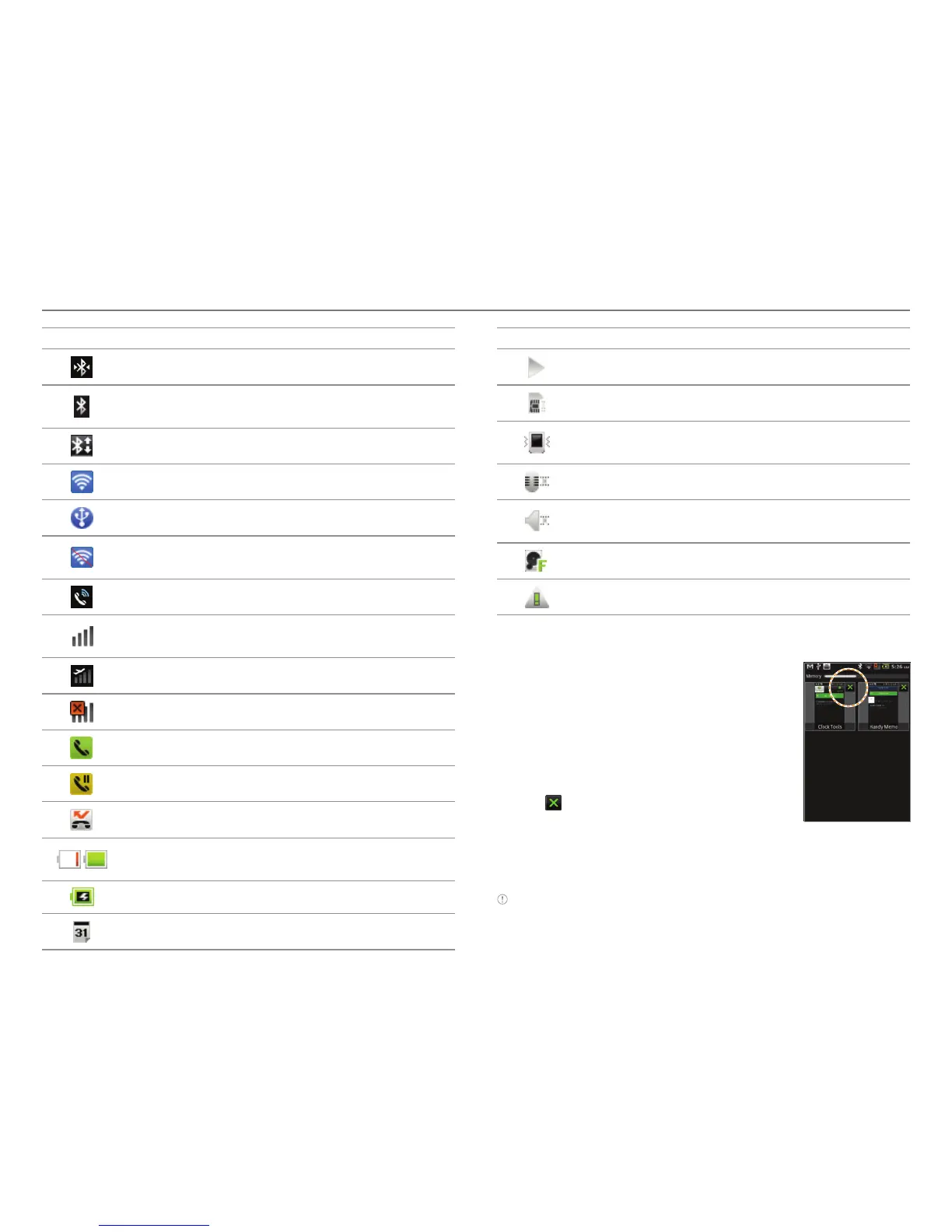
Icon Description
Bluetooth is connected.
Bluetooth is active but not connected to other
device.
A file is ready to be delivered from other device.
Portable Wi-Fi hotspot is active.
USB tethering is active.
USB tethering or Portable Wi-Fi hotspot is not
active.
The speakerphone is active.
Strength of signal: The bar becomes bigger
when the signal is strong.
Airplane mode is active.
There is no signal.
A call is under way.
There is a call on hold.
There is a missed call.
Strength of battery: The more green, the more it
is charged.
The battery is charging.
There is an upcoming event.
Icon Description
Music is being played.
There is no SIM/USIM card.
The phone vibrates when there is an incoming
call.
The other party cannot listen to you during a call.
The phone doesn’t ring when there is an
incoming call.
The memory disk is full.
There is an error.
Managing running applications
1. Press and hold o while you are
using an application. Applications
that are running in the background
appear.
2
. Select and tap an application in the
screen if you want to resume your
work with the application.
3
. Tap if you want to end the
application by force and tap Yes.
Press n and tap Close all > Yes if
you want to stop all applications at
once that are running.
Note Make sure to press l and move to the home screen if you want
to finish using an application. Otherwise, the application continues to
run and will take memory and consume battery.



 To Next Page