24 25
Getting Started
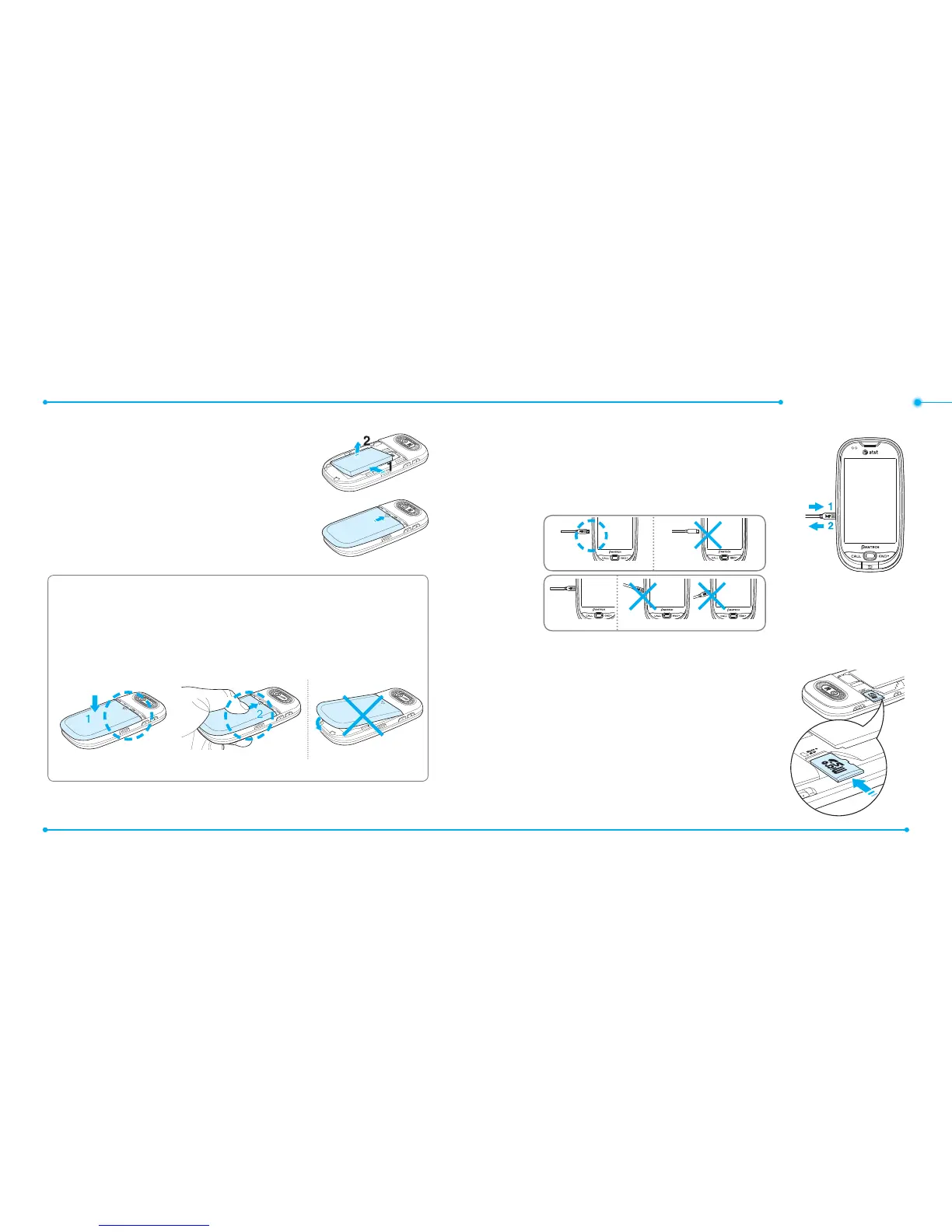
3. To remove the battery push the bottom of the
battery to upwards (1) and remove (2) the
battery. Push the SIM card in the direction of
the arrow as shown.
4. To t the battery cover, put it on the guide rail
and push up.
To charge your battery
1. To charge, connect the charger adapter. Make sure
you align the connector as the image(1).
If not, it will damage the charging connector on
the phone and will not charge.
2. To remove pull the adapter away (2).
Memory card
You can use a microSD card as a memory card.
It gives you more space to save pictures,
videos, music, etc.
Inserting and removing a memory card
1. Open the memory card slot.
Correct Incorrect
Correct Incorrect
Incorrect
Correct
Instructions for Optimal Performance
Put the cover align with the phone(1) and push up(2) as the arrow
until you hear the light ‘click’.
Make sure you align the battery cover as shown below. If not, the
battery cover will be damaged.



 To Next Page