10 11
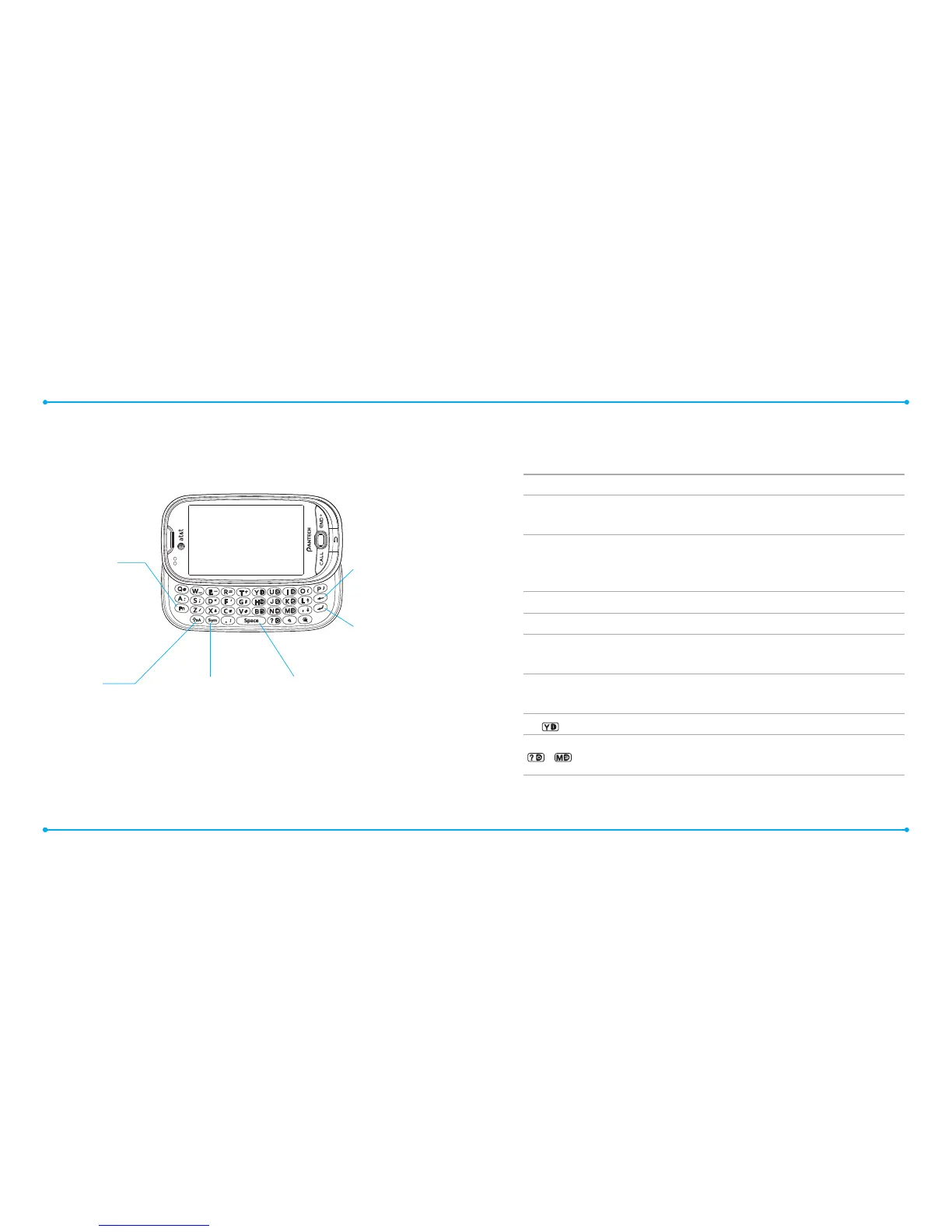
Your phone has a QWERTY keypad which provides a superior typing
experience on a small handheld for easy and comfortable texting. You
can use all of the phone functions with the QWERTY keypad.
Keys Functions
!
Press to change entry mode at the text editing screen.
(Abc / ABC / abc / T9Ab / T9AB / T9ab)
"
Press to enter a special character or number. To
enter symbols and numbers continually, press twice until
.
displays in top right of screen.
#
Enter the space character in text input mode.
%
Insert a hard return in text input mode.
$
Delete a character to the left of the text cursor in text editing
screen.
Press to view to type a special character that is not placed on
the keypad.
Access voice mail if pressed in standby mode.
~
Enter numbers, letters or special characters.
Opens dialer if numbers are pressed standby mode.
QWERTY mode view
Function key
To enter a number
or symbol, and press
this key and then the
corresponding key
Fn + any key : Insert a
number or symbol.
Fn + Fn : Fn Lock mode.
Enter key
Press to move to the
next row.
Delete key
Press to delete a
number or letter.
CAPS key
To type a single uppercase
letter, press this key then
enter a letter.
Symbol key
Press to open symbol
menu.
Space key
Press to enter a space.



 To Next Page