46
Multimedia
Deleting multiple video clips
1. Tap Menu : > Video Player.
2. Tap Delete.
3. Tap to mark desired files or tap All to mark all files.
4. Tap OK > Yes.
5. To cancel deleting action, tap No or press
.
Playing a video clip
1. Tap Menu : > Video Player.
2. Tap Video.
3. Scroll and tap to select a file.
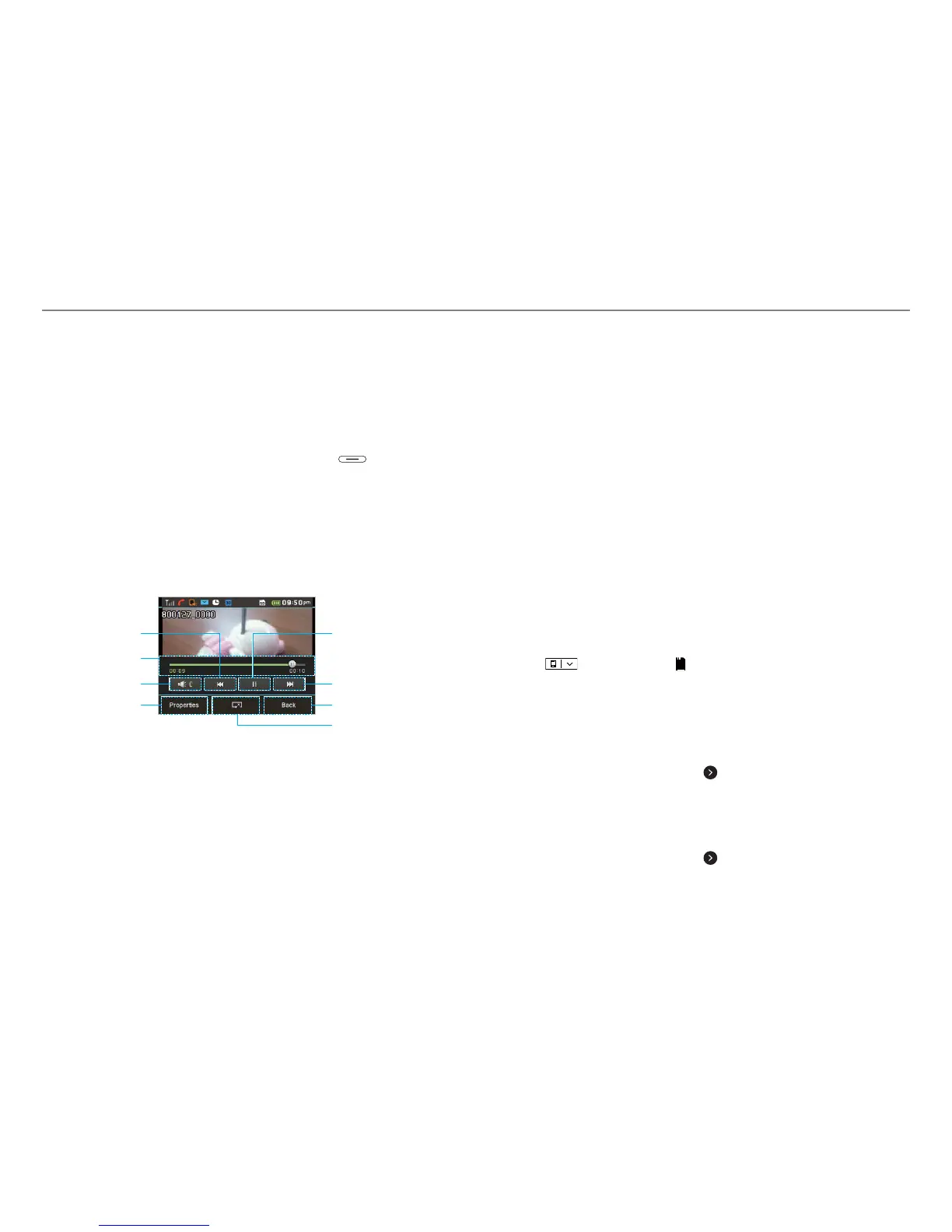
Video player
Properties
Back
Repeat
Volume
Play bar
Rewind
Fast Forward
Play/Pause
Audio album
You can play, send, delete, move or copy saved sounds to
external memory or to the phone. Supported formats are MP3,
AAC, AAC+ and WMA.
Listening to a recorded sound
1. Tap Menu : > My Stuff > Audio.
2. Select a folder and tap to open.
3. Tap the file to play.
Moving or copying multiple sounds to external
memory
1. Tap Menu : > My Stuff > Audio.
2. Tap Options > Copy or Move.
3. Select the file to copy or move > OK.
4. Tap
and select the
SD
Memory Card.
5. Select the folder > Copy Here or Move Here.
Sending sound files via message
1. Tap Menu : > My Stuff > Audio.
2. Select the audio file and tap
> Send > via Message.
Sending sound files via Bluetooth
1. Tap Menu : > My Stuff > Audio.
2. Select the audio file and tap
> Send > via Bluetooth.



 To Next Page