48
Multimedia
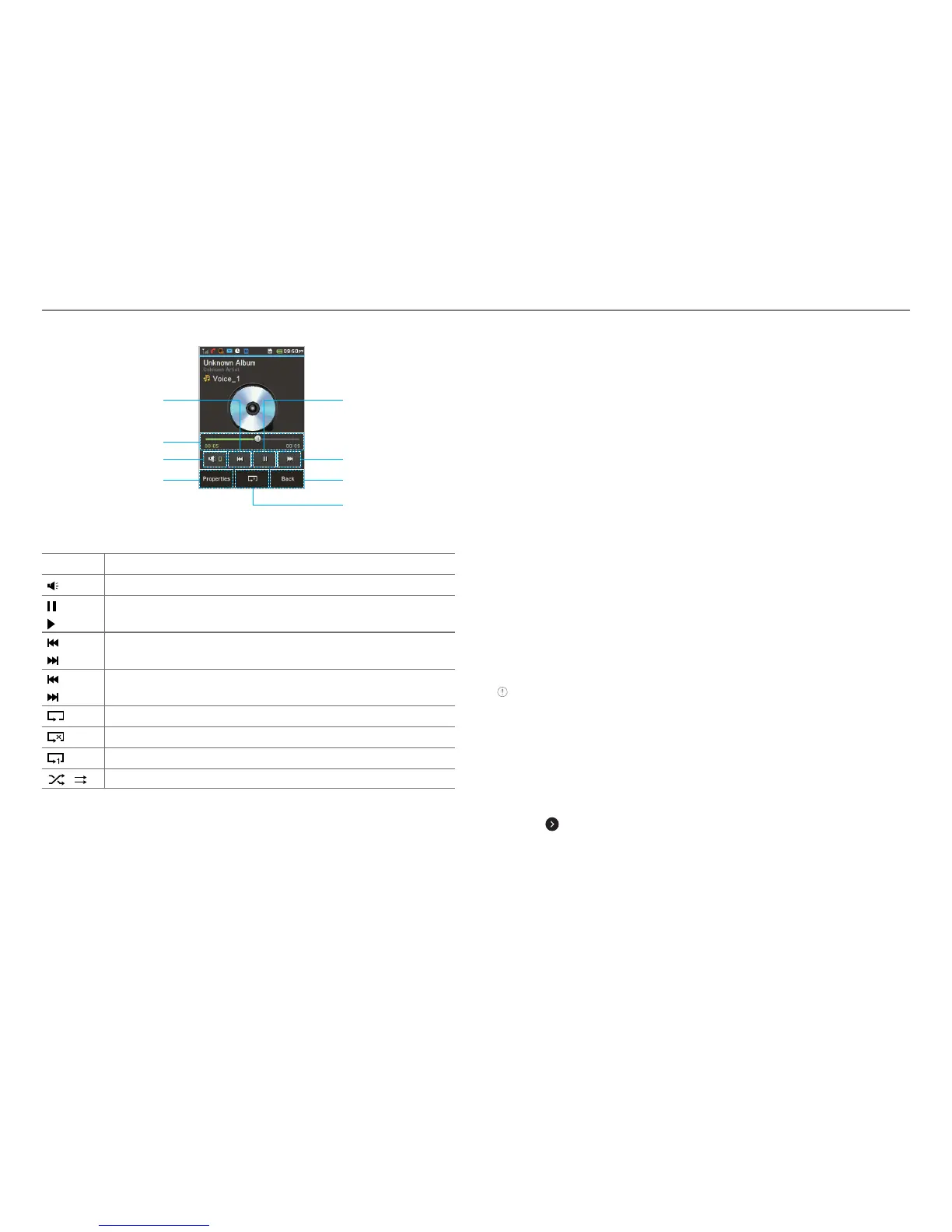
Repeat
Properties Back
Volume
Fast forward/Next
track
Play/Pause
Play bar
Rewind/Previous
track
Icons for player
Icon Description
Adjust the volume
Pause and play the audio file
Tap and hold : Rewind, Fast Forward
Tap: Previous, Next
Repeat all
Repeat off
Repeat Single Track
Shuffle On / Off
Creating a playlist
1. Tap Menu : > Music Player.
2. Tap Playlists > New Playlist.
3. Enter playlist name > OK.
4. Tap to select a category.
5. Scroll and tap to select the music files and tap Done to add
to playlist.
Adding music to a playlist
1. Tap Menu : > Music Player.
2. Tap Playlists.
3. Select the playlist and tap > Add Tracks.
4. Tap to select a category.
5. Tap to mark desired files or tap Select All > Done.
6. To remove tracks tap Remove Tracks > scroll and tap to
select the files and tap Done.
Note To delete the playlist, tap Menu : > Music Player > Playlists >
Delete, and tap to mark desired playlists or Select all > Delete > Ye s.
Viewing file information
1. Tap Menu : > Music Player.
2. Scroll and tap to select a category.
3. Scroll and tap to select the file.
4. Tap
> Properties.
5. Scroll up or down to view the properties.



 To Next Page