Section 2
4
PRESET PROGRAMS
START
This is the fastest way to begin exercising, and it bypassed the steps involved in
selecting a specific workout program. Once the power is turned on and the safety key
is secured in place, simply press the START/ENTER button . Treadmill will activate at
1.0 Km/H after 3 seconds. You may increase/decrease speed or elevation at any time
during your workout. To end workout, simply press the STOP button to stop the
treadmill. During manual start workout, time will count up. During other program
workouts, time will count down.
1. Turn power on
2. Check safety key secured to treadmill and clip secured to user clothing
3. Press START/ENTER to begin workout
SPEED PROGRAMS
Once the power is turned on and the safety key is secured in place, you may press << >> to choose the pre-set speed
programs, P4, P5 or P6. LCD window will prompt user to set up workout duration, and intensity level based on max
speed value. Once you have made your selection, press START/ENTER key to activate the treadmill.
During workout, treadmill will automatically adjust speed according to pre-set program settings. User may still be able
to adjust intensity level using +/- button if the preset is not appropriate. The entire remaining program will scale up or
down accordingly. During workout, user may adjust speed and elevation level at will. To end workout, simply press the
STOP button to stop the treadmill. During workout, time counts down from target workout time.
1. Turn power on.
2. Check safety key secured to treadmill and clip secured to user clothing.
3. Press << >> to select P4, P5 or P6 to set up the speed program.
4. Press START/ENTER to confirm.
5. Press + / - buttons to input workout duration.
6. Press START/ENTER to confirm.
7. Press + / - buttons to input max workout level(speed).
8. Press START/ENTER to confirm
9. Begin workout.
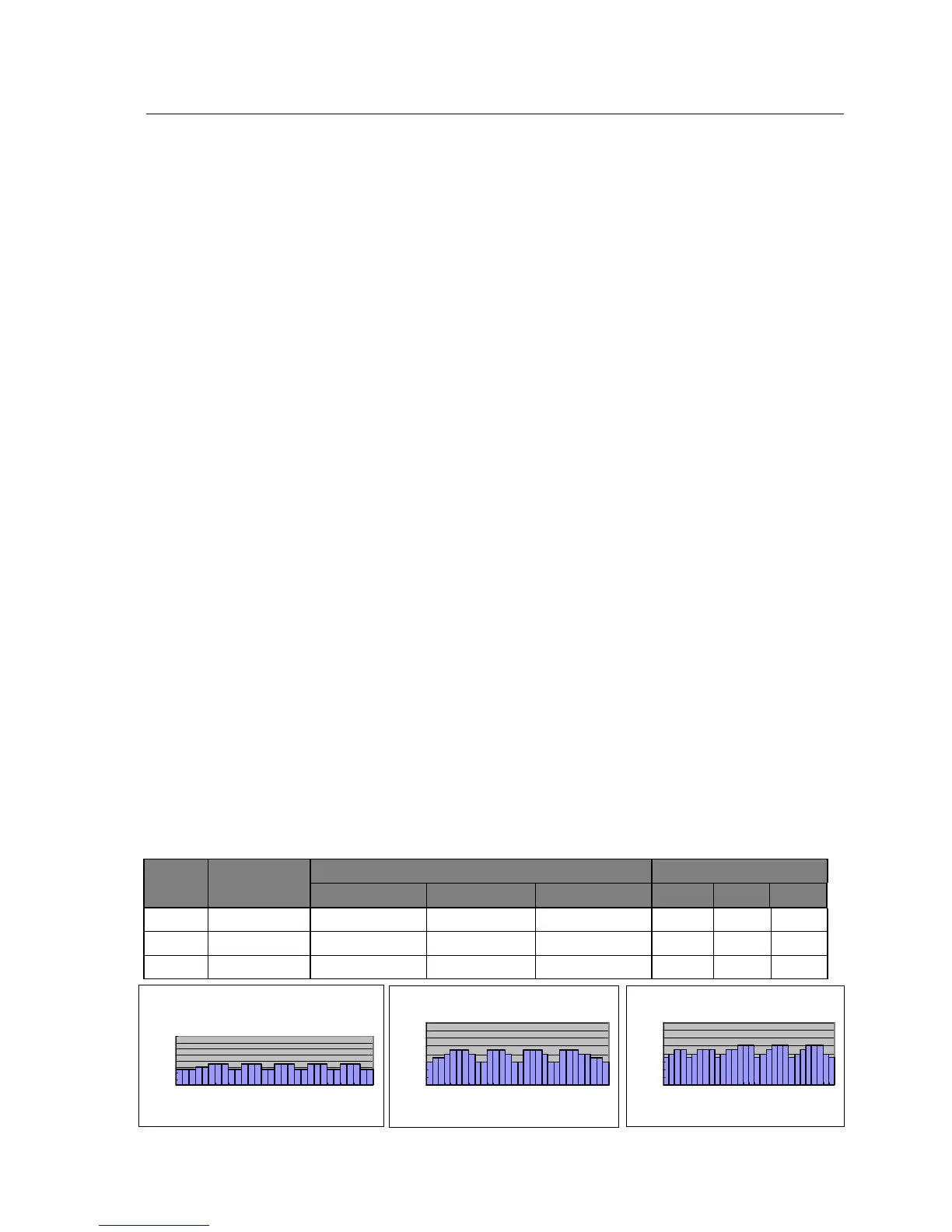
Speed Program Profile
Program
min max
P 4 Speed Interval 9,0 km/h (max.) 2,0 km/h (max.) 16,0 km/h (max.) 30 min 15 min 90 min
P 5 Speed Interval 9,0 km/h (max.) 3,0 km/h (max.) 16,0 km/h (max.) 30 min 15 min 90 min
P 6 Speed Interval 10,0 km/h (max.) 3,0 km/h (max.) 16,0 km/h (max.) 30 min 15 min 90 min
QUICK START
Once the power is on
and the safety tether key
is secured in place,
simply press the START
button, and after three
second count down
treadmill will activate
and maintain the
running belt at 1Km/H.
P 4
P 4P 4
P 4
0
2
4
6
8
10
12
14
16
1 6 11 16 21 26
Time (min)


 To Next Page