Section 2
6
METs PROGRAM
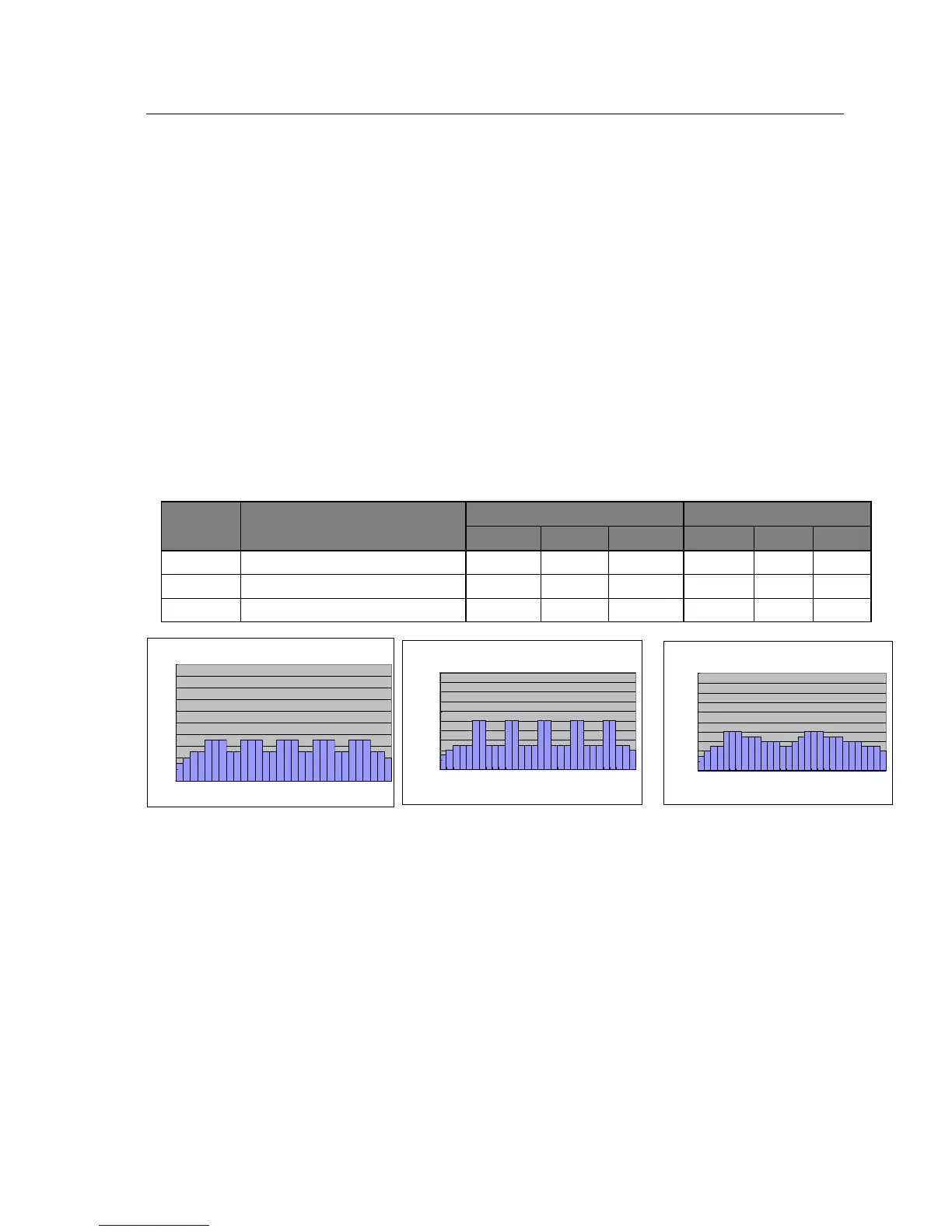
METs program is a motivational program designed to determine user’s physical fitness level. METs is indirect indicator
of your fitness level. User may still be able to adjust intensity level using +/- button if the preset is not appropriate. The
entire remaining program will scale up or down accordingly. During workout, user may adjust speed and elevation level
at will. The program will adjust METs level by both speed and elevation. Test your fitness level using METs program.
1. Turn power on
2. Check safety key secured to treadmill and clip secured to user clothing
3. Press << >> to select P7, P8 or P9 to set up the METs program.
4. Press START/ENTER to confirm
5. Press + / - buttons to input workout duration.
6. Press START/ENTER to confirm
7. Press + / - buttons to input max workout level(METs).
8. Press START/ENTER to confirm
9. Begin workout.
METs Program Profile
Program
min max
P 7 METS(Speed & Elevation) Interval 7 (max.) 5 (max.) 20 (max.) 30 min 15 min 90 min
P 8 METS(Speed & Elevation) Interval 10 (max.) 8 (max.) 20 (max.) 30 min 15 min 90 min
P 9 METS(Speed & Elevation) Interval 8 (max.) 6 (max.) 20 (max.) 30 min 15 min 90 min
P 7
0
2
4
6
8
10
12
14
16
18
20
1 6 11 16 21 26
Time (min)


 To Next Page