HS Consumer Treadmill
How To…Replace The Rear Roller
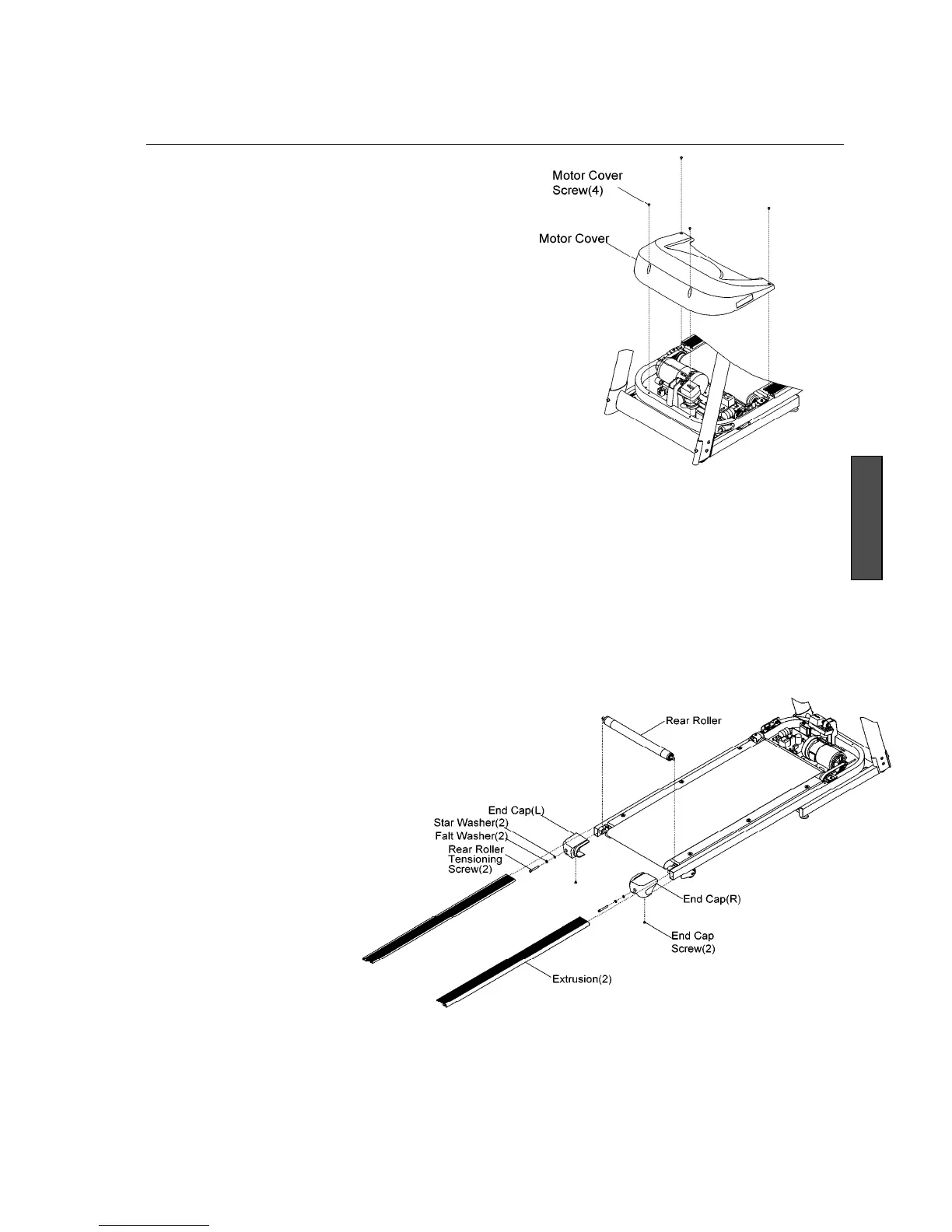
Tools Required: Allen key set, Phillips screwdriver, rubber hammer, and open end wrench set. (All fasteners are metric.
Make sure that you have metric tools.)
REMOVAL AND INSTALLATION
1. At the power switch, turn off the unit, then
unplug the power cord at the wall outlet.
2. Remove the motor cover front screws(4) of the
motor cover, lift off the motor cover.
NOTE: In order to lift rear roller out,
extrusions need to be moved out of the way.
Motor cover has to be removed to get
enough space for sliding the extrusions
forward.
3. Fold the treadmill. Remove the end caps by
removing end cap screws(2) .
4. Unfold the treadmill. Remove the rear roller
tensioning screws(1), flat washers(2) and star
washers(2). Slide the extrusions(2) towards
the front roller.
5. Install new rear roller in reverse order of
removal. Make sure to adjust the running belt
tension. Refer back to belt adjustment in this
section.


 To Next Page