InspectRx200 Operator Guide | 1 - InspectRx200 Operator Guide | 4
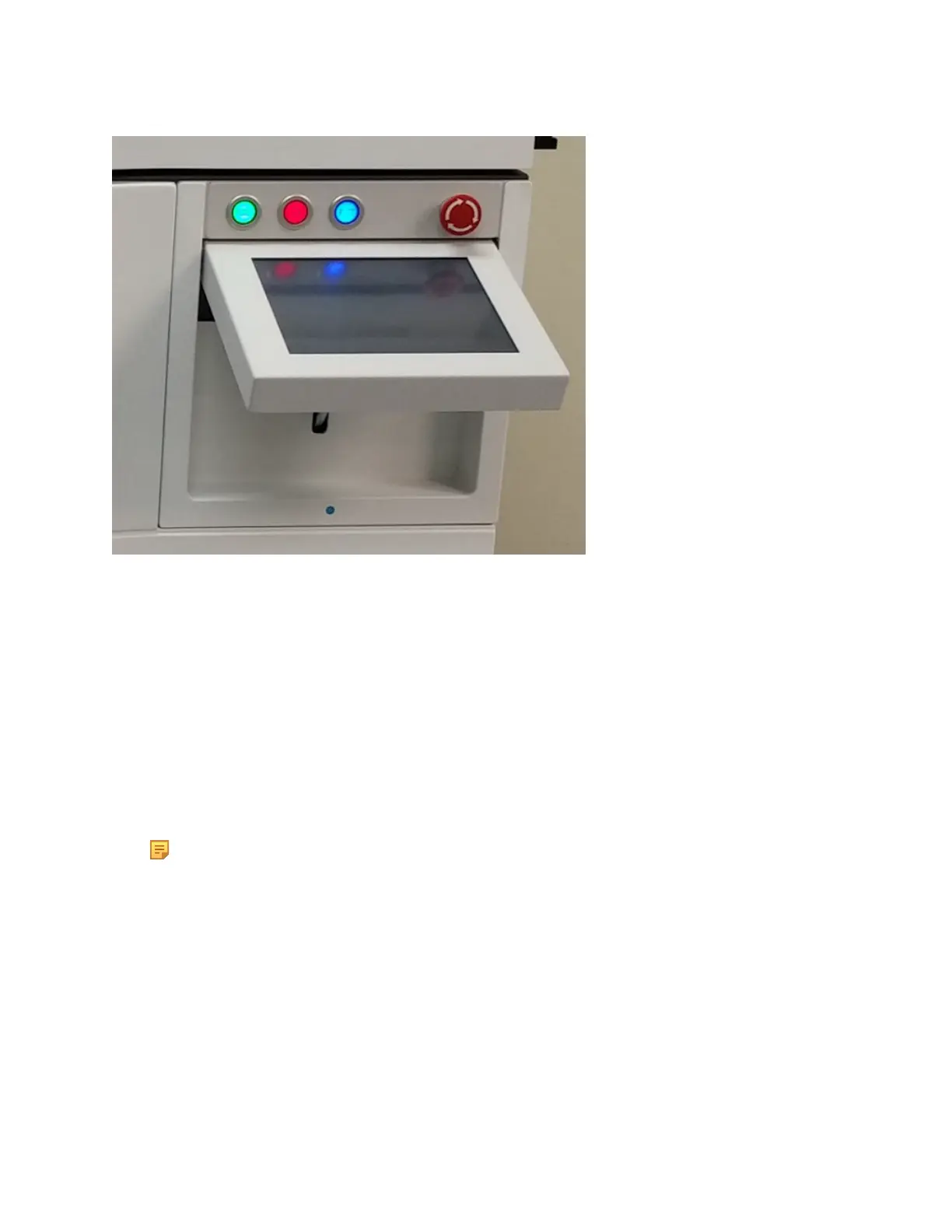
• Start (green) Button: This button activates the main transport belt of the machine. As with the
red button, do not use this button for normal production. Only use this button for installation,
configuration and error resolving situations.
• Stop (red) Button: This button stops the main transport belt of the machine, and all other
commonly handled operations. Only use this button for installation, configuration and error
resolving situations.
•
Reset (blue) Button: this button resets the machine out of an error state. For example, when
the emergency stop button is pressed, because of a situation that required the machine to stop
instantly. Production can only be resumed by removing the error, twisting out the emergency
stop button and resetting the machine, using the blue reset button. A reset may be required in
other situations, and those will be displayed on the touch screen.
Note: While using remote access software for support purposes, it is also possible to reset
the machine using the “R” key on the keyboard.
•
Emergency Stop Button: This button is used to stop all operations immediately. For example,
if a bags get jammed in the main transport belt. Use the button when you, a colleague or the
machine is in danger. Release the button by turning it clockwise. Always reset the button after
an emergency stop.
◦
To reset the emergency state back to the normal operation mode, perform the following
steps:
1. Use the Blue Machine Reset button.
2. After performing this step, the machine will return to normal operating mode.



 To Next Page