- 9 - PATON ProTIG AC/DC TIG/MMA
“Enter” button – saving the welding mode to the memory;
“Up” button – parameter setting (more);
“Down” button – parameter setting (less);
“Right” button – welding parameter selection;
“Left” button – welding parameter selection;
LCD display – for displaying welding mode parameters;
Fig.3.2. Basic controls
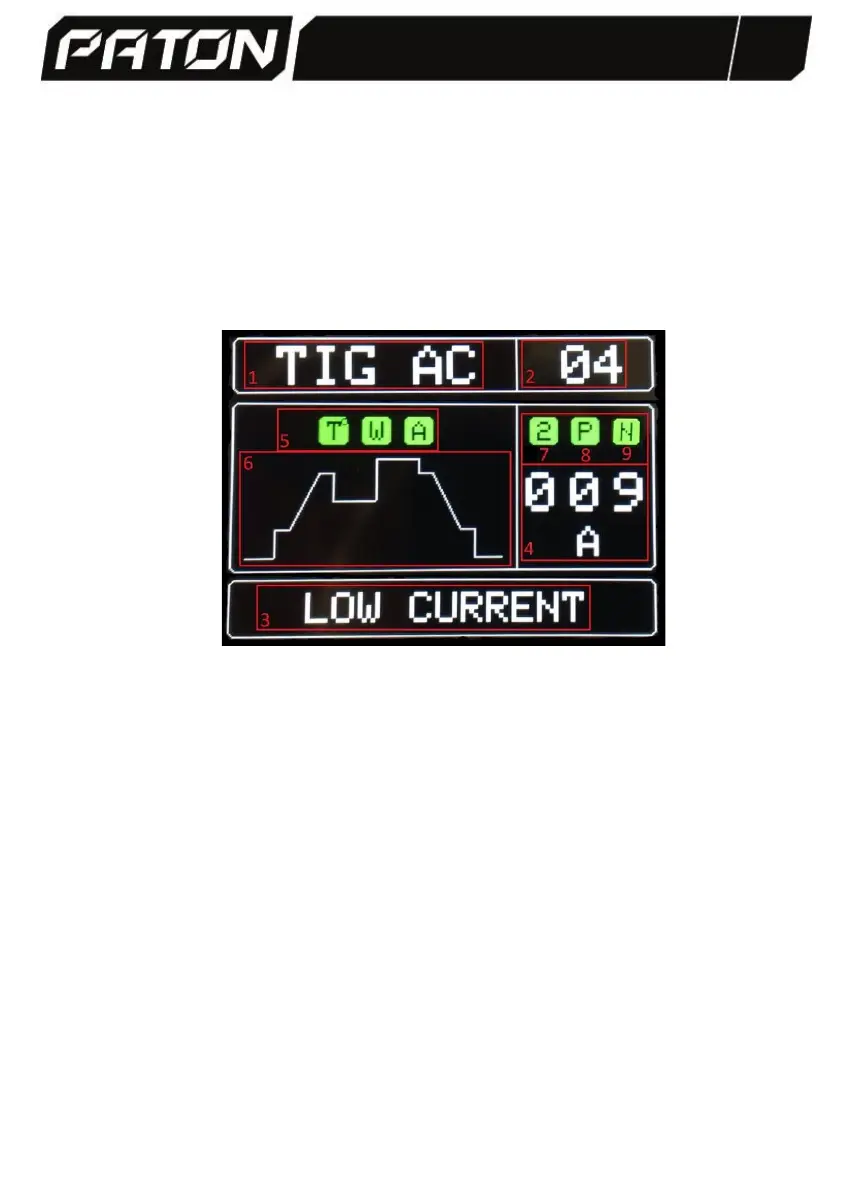
1. Welding mode display. It is switched with the "Mode" button and can be:
- TIG AC handheld argon-arc welding with a non-fusing tungsten electrode at
alternating current.
- TIG DC handheld argon-arc welding with non-fusible tungsten electrode at
direct current.
- MMA handheld argon-arc welding with a coated fusible tungsten electrode
at direct current.
- RIV rivet weld mode.
2. The number of the user program is displayed. It is switched with the
"Program" button; the maximum number is 10.
3. Parameter name of the selected welding mode is displayed. Each mode has
its own set of parameters. It is switched with "Right" and "Left" buttons.
4. The values and units of the selected welding parameter are displayed. They
are switched with "Up" and "Down" buttons.
5. Device condition indicators:


 To Next Page