PATON ProTIG AC/DC TIG/MMA - 22 -
Fig. 5.1 Device interface
1 – “Mode” – button – welding mode switching;
2 – “Program” button – user program selection;
3 – “Enter” button – saving the welding mode to the memory;
4 – “Up” button – parameter setting (more);
5 – “Down” button – parameter setting (less);
6 – “Right” button – welding parameter selection;
7 – “Left” button – welding parameter selection; 8 – LCD screen;
9 – Plug for connecting the button on the torch, as well as the pedal;
10 – Gas hose connection socket on the torch;
11 – Coolant flow relay connector;
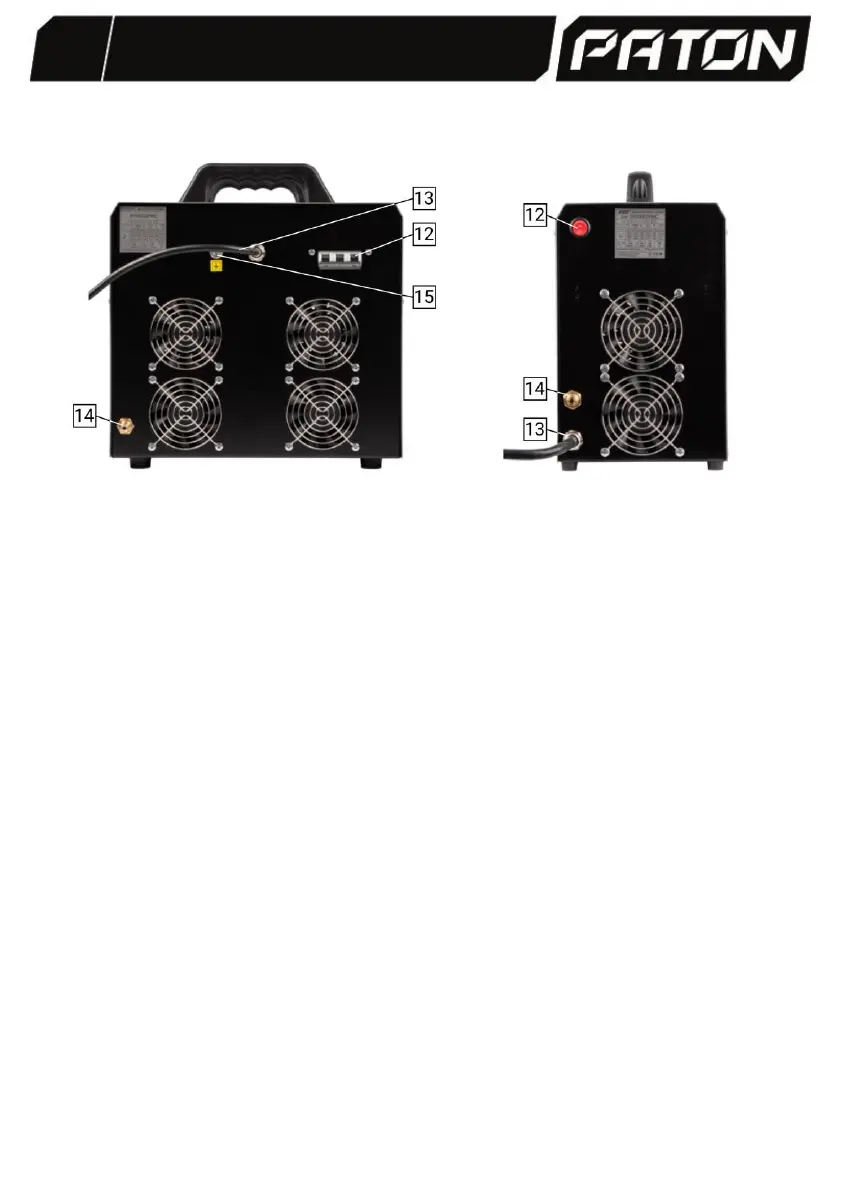
12 – Button/automatic breaker for turning the unit ON/OFF (color – decorative);
13 – Power supply cable;
14 – Socket for connecting the Argon gas cylinder;
15 – Grounding cable connection; A – Power lead, A "+" socket (red); B – Power
lead, B "-" socket (black).
6. MANUAL ARC WELDING WITH COATED ELECTRODE (MMA)
To start working in the MMA mode, you must:
- Connect the electrode holder cable to B "-", the ground holder cable to socket A
"+", setting the polarity to direct welding;
- Connect the mains plug to the mains supply;


 To Next Page