Introduction 47
SmartNode 4170 User Manual C • Cabling
Introduction
This section provides information on the cables used to connect the SmartNode to the existing network infra-
structure and to third party products.
Serial Console
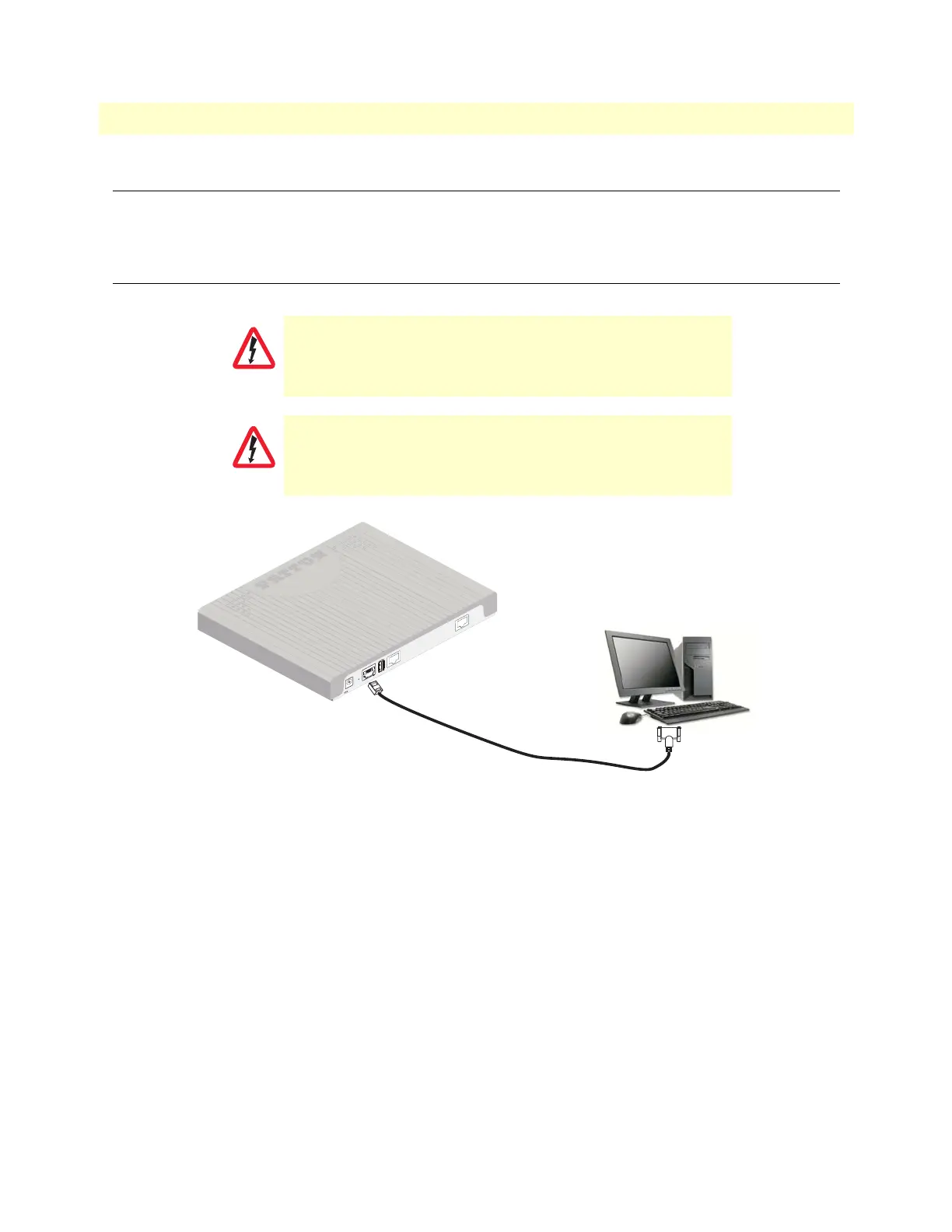
The SmartNode can be connected to a serial terminal over its serial console port, as depicted in figure 12.
Figure 12. Connecting a serial terminal
Console Connection settings:
• 19200 Bps
• 8bits, no parity
• 1stop bit
• flow control off
Note See section “Console port” on page 51 for console port pin-outs.
The interconnecting cables shall be acceptable for external use
and shall be rated for the proper application with respect to volt
-
age, current, anticipated temperature, flammability, and
mechanical serviceabilty.
For the ISDN connection to a carrier network, it shall be con-
nected to a network termination device and not connected
directly to an outside POTS line.
CAUTION
CAUTION
Note A Patton Model 16F-561 RJ45 to DB-9 adapter is included with
each SmartNode Series device
Serial Terminal
1
2V, 1A
P
R
I
0/
0
ETH 0/0
USB
Console
Reset


 To Next Page