Ethernet 48
SmartNode 4170 User Manual C • Cabling
Ethernet
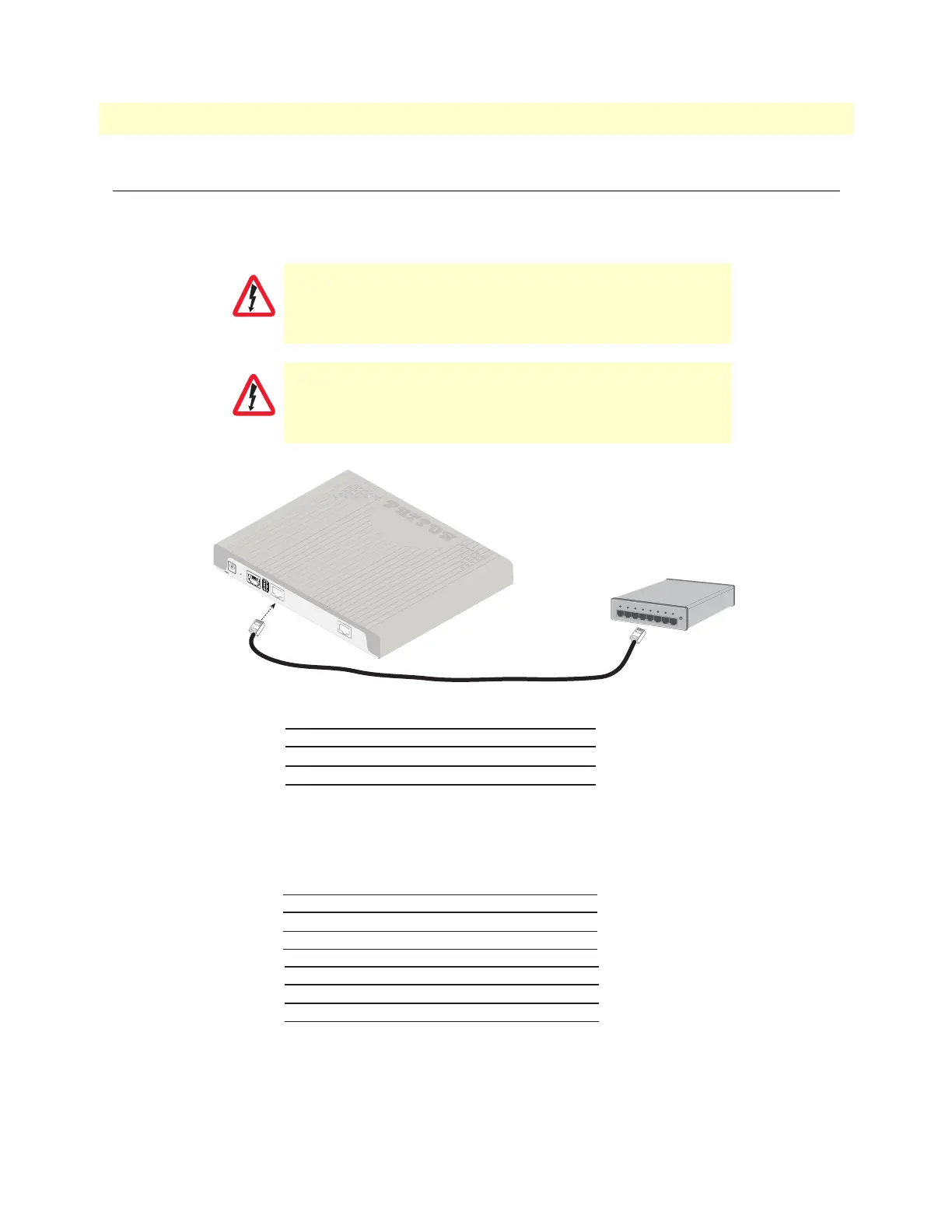
Ethernet devices (10/100/1000 Base-T) are connected to the SmartNode over a cable with RJ-45 plugs. The
Ethernet port on the SN4170 is Auto-MDX. Use any straight or crossover cable to a host, hubs, switches, PCs
or other devices.
Figure 13. Typical Ethernet straight-through cable diagram for 10/100Base-T
Figure 14. Typical Ethernet straight-through cable diagram for 1000Base-T
The interconnecting cables shall be acceptable for external use
an shall be rated for the proper application with respect to volt
-
age, current, anticipated temperature, flammability, and
mechanical serviceability.
For the ISDN connection to a carrier network, it shall be con-
nected to a network termination device and not connected
directly to an outside POTS line.
CAUTION
CAUTION
RJ-45, male
1
2
3
6
RJ-45, male
1
2
3
6
Switch or Hub
Straight-through cable
Note: Other pins are not used
12V, 1A
P
R
I
0
/
0
USB
Console
Reset
ETH 0
/0
RJ-45, male
1
2
3
4
RJ-45, male
1
2
3
4
5
6
7
8
5
6
7
8


 To Next Page