1 Westleigh Oce Park,
Scirocco Close, Moulton Park,
Northampton, NN3 6BW
0333 123 1243
www.libertypay.co.uk
info@libertypay.co.uk
PAX A920
Accepting Payments
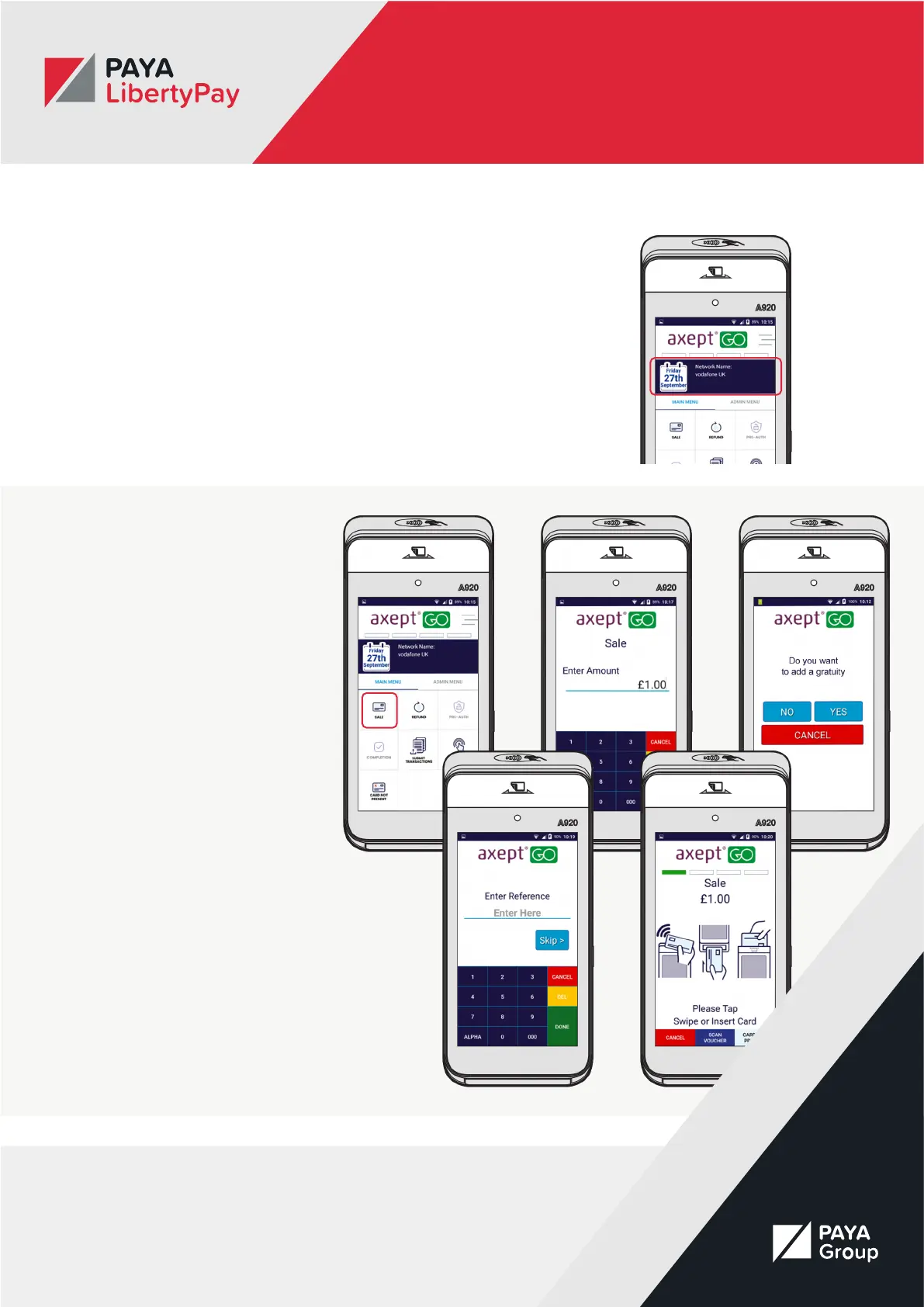
To start accepting payments, simply
navigate to the Main Menu and
select “Sale” from the options. You
will be asked to enter the amount
of the sale. You will then be asked
if you want to add gratuity, either
select No or select Yes and enter the
desired amount.
You will then be asked if you want
to add a reference number for
the transaction. You can skip this
step if you wish. The sale screen
will then appear. The payment is
now ready to be made. Ask the
customer to present their card
either by Contactless, Chip and Pin
or Magstripe.
Quick Data Display
On the Main Menu screen you will
nd a small data display that will
give you some quick information
about your device.
This includes:
• Your connection type
• Your signal strength
• Your number of stored
transactions
• Your user ID
• Your department ID
• Your terminal ID
• Your merchant ID
• Your last Z Report date and time
• Your last update date and time



 To Next Page