1 Westleigh Oce Park,
Scirocco Close, Moulton Park,
Northampton, NN3 6BW
0333 123 1243
www.libertypay.co.uk
info@libertypay.co.uk
PAX A920
Uploading Transactions
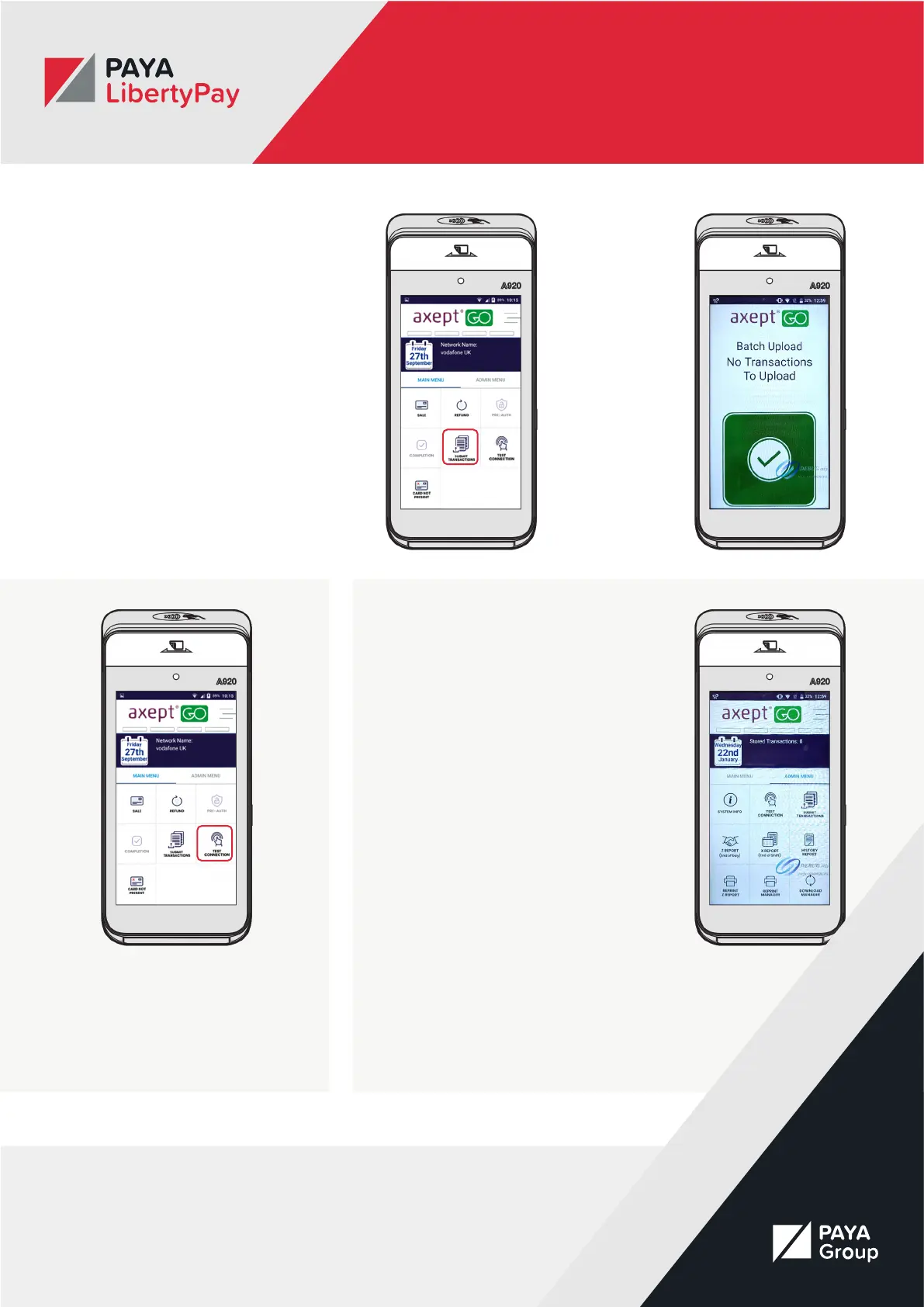
You can upload your transactions by
selecting the “Submit Transactions”
button from the Main Menu. The
upload will then start automatically.
Once complete, you will see a green
tick on the screen to let you know
the upload was successful. You will
then be taken back to the main
menu.
Testing the connection
To test the device connection, select
the “Test Connection” button on the
Main Menu.
Administration Tools
You can access the Admin Tools by
selecting “Admin Menu” in the menu
settings.
This will give you access to the
following options:
• System Info
• Test Connection
• Submit Transactions
• Z Report
• X Report
• History Report
• Reprint Z Report
• Reprint Manager
• Download Manager



 To Next Page