Set the Jumpers
Jumpers are sets of pins that can be connected together with
jumper caps. The jumper caps change the way the mainboard
operates by changing the electronic circuits on the mainboard. If a
jumper cap connects two pins, we say the pins are SHORT. If a
jumper cap is removed from two pins, the pins are OPEN.
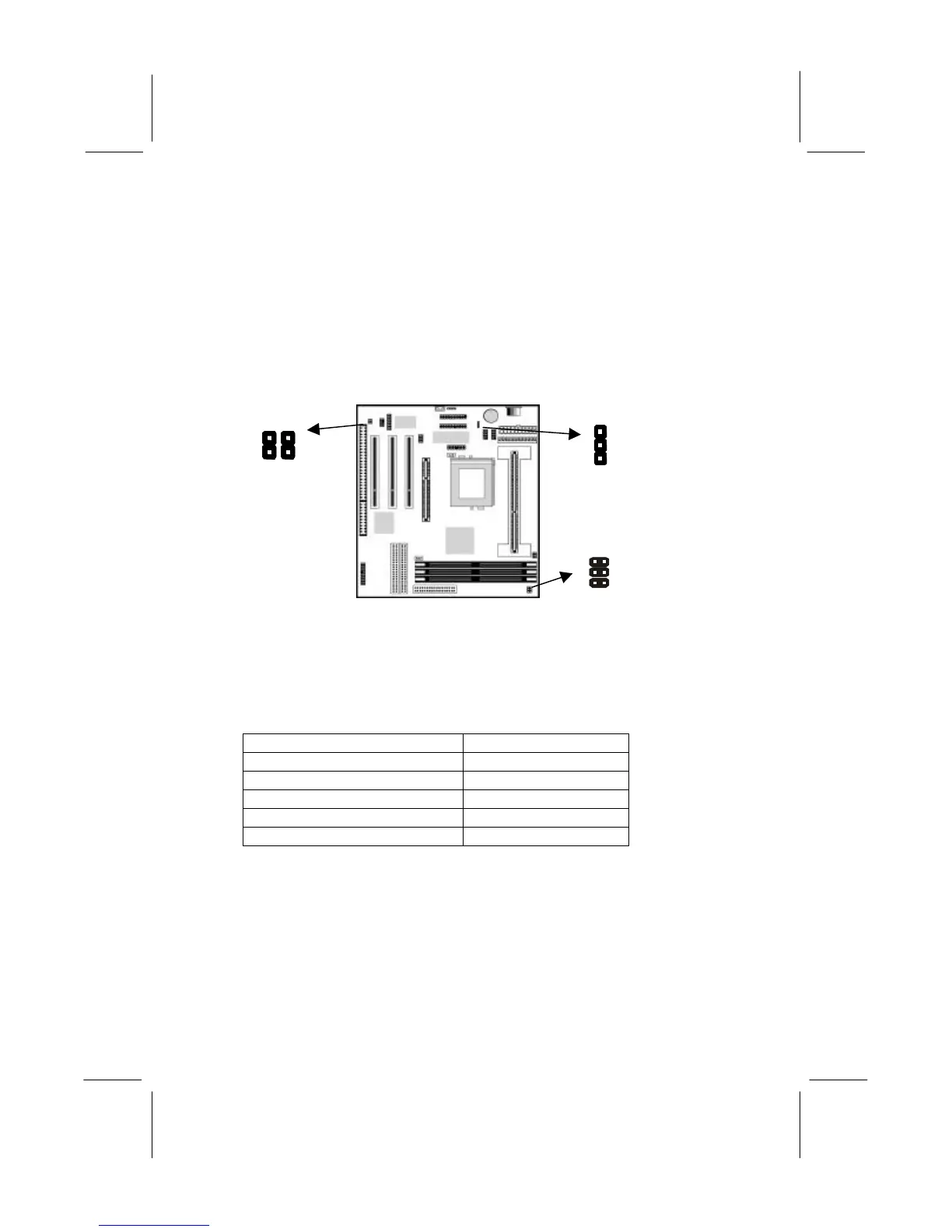
Jumper JP1: Fax/Modem & Audio System Enable/disable
This jumper consists of two sets of 2-pin jumpers JP1A and JP1B.
Use JP1A to enable or disable the onboard sound system. Use
JP1B to enable or disable the onboard Fax/Modem.
JP1A: Function Jumper Setting
Disable Audio System Short Pins 1-2
Enable Audio System Open Pins 1-2
JP1B: Function Jumper Setting
Disable Fax/Modem Short Pins 1-2
Enable Fax/Modem Open Pins 1-2
Note: If you use JP1A to disable the onboard sound system,
the Fax/Modem is also disabled, even if you have set JP1B
to the Enable Fax/Modem setting.
JP1
B
A
1
JP4
JP8
A B


 To Next Page