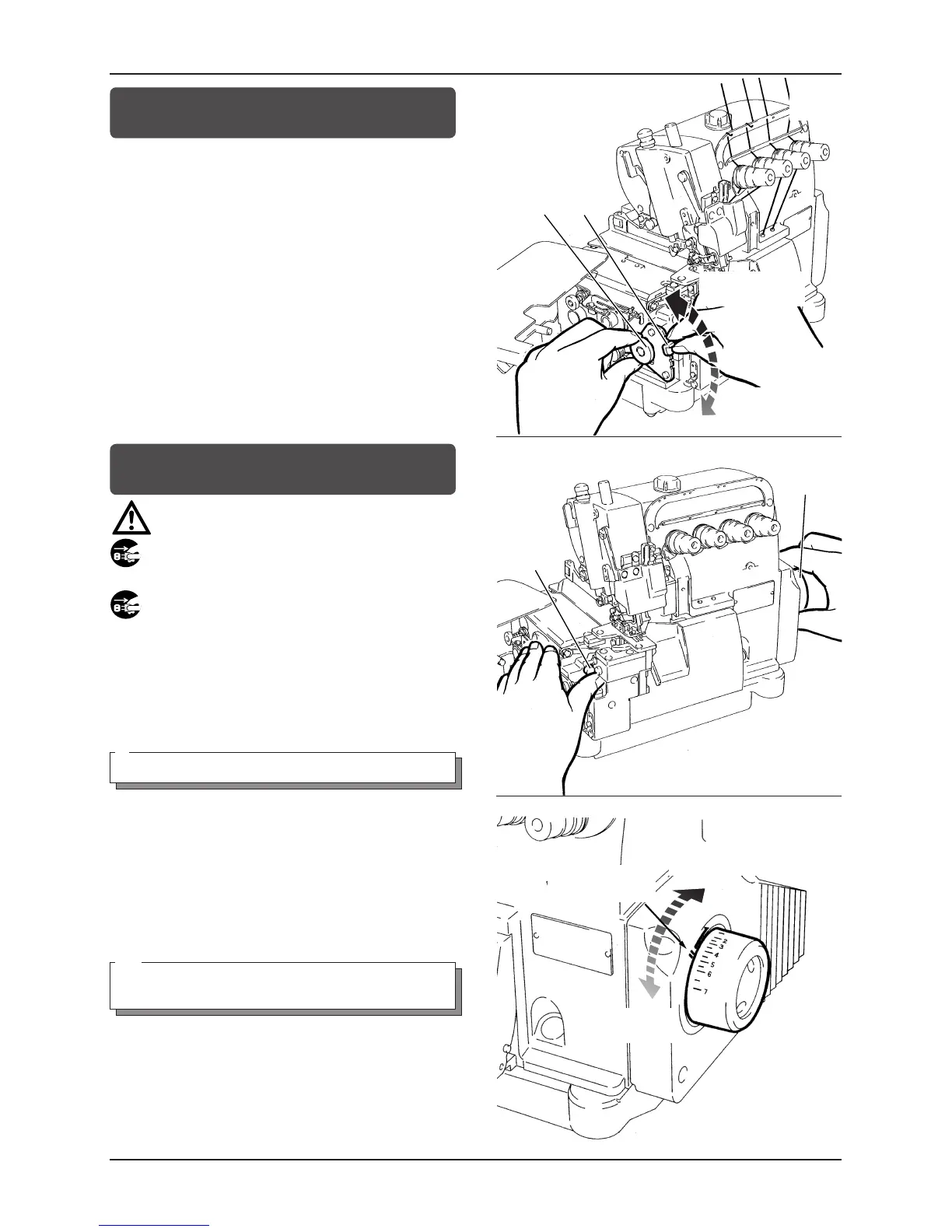
Adjusting the differential feed ratio
1.
1
2
2
2.
1
1.
Loosen nut
1
. To increase the differential feed ratio, bring
lever
2
down. The finished fabric is shrunk.
To decrease the differential feed ratio, bring lever
2
up.
The finished fabric is stretched
2.
After this adjustment is made, tighten nut
1
.
Adjusting the stitch length
CAUTION
Always turn off the power and unplug the machine when
adjusting the stitch length.
1.
3
2.
4
1.
With push button
3
depressed, turn machine pulley
4
so that
the push button
3
goes further into the depth.
2.
With the push button in the place stated in 1
,
turning machine pulley
4
in the direction of (+) produces
coarse stitches.
turning machine pulley
4
in the direction of (
-
) produces fine
stitches.
Note
Stitch length adjustment must only be made after the differential
feed ratio has been changed.
図 18
図 17
Fig.18
Fig.17
図 19
Fig.19



 To Next Page