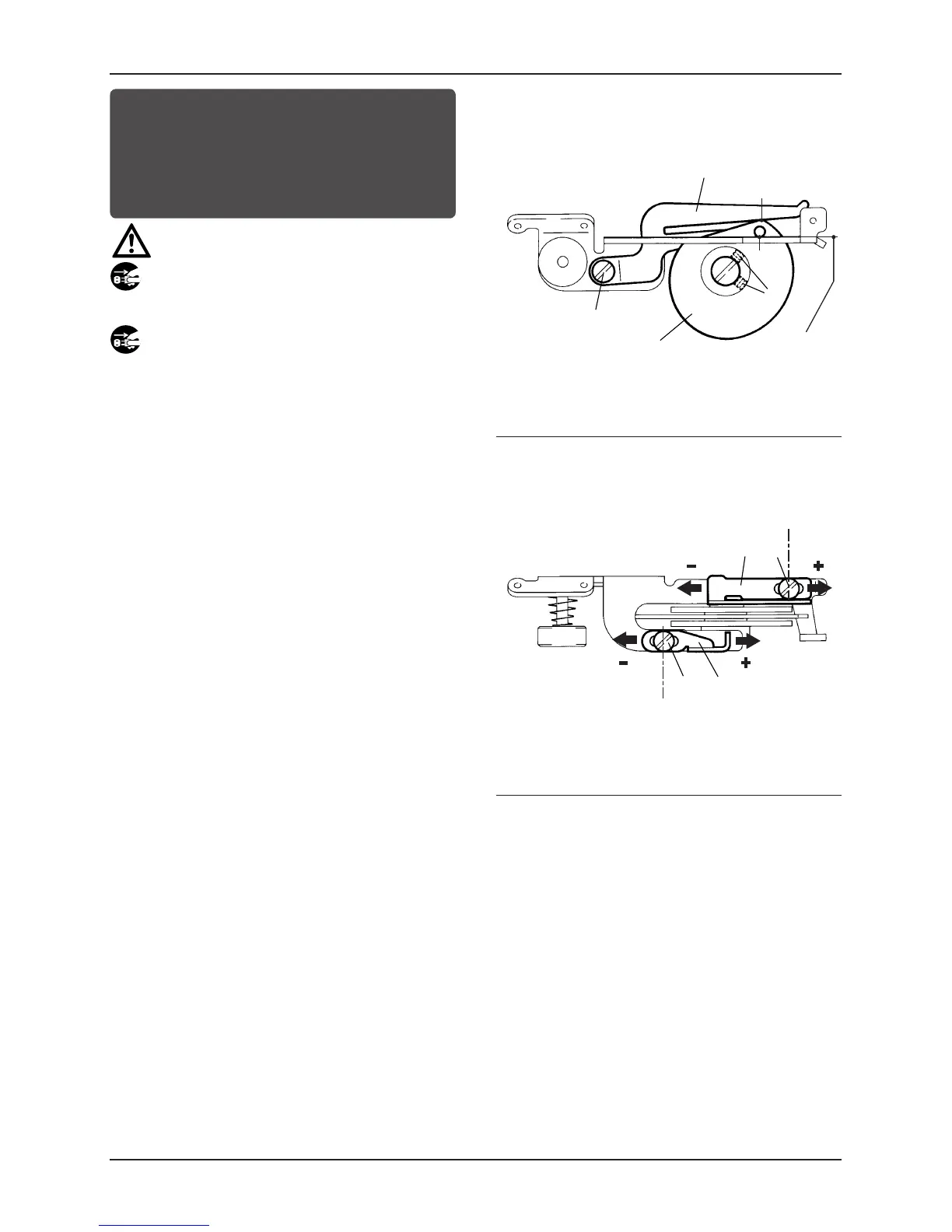
Positioning the double chainstitch looper thread
take-up and thread guides
Adjusting the amount of thread to be supplied from
the double chainstitch looper thread take-up
CAUTION
Always turn off the power, unplug the machine and then
authorized technicians are allowed to adjust the thread take-up.
1.
2.
1
A
2
1
3.
3
B
1
B
4
3
4.
7
8
5
6
A
B
1.
Turn the machine pulley until the needle is at the top of its
stroke.
2.
Align point
A
on double chainstitch looper
1
with the top
surface of the bracket. Adjustment is made by loosening
screws
2
and turning double chainstitch looper
1
.
3.
Align point
B
on thread take-up guide
3
with point
B
on double chainstitch looper
1
. Adjustment is made by
loosening screw
4
and moving thread take-up guide
3
up or
down.
4.
To adjust thread guides
5
and
6
, loosen screws
7
and
8
, and
move guides
5
and
6
to the left or right (see the illustration).
To increase the amount of thread, move thread guides
5
and
6
in the direction of
. To decrease the amount of thread,
move thread guides
5
and
6
in the direction of
.



 To Next Page