10
To Start Taking Pictures Right Away
1
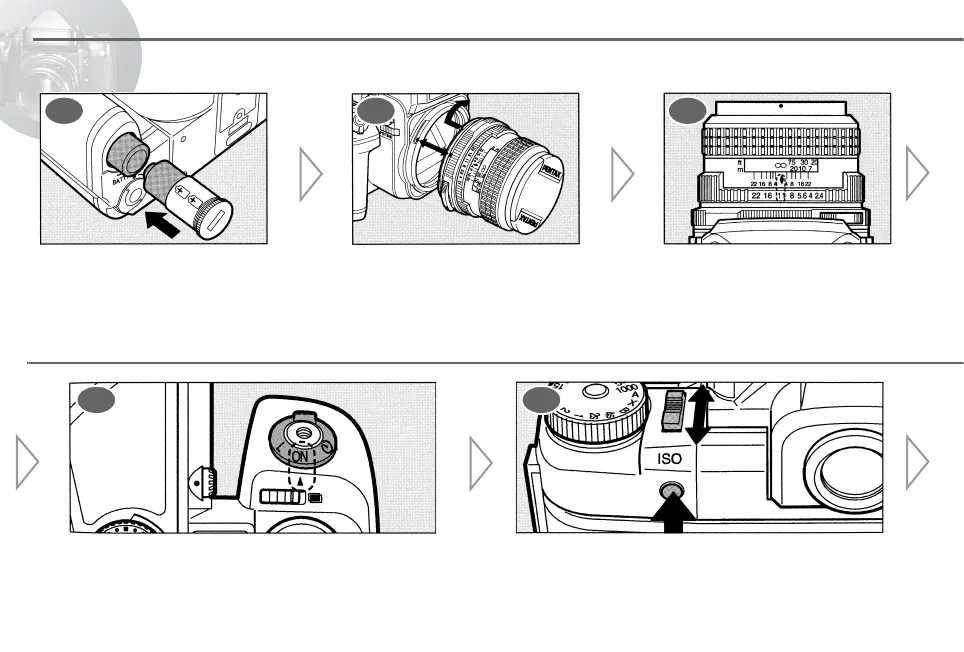
Load the Batteries
Remove the battery chamber cover
and load two CR123A batteries.
[Page 14]
2 3
Attach the Lens
Align the red dots on the camera
and lens mount, attach the lens to
the camera body, and turn it to the
right until it locks. [Page 18]
Set the F-Stop
Set the lens aperture ring to the
desired f-stop. [Page 35]
Turn the Power On
Set the main switch to i. [Page 16]
Set the Film Speed
Adjust the film speed using the film speed set lever
and film speed set button. [Page 24]
7 8



 To Next Page