ADVANCED OPERATION
54
About Exposure
Compensation
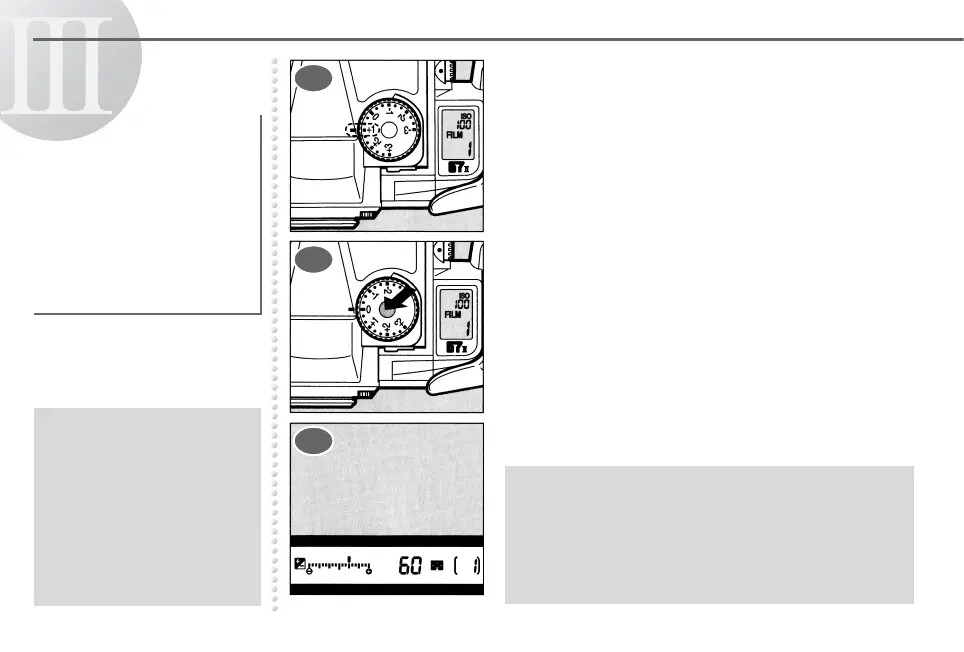
Turn the exposure compensation dial to the
desired compensation value.
To set the exposure compensation dial to a
position other than the a position, turn the
exposure compensation dial while holding
down the exposure compensation dial release
button.
The bar graph indicates the compensation
value and k appear in the viewfinder.
Exposure compensation
allows you to deliberately
overexpose (brighten) or
underexpose (darken) a
subject, or to compensate
for difficult lighting
conditions which may fool
the camera’s built-in
exposure meter.
● Exposure compensation
does not work in the Bulb
Exposure Mode.
● The exposure compensation
range is –3EV to +3EV in
0.3EV step.
● Moving one bar above the
bar graph indicates a
0.3EV step.
● When exposure compensation is used in the Metered
Manual Mode, the bar above the bar graph indicates
the value of under or over exposure and k is
displayed instead of the bar graph showing the
compensation value in the viewfinder. You can take
pictures with the compensation value you set by
setting q to the center of the bar graph.
1
2
3



 To Next Page