BASIC OPERATION [SHOOTING]
35
Using the
Apperture-Priority
AE Mode
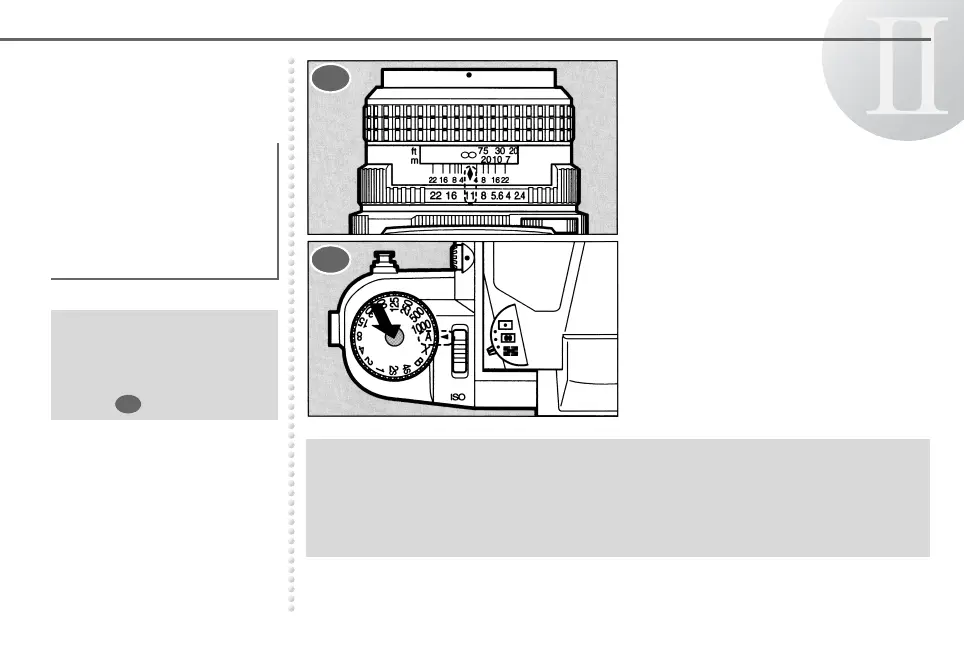
Set the lens aperture ring to the
desired f-stop.
Turn the shutter speed dial to b
while holding down the shutter
speed dial lock button.
When the desired aperture
is selected, an appropriate
shutter speed is
automatically set by the
camera for a proper
exposure.
● The shutter speed dial
can be released from b
to another position in
the same manner as
step .
2
● See page 49 for the Metered Manual Mode.
● The Aperture-Priority AE Mode does not operate unless the AE Pentaprism Finder
672 is attached.
● When the shutter speed dial is set to b without attaching the AE Pentaprism Finder
672, the shutter speed will be set at 1/30 of a second.
1
2



 To Next Page