EasyManua.ls Logo

PERDIX SHEARWATER - Troubleshooting; 8.1. Warning and error displays; 8.2. Connection problems

PERDIX SHEARWATER
20 pages
Print Icon
To Next Page IconTo Next Page
To Previous Page IconTo Previous Page
Loading...
Operating Instructions
Page 18
RevA
8. Troubleshooting
Follow these guidelines to help solve problems with the
Perdix AI�
8.1. Warning and error displays
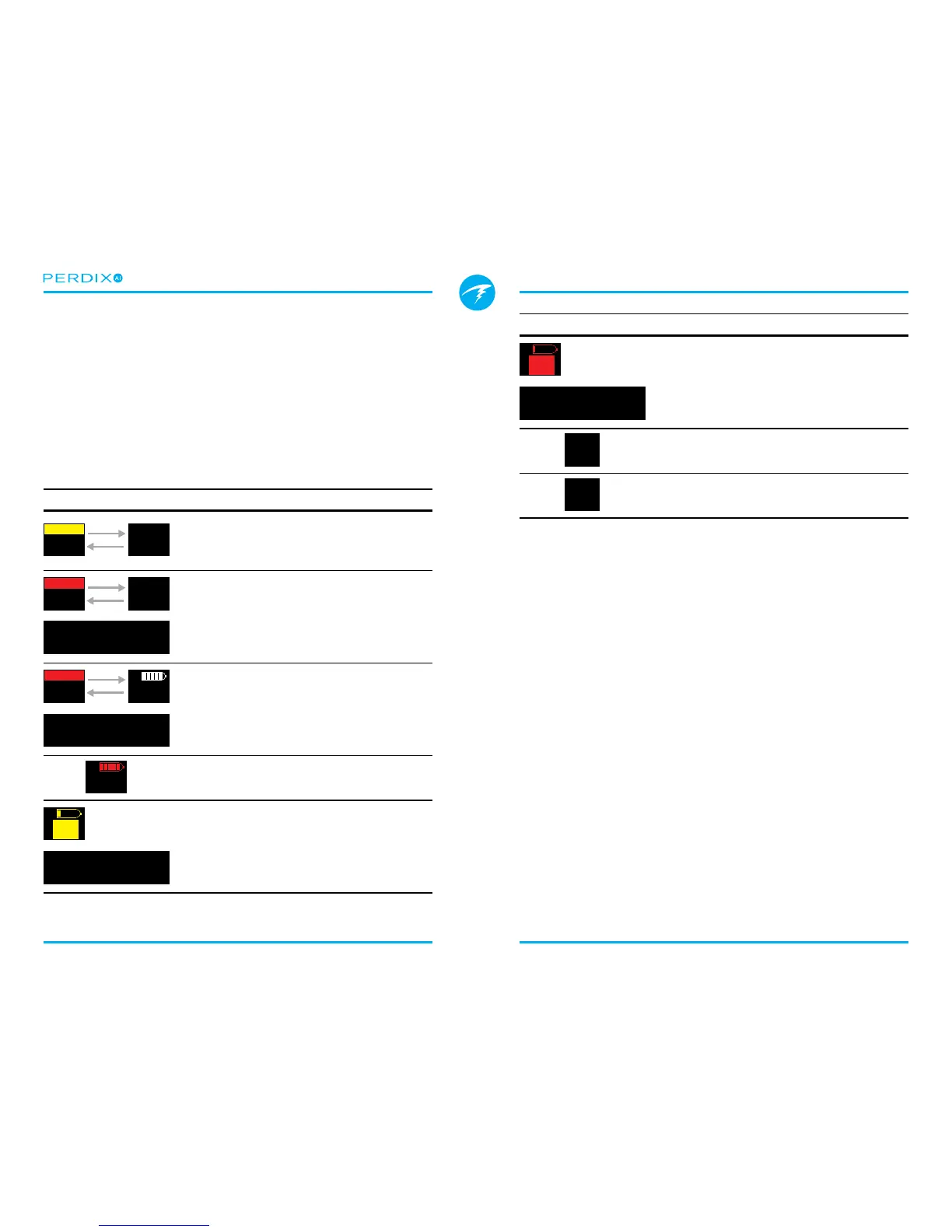
The following table shows warnings and errors you may see,
their meaning, and steps to take to solve any problems�
Display Meaning Action to take
I
T1
----
P
S
I
3042
P
S
No Comms
Alternates
No communications for 30
to 90 seconds�
See Section 8.2. Connec-
tion problems
I
T1
----
P
S
I
----
P
S
No Comms
Alternates
Warning Confirm
AI LOST COMMS
+
No communications for
90+ seconds�
See Section 8.2. Connec-
tion problems
Warning Confirm
AI LOW BATTERY
+
I
3042
P
S
I
T1
3042
P
S
Low Bat
Alternates
Low transmitter battery�
Replace the transmitter
battery� See Section 9.1.
Transmitter Battery Re-
placement
I
T1
3600
P
S
Tank pressure exceeds
rated pressure by more
than 10%�
Properly set the rated pres-
sure in the AI Setup->Tx
Setup menu�
Warning Confirm
T1 RESERVE PRES.
+
I
T1
P
S
682
Tank pressure has
fallen below the reserve
pressure setting�
Be aware that gas is
running low� Begin to end
your dive and perform a
controlled ascent to the
surface�
Display Meaning Action to take
Warning Confirm
T1 CRITICAL PRES
+
I
T1
P
S
345
Tank pressure has fallen
below the critical pressure�
Be aware that gas is
running low� Begin to end
your dive and perform a
controlled ascent to the
surface�
GTR T1
---
GTR is not available when
on the surface�
None� GTR will display
during a dive�
GTR
wait
T1
GTR (and SAC) are not
available for the first
few minutes of a dive�
None� After a few minutes,
enough data has been
collected for display�
8.2. Connection problems
If you are seeing “No Comms” errors, follow these steps:
If the “No Comms” is persistent:
• Check that the proper serial number is entered into the
AI SetupT1/T2 Setup menu�
• Ensure the transmitter is turned on, by connecting it
to a rst stage and turning on the tank valve. Applying
high pressure > 50 PSI (3�5 Bar) is the only way to turn
on the transmitter. The transmitter will power o󰀨 after 2
minutes of no pressure�
• Bring the handset within range (3ft / 1m) of the
transmitter� Having the transmitter too close (less than
2 inches / 5 cm) can also cause communication loss�
If the “No Comms” is intermittent:
• Search for sources of radio frequency (RF)
interference, such as HID lights, scooters, or photo
ashes. Try eliminating such sources to see if this
solves the connection problem�