permaPROMP-6Distributor-12-
Outlets
1
3
2
4
5
6
Outlets
1
3
2
4
5
6
%Vol.
LC 500
ON/OFF
SELECT
ON/OFF
SELECT
Outlets
1
3
2
4
5
6
%Vol.
LC 500
5.4 During Operation
♦ Carryoutregularinspectionsduringoperation.Youshouldpayspecialattentiontoleakage,tothecondition
ofthedistributor,andthecompletelubricationsystem!
♦ Regularlychecktheconditionofthegreaselinesandtheconnections!
♦ RegularlycheckthefillinglevelofthetransparentPROLCunitofthelubricator!
♦ Afteroneorseveraladditionaldischarges,youhavetocalculatetheremainingdischargeperiodandmarkit
inyourlubricationandmaintenanceschedule.
♦ Ifamalfunctionisindicatedonthedisplay,youcandeterminethecauseusingthetroubleshootingguide
(refertochart3,chapter6.2).Ifthefaultcannotbefixed,pleasecontactyoursupplierfortechnicalsupport.
Additional discharges and long machine standstills must always be taken into account with regard to the
remaining discharge period of the lubrication system.
5.5 Switching the Complete Lubrication System On
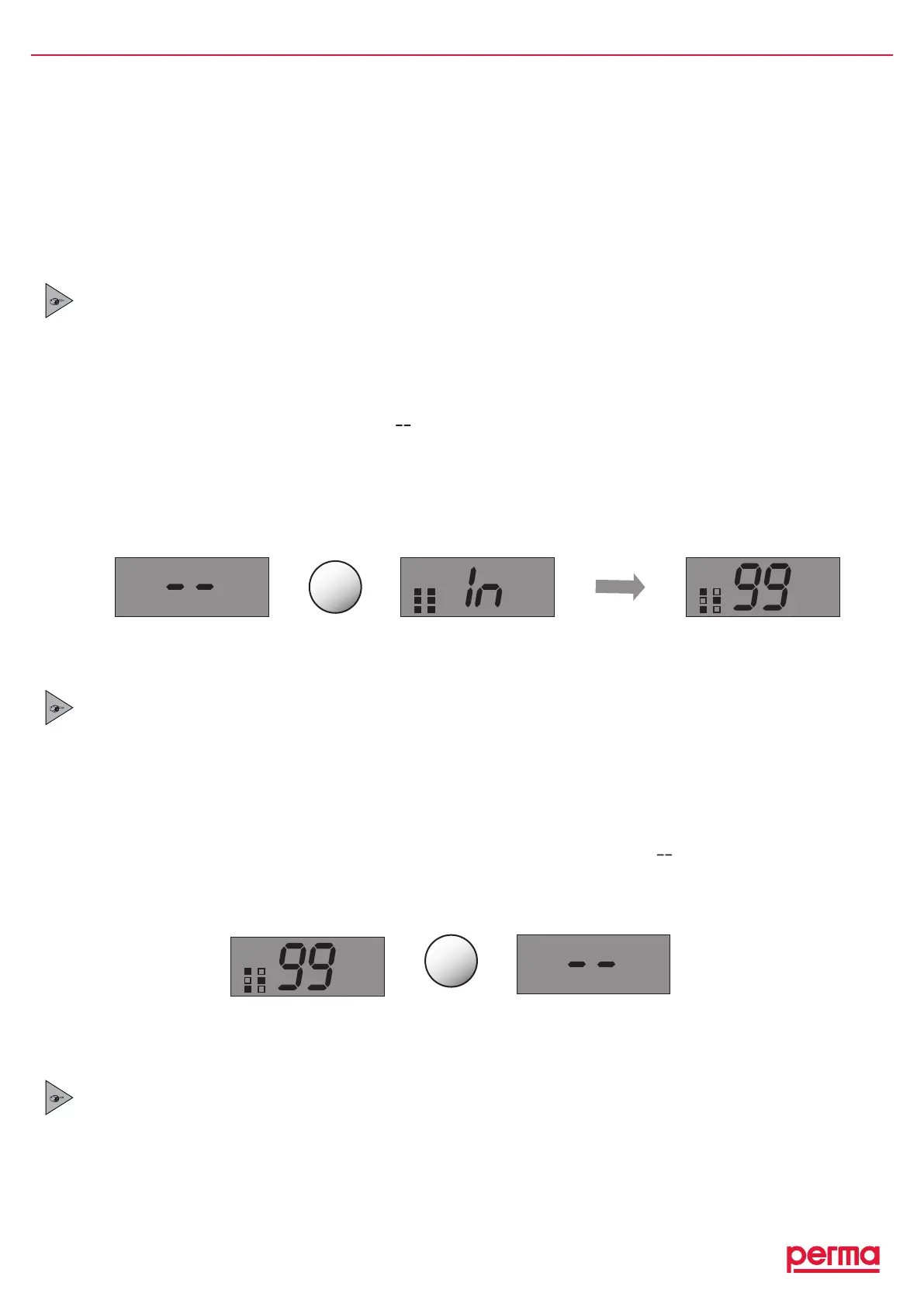
ToswitchonthelubricationsystemPRO (refertofigure8),keeptheON/OFF/SELECTbuttonofthelubricator
presseduntilthedisplaynolongershows“ ”.
TostartthelubricationsystemPRO Cyouhavetoswitchonpowersupply.
Afterswitch-on,thelubricatorautomaticallydoesaninitialization(systemrecognizestheactivatedoutlets).During
initialization,theoutlets(representedbysquares)inthedisplayareblinking.Activatedoutlets(squares)willbe
blackened,inactiveoutlets(squares)areblank.Whentheinitializationprocessisfinished,thegreenLEDblinks
andthedisplayshowstheoutlets(squares),theremainingvolume(inpercent),andtheLCunitsize(250and
500cm
3
).
5.7 Determining the Discharge Period
TherequireddischargeperiodmustbedeterminedusingtheOperatingInstructionsoftheconnectedlubricator.
YouhavetotakeintoaccountthatthedistributorpermaMP-6isabletosupplyanequalamountoflubricantto
upsixlubricationpoints.
Whendeterminingthedischargevolume,youhavetomultiplythenumberofopenoutletswiththerequired
dischargevolumeperoutlet.Withtheresultofthiscalculationyoucandeterminethesettingpointofthe
dischargeperiodusingtheOperatingInstructionsoftheconnectedlubricator.
gure9
OnlywithPRO
gure8
OnlywithPRO
Thelubricationsystemis
switchedoff.
Initializationprocess
Thelubricationsystemison.
Whenthelubricationsystemisswitchedonforthersttime,theinitializationiscarriedoutautomatically
bythelubricator.Theoutlets(squares),theremainingvolume(inpercent),andtheLCunitsize(250or
500cm
3
)areonlydisplayedaftertheinitializationprocessisnished.
5.6 Switching the Complete Lubrication System Off
ToswitchoffthelubricationsystemPRO(refertogure9),keeptheON/OFF/SELECTbuttonofthelubricator
presseduntilthedisplaynolongerindicatestheremainingvolumebutindicates“ ”instead.
TostopthelubricationsystemPRO C youonlyhavetoswitchonpowersupply.
Whenthelubricationsystemisswitchedoff,allofthesettingsaresaved.Thismeansthatifyoustartthe
lubricatoragain,itwilltakeupoperationatthepointwhereithadbeenswitchedoff.


 To Next Page