permaPROMP-6Distributor -15-
PRO
ON/OFF
SELECT
MODE
SAVE
PROC
SELECT
MODE
SAVE
Outlets
1
3
2
4
5
6
Days
Weeks
Months
%Vol.
LC2500LC2500
Confi g.
TimeTime PIN
Outlets
1
3
2
4
5
6
Outlets
1
3
2
4
5
6
Days
Weeks
Months
%Vol.
LC2500LC2500
Confi g.
TimeTime PIN
Outlets
1
3
2
4
5
6
Outlets
1
3
2
4
5
6
Days
Weeks
Months
%Vol.
LC2500LC2500
Confi g.
TimeTime PIN
Outlets
1
3
2
4
5
6
Outlets
1
3
2
4
5
6
Days
Weeks
Months
%Vol.
LC2500LC2500
Confi g.
TimeTime PIN
Outlets
1
3
2
4
5
6
Outlets
1
3
2
4
5
6
Days
Weeks
Months
%Vol.
LC2500LC2500
Confi g.
TimeTime PIN
Outlets
1
3
2
4
5
6
Outlets
1
3
2
4
5
6
Days
Weeks
Months
%Vol.
LC2500LC2500
Confi g.
TimeTime PIN
Outlets
1
3
2
4
5
6
Outlets
1
3
2
4
5
6
Days
Weeks
Months
%Vol.
LC2500LC2500
Confi g.
TimeTime PIN
Outlets
1
3
2
4
5
6
Initializationnished
5.10 Initialization of Distributor
Automatic Initialization of the Distributor
InordertosupplylubricanttoallopenoutletsandtoensureacorrectoperationofthepermaMP-6,an
automaticinitializationofthelubricationsystemiscarriedoutwhenthesystemisswitchedonforthersttime.
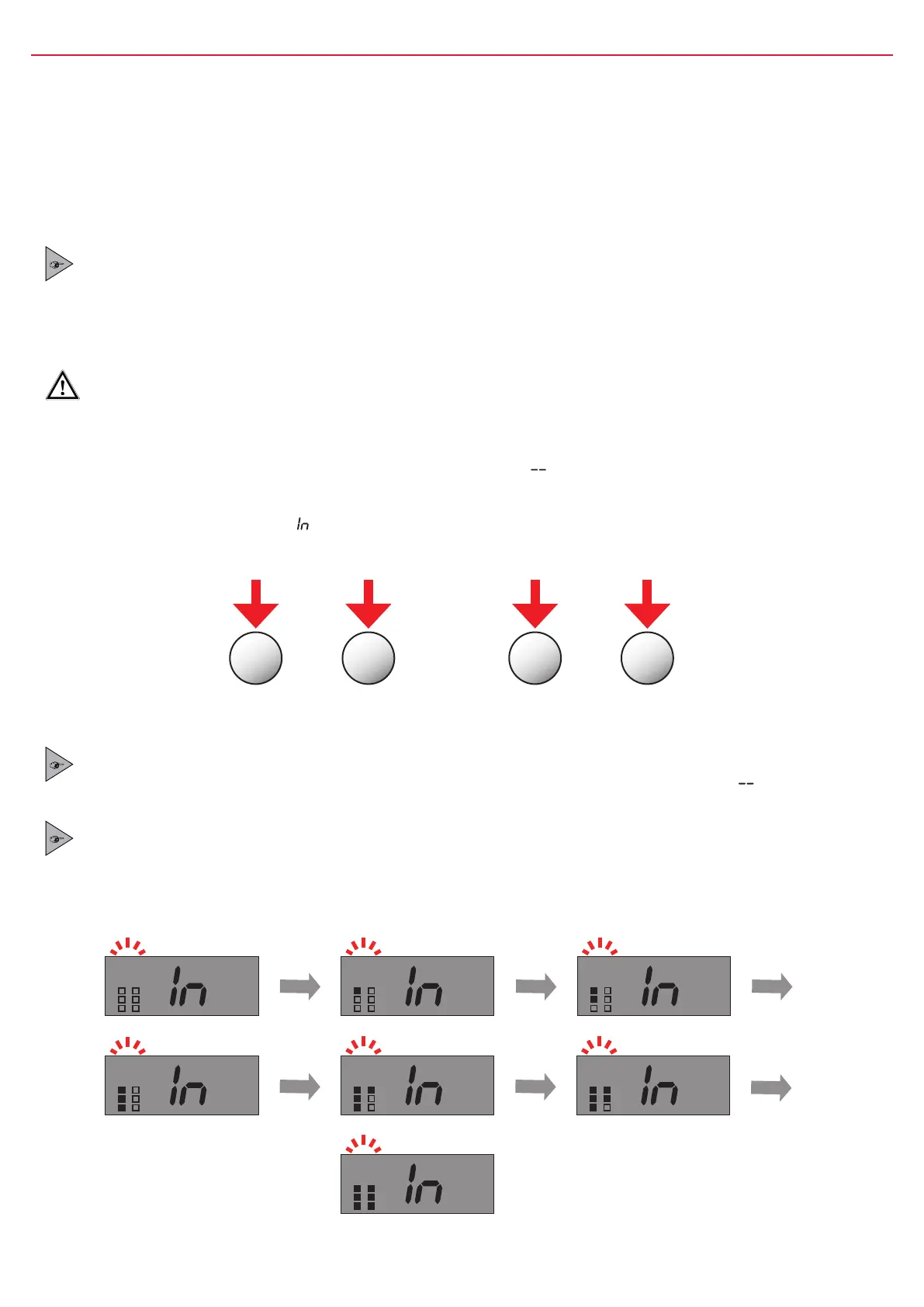
Duringinitializationthesystemrecognizestheactivatedoutlets.Outlets(representedbysquares)inthedisplay
areblinking.Activatedoutlets(squares)willbeblackened,inactiveoutlets(squares)areblank.
When initialization is nished, the display shows the remaining volume and activated outlets. The green
LED starts to blink and the lubrication system operates.
Manual Initialization of the Distributor
Ifyouconnectanewdistributortothelubricator(exchangeolddistributorwithnewone),youmustdoamanual
initializationofthepermaMP-6.Thesystemrecognizestheactivatedoutlets.Outlets(representedbysquares)in
thedisplayareblinking.Activatedoutlets(squares)willbeblackened,inactiveoutlets(squares)areblank.
Amanualinitialization(longpushofbothbuttonsonthelubricator–refertogure11)canonlybedonewhenthe
lubricationsystemisturned OFF(displayoflubricatorshows“
”forOFF)
PROwillimmediatelystartinitialization(refertogure12).
PROCwillshowablinking“ ”inthedisplayforthetriggeredinitialization–theactualinitializationwillbecarried
outassoonasthesystemisturnedON(refertogure12).
Lubricator PRO
When the manual initialization is completed, the display of the lubricator PRO shows “ ” for OFF and
the lubrication system is switched off.
Lubricator PRO C
When the manual initialization is completed, the display of the lubricator PRO C shows the remaining
volume of the PRO LC unit and the lubrication system is switched on.
Initialization Sequence
gure11 Foramanualinitialization,pressandholddownbothbuttonsofthelubricatorsimultaneously.
gure12


 To Next Page