28
EVOLV SHIFT XTRE-INSTALLING EXTERNAL PANELS
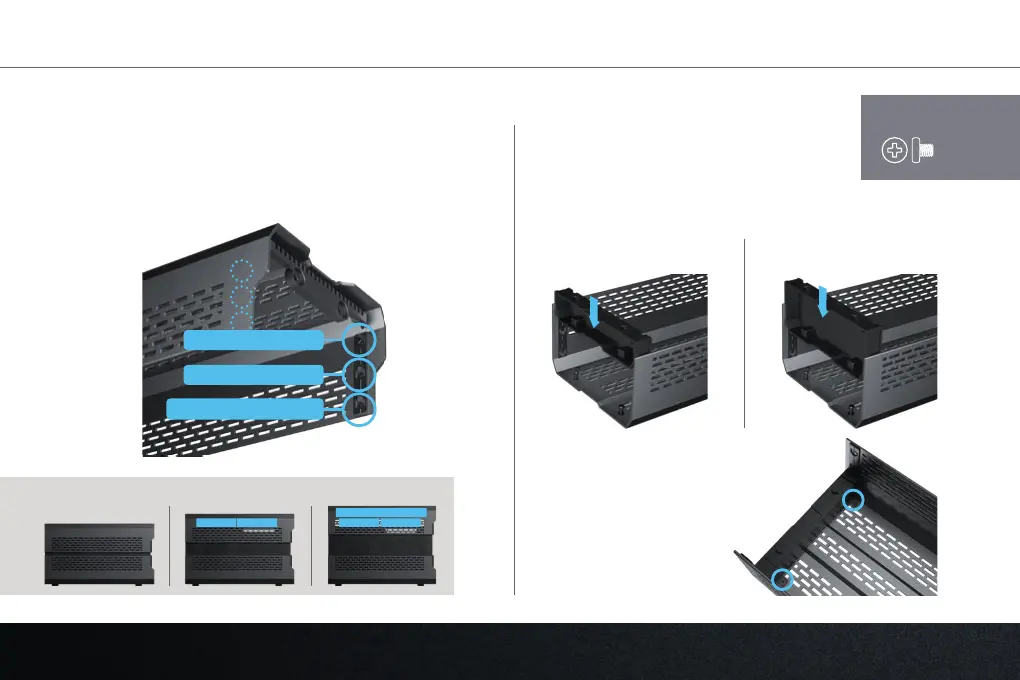
Optional: Adjust top panel position for your conguration if using the ‘Air Boost’ or ‘Liquid Cooled’ conguration.
1. Move the 2x stand-os to the 2nd or 3rd position for the
‘Air Boost’ or ‘Liquid Cooled’ conguration respectively.
Use the included screwdriver for this step.
2. Slide the rear cover in the rear of the top
panel as shown. Choose the correct size
cover, depending on your build.
3. Secure the cover to
the top panel with
2x rear cover screws.
Small cover for Air Boost
conguration
Large cover for Liquid Cooled
conguration
1. Compact Conguration
2. Air Boost Conguration
3. Liquid Cooled conguration
Compact conguration Air Boost conguration Liquid Cooled conguration
fan fan fan fan
radiator
2x
REQUIRES:




 To Next Page