5
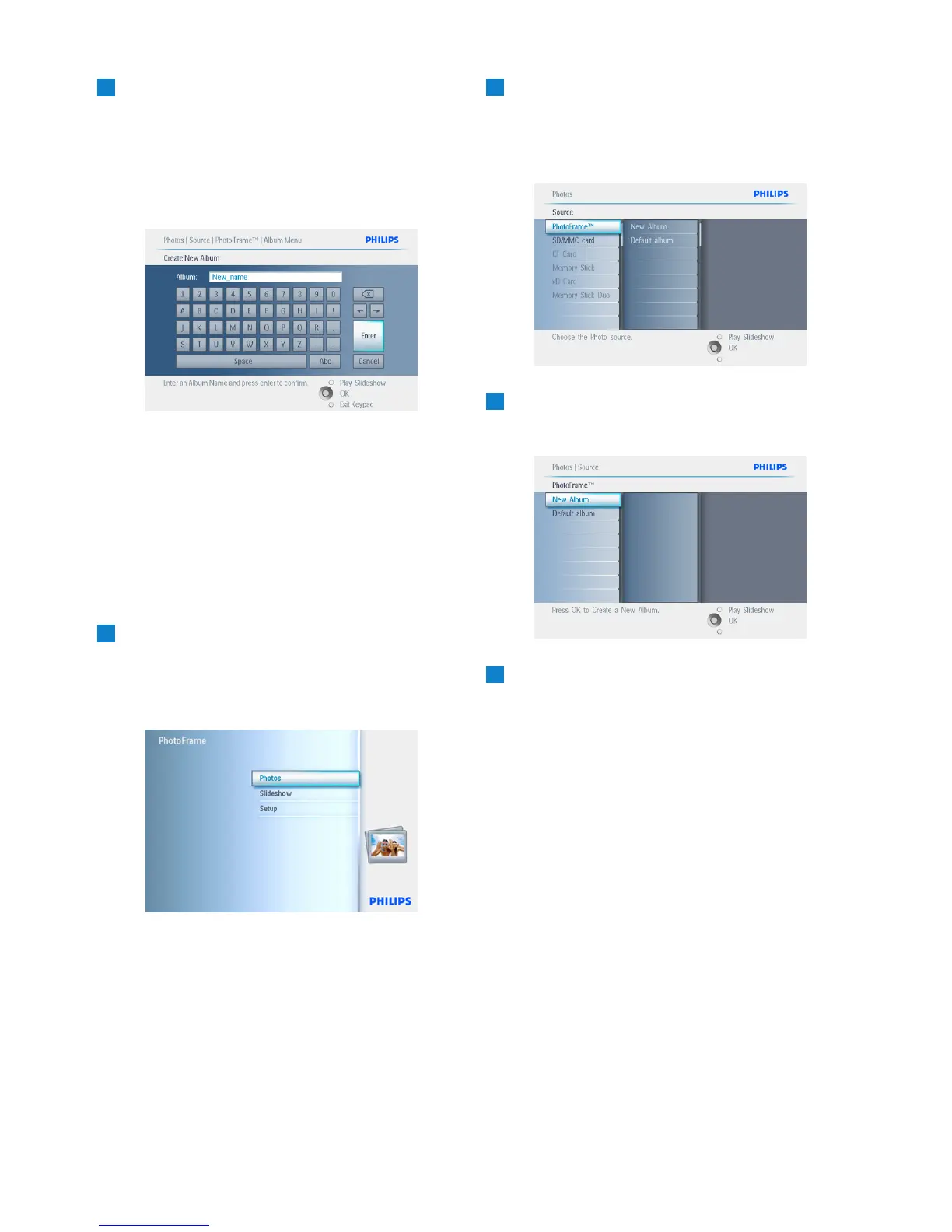
• Use the navigation buttons and OK to
enter the name of the album to be
created, up to maximum of 24 characters.
• Highlight ENTER and press the OK
button to confirm the name and return to
the PhotoFrame menu.
Press Play Slideshow to leave this menu and
play the slideshow.
5.3.3 Delete an Album
If you need to delete an entire album
1
• Press the menu button to access the
Main Menu.
• Navigate right or press the OK button to
access the Photo menu.
2
• Navigate down to select the source to
browse.
• Navigate right to enter the required
album.
3
Press the menu button to access the album
menu.
4
• Navigate down to select delete album.
• Navigate right to select Yes / No.
• Press the OK button to validate
Press Play Slideshow to leave this menu and
play the slideshow.
26
Using more of your PhotoFrame


 To Next Page