
 Need help?
Do you have a question about the Philips 2 Series and is the answer not in the manual?
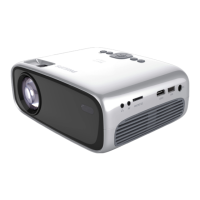
Essential safety guidelines for operating the projector to prevent hazards.
Details on features like Keystone Correction, Auto Setup, USB connectivity, and Digital Zoom.
Explanation of buttons and controls on the projector and its remote controls.
Guide to positioning, connecting power, focusing, sizing, and angling the projector.
Instructions for inserting remote batteries and adjusting keystone distortion.
Steps for safely moving the projector and packing it for transport.
Instructions for connecting PCs and Macs via USB and VGA/USB cables.
Steps for connecting VCRs, cameras, and TVs using AV, S-Video, and Scart connections.
Guide for connecting component or HDTV video sources using the data in connector.
How to connect audio amplifiers and external monitors for sound and video output.
Powering on, selecting inputs, and understanding status and feedback messages.
Adjusting image parameters like brightness, contrast, sharpness, and digital zoom.
Managing sound levels, tone, mute, and selecting audio output modes.
Configuring startup screen, system info, factory reset, auto standby, and key lock.
Instructions for cleaning the projector lens, cabinet, and dust filter.
Procedure for replacing the projector lamp and resetting the lamp hour counter.
Solutions for issues like no image, poor color, blurred image, no sound, and remote control problems.
 General
| Light Source | LED |
|---|---|
| Aspect Ratio | 16:9 |
| Throw Ratio | 1.4:1 |
| Focus Adjustment | Manual |
| Recommended Usage | Home entertainment |
| Connectivity | HDMI, USB, VGA |
| Lamp Life | 30, 000 hours |










 To Next Page