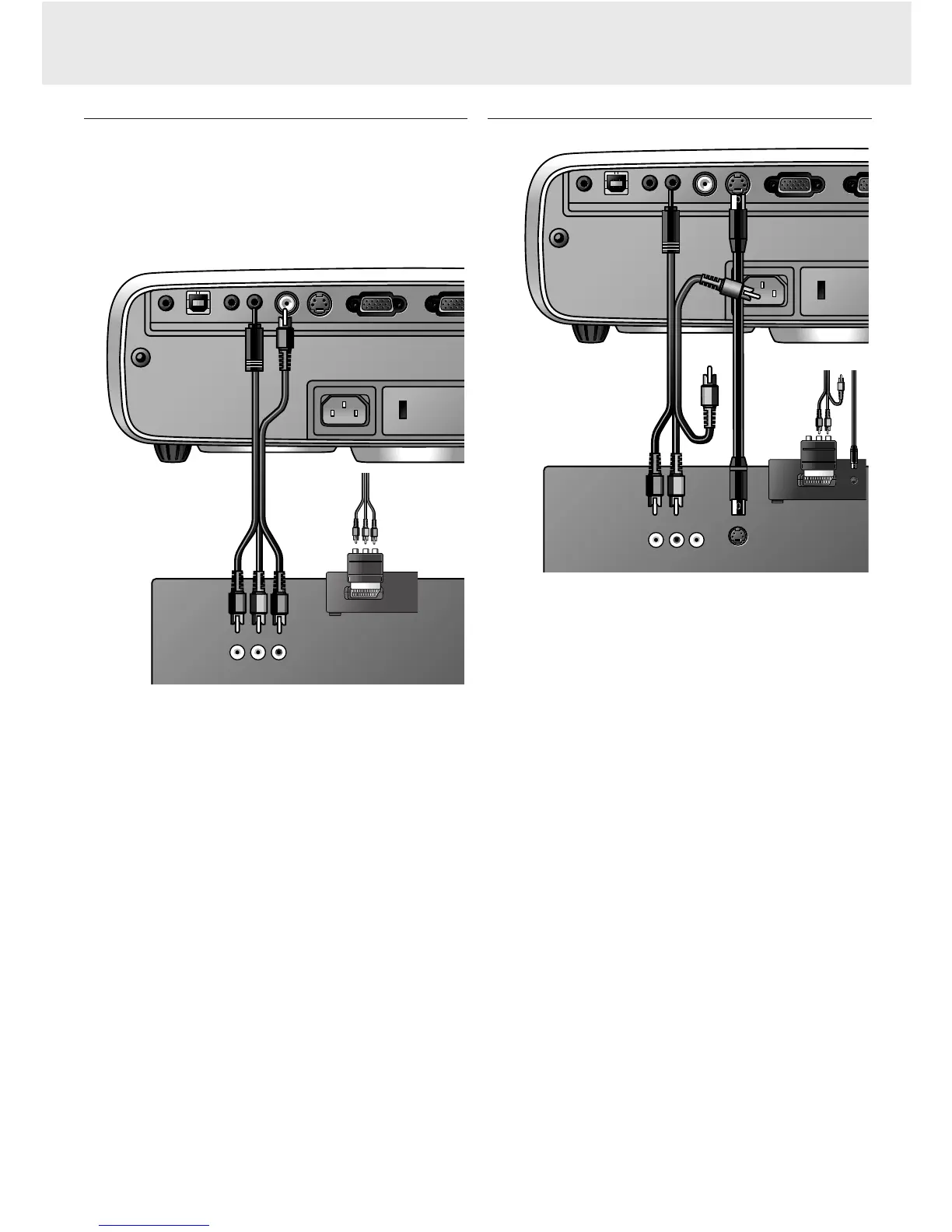
Connecting to video equipment
Note: The figures in brackets (1) correspond to the figures in the
accessories diagram.
The characters in brackets (a) correspond to the characters
in fig. 4 of ‘Controls and connections’.
Caution!
Always switch off the projector before making any connections.
PAL, NTSC, SECAM
1.
Connect the Video out socket of a VCR, Laser Disc player,
video camera or TV to the Video socket
(e)
of the projector.
For this, use the video/audio connection cable
(2)
supplied.
2.
Connect the Audio out L/R sockets of the VCR, Laser Disc
player, video camera or TV to the Video audio-in socket
(c)
of
the projector.
For this, use audio/video connection cable
(2)
supplied.
In case your VCR, Laser Disc player, video camera or TV is
equipped with a Scart connector (depending on region):
1.
Connect the Scart/RCA Audio Video adapter
(3)
supplied to
the Scart connector of the VCR, Laser Disc player, video
camera or TV.
2.
Plug the video/audio connection cable
(2)
supplied into both
the adapter and the Video
(e)
and Video audio-in
(c)
sockets
of the projector.
S-VHS
1.
Connect the S-Video out socket of a S-VHS video recorder,
Laser Disc player, video camera or TV to the S-Video socket
(f)
of the projector.
For this use the S-Video connection cable
(4)
supplied.
2.
Connect the Audio out L/R sockets of the S-VHS video
recorder, Laser Disc player, video camera or TV to the Video
audio-in socket
(c)
of the projector.
In case your VCR, Laser Disc player, video camera or TV is
equipped with a Scart connector (depending on region):
1.
Connect the Scart/RCA Audio Video adapter
(3)
supplied to
the Scart connector of the VCR, Laser Disc player, video
camera or TV.
2.
Plug the audio/video connection cable
(2)
supplied into both
the adapter and Video audio-in socket
(c)
of the projector.
3.
Plug the S-Video connection cable supplied into the VCR and
the S-Video socket
(f)
of the projector.
R Audio L
out
S-Video
S-Video
R Audio L
out
VCR
Video
out
Video
out
Audio out USB Video S-Video
Audio out USB Video S-Video
Projector
Data out











 To Next Page