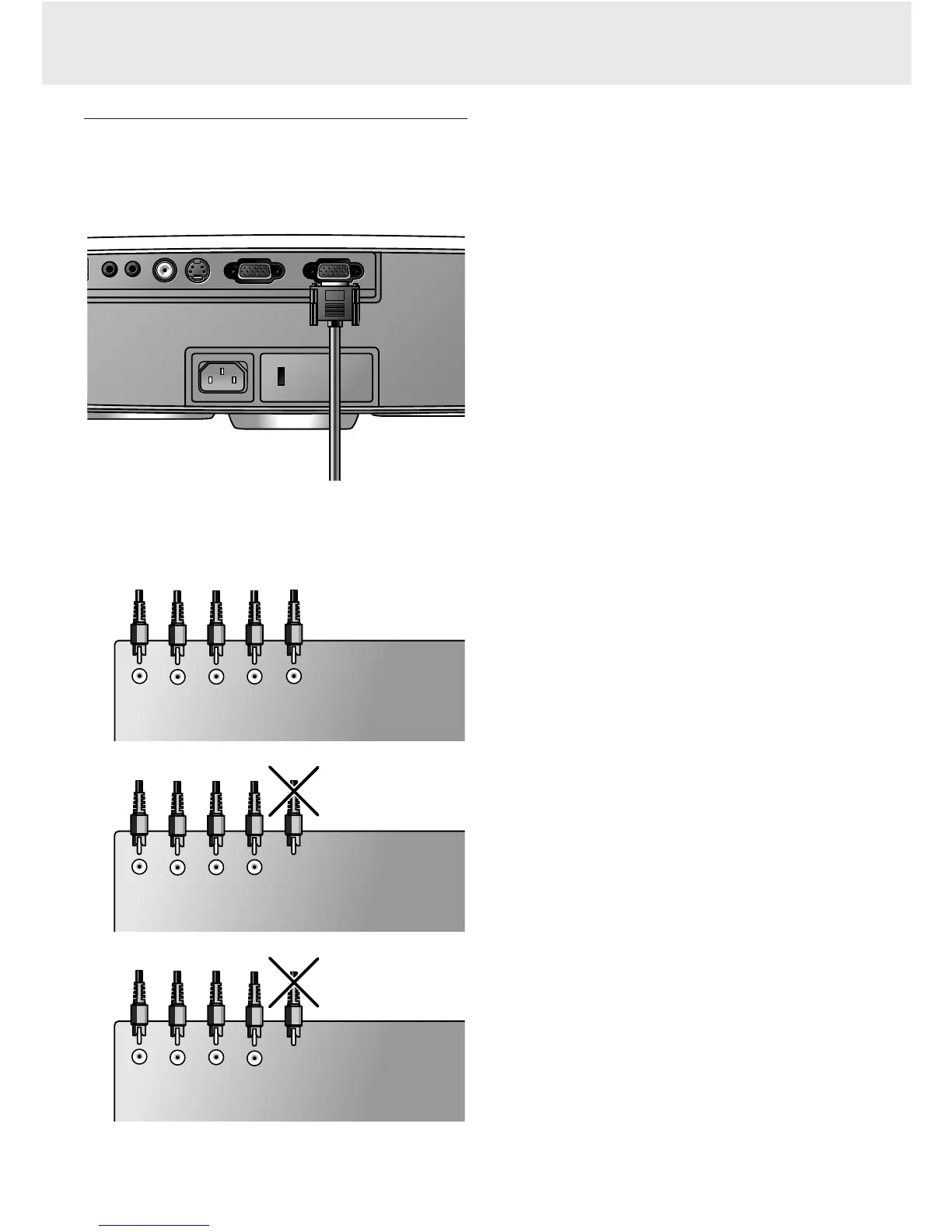
Connecting to Component- and HDTV-video equipment
Note: The characters in brackets (a) correspond to characters in
fig. 4 of ‘Controls and connections’.
Caution!
Always switch off external equipment and projector before
making any connections.
1.
Connect the 15 pin connector of an optional component/HD
input cable to the Data in terminal
(h)
of the projector.
2.
Connect the other end of the cable to the appropriate
outputs of your Component- or HDTV-video equipment (e.g.
DVD player, Settop Box, HDTV receiver, etc.).
Note: Connections that are not in use in your particular situation
need not be connected.
Pr
Cr
Y
Y
Pb
Cb
Red
Green Blue
DVD player, Settop Box,
HDTV receiver, etc.
Y/S
Grey Black
(Yellow)
RG B
Y/S
Red
Green Blue Grey Black
DVD player, Settop Box,
HDTV receiver, etc.
(Yellow)
RG B
H
V
Red
Green Blue Grey Black
DVD player, Settop Box,
HDTV receiver, etc
.
Optional
Video S-Video
Video S-Video
Data out Data in
Data out Data in
Data audio-in
Data audio-in
Video audio-in
Video audio-in
(h)
7. Installation
13
Connecting to Component- and HDTV-video equipment











 To Next Page