32BDL4050D
24
5. Youcouldeditordeleteanon-emptyplaylist,justchoosethe
desiredplaylistwhichiswithpencilicon.
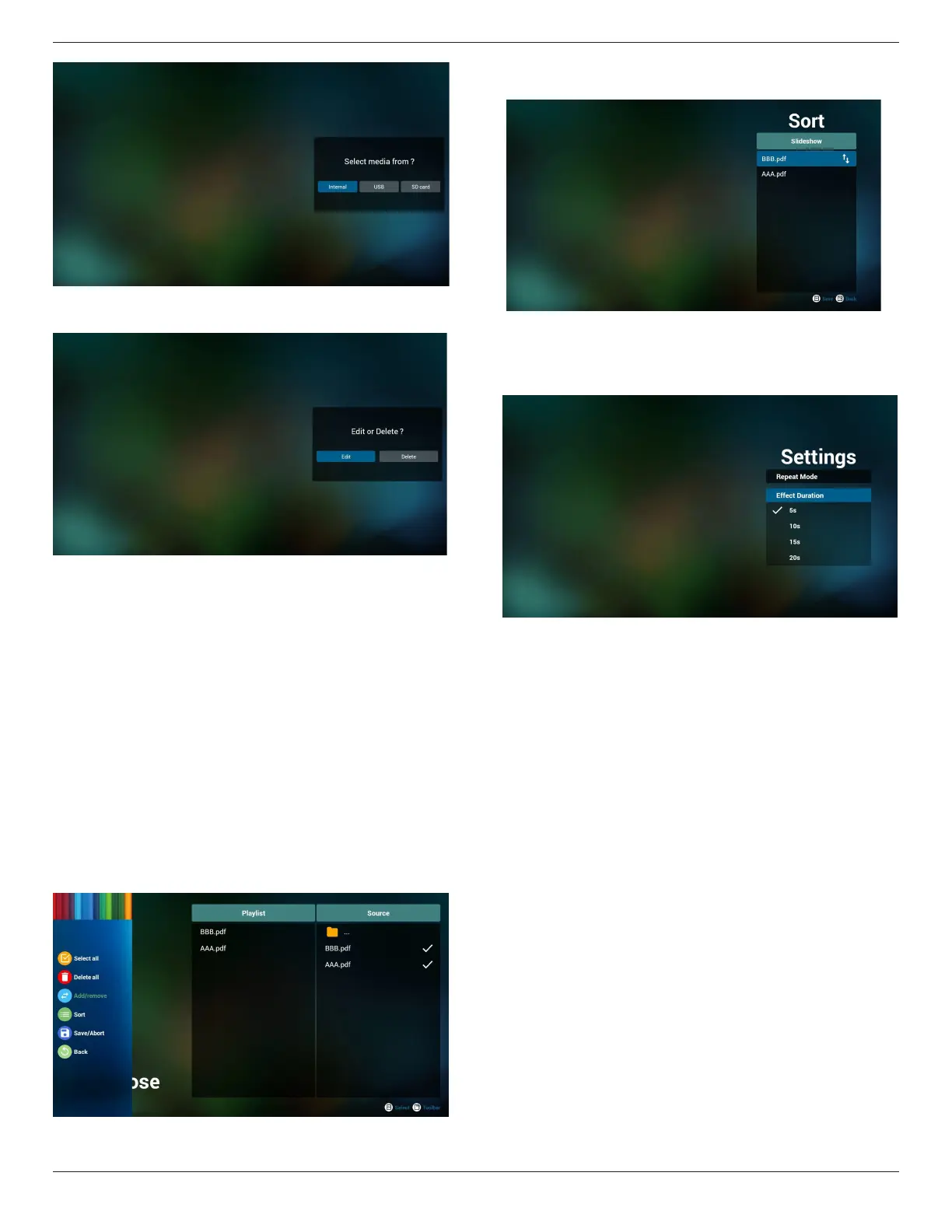
6. Onceyoustarttoeditaplaylist,youwillseebelowscreen.
Source-lesinstorage.
Playlist–lesinplaylist.
Thereare4iconswhichmaptothekeysofremotecontroller.
Optionkey–launchslidebar
Playkey–playmediale.
Infokey–showmediainfo.
Okkey–select/unselectle.
6-1.Intheslidebar,ithelpsyoutodothefollowing:
-selectall:selectallstorageles.
-deleteall:deleteallplaylistles.
-add/remove:updateplaylistfromsource.
-sort:sortplaylist.
-save/abort:saveorabortplaylist.
-back:return.
7. ifyouchoose“Sort”intheslidebar,youcanchangetheorderof
lesonebyone.
8. Select“Settings”onhomepage,thispagehastwoparts,“Repeat
Mode”and“EffectDuration”.
RepeatMode:playmode.
EffectDuration:photoeffectduration.
Media Hotkey:
Play:Playbackle.
Pause:Pausepage.
Fastforward:gotonextpage,ifthepageisendofthele,itwillgo
tonextle.
Rewind:backtolastpage,ifthepageisrstofthele,itwillbackto
lastle.
Stop:returntorstpageofle
Color Hotkey:
Blue:Zoomin.(+10%)
Yellow:Zoomout.(-10%)
OK:Restorezoom
Arrow keys:
Up/Down/Left/Right:Adjustpage.(Whenthepagehaszoomedin/
out)
Left:PreviousPage.(Whenthepagehasnotzoomedin/out)
Right:NextPage.(Whenthepagehasnotzoomedin/out)
Combination key:
Numberkey+OKkey:selectspecicpage,andpressokkeyto
changepage.
-Pressnumberkey.








 To Next Page