32BDL4050D
35
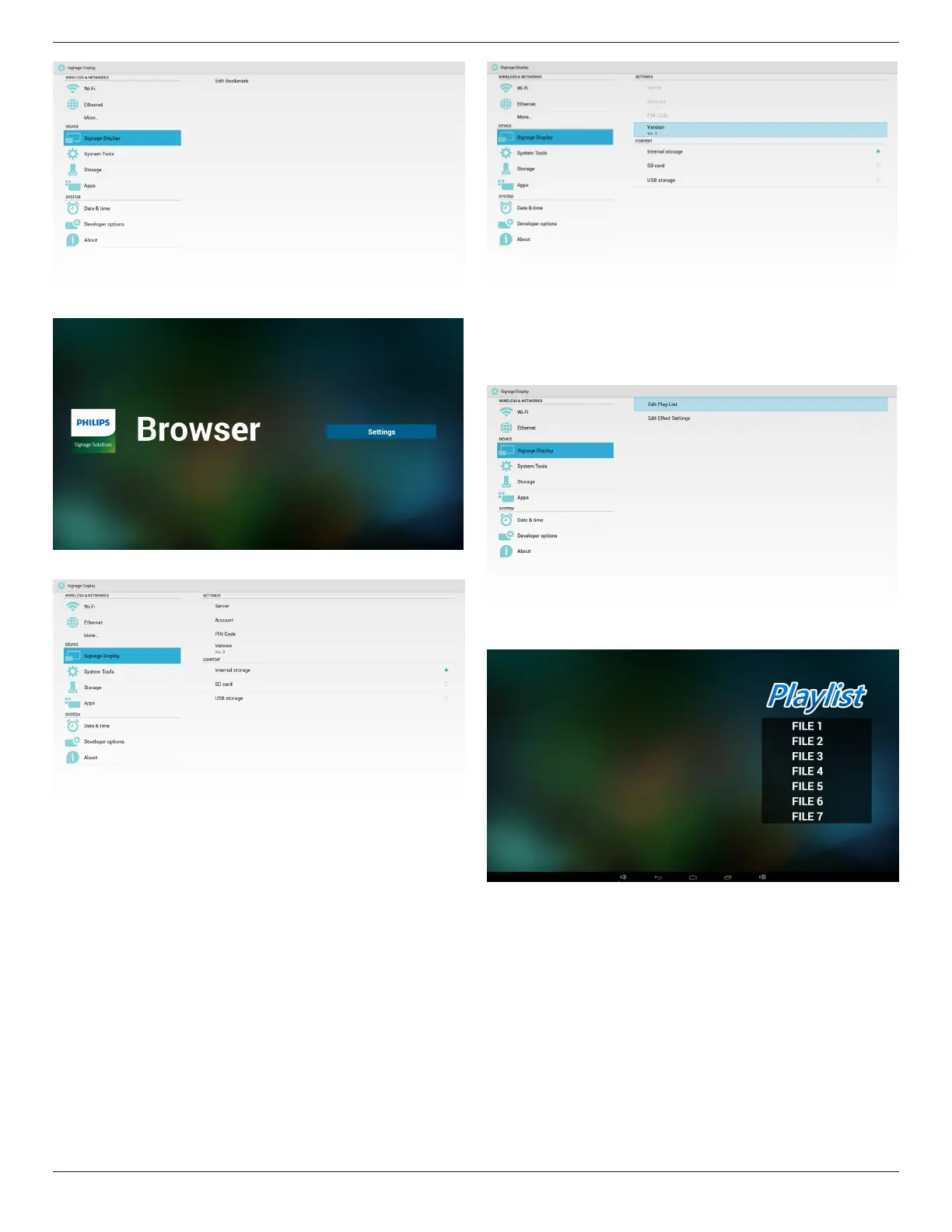
(1)OpenBrowsersettingpage.
3. SmartCMS
1)Server
SetupSmartCMSServeraddress.
2)Account
SetupSmartCMSaccount.
Note:
Inputformatlimitation:ASCIIonly(referto11.2ASCIITable)
3)PINCode
SetupSmartCMSPINCode
4)Version
CanselectVer.2andVer.3
• Ver.2:Using2.0/2.2updateadvertisingagreement.
• Ver.3:Using3.0/3.1updateadvertisingagreement.
InVer.2cases,donotuseServer/Account/PINCodevalues,sothe
threegrayandcannotbeused.
5)Content
CanselectInternalstorage/SDcard/USBstorage.
4. PDFPlayer
CaneditPDFPlayerPlayListandEffectSettings.
(1)OpenPDFPlayerPlayerListeditpage.
(2)OpenPDFPlayereffecteditpage.








 To Next Page