32BDL4050D
45
**IfLogosettoUSER.
UserlogodoesNOTsupportrotationfunction.
Monitor ID
SettheIDnumberforcontrollingthedisplayviatheRS232Cconnection.
EachdisplaymusthaveauniqueIDnumberwhenmultiplesetsofthis
displayareconnected.MonitorIDnumberrangeisbetween1to255.
Theoptionare:{Monitor group}/{Tiling matrix}/{Auto ID}
Monitor Id
Monitor Id
Monitor group
Tiling matrix
Auto ID
1
1
1
End
• {Monitor group}
Theoptionsare:{Off}/{1-254}
• {Off}–{Monitorgroup}arenotsupported.
• {1-254}–{Monitorgroup}aresupported.Thedefaultsettingis1.
• {Tiling matrix}
Tilingmatrixnumberrangeisbetween1to15.1isdefaultsetting.
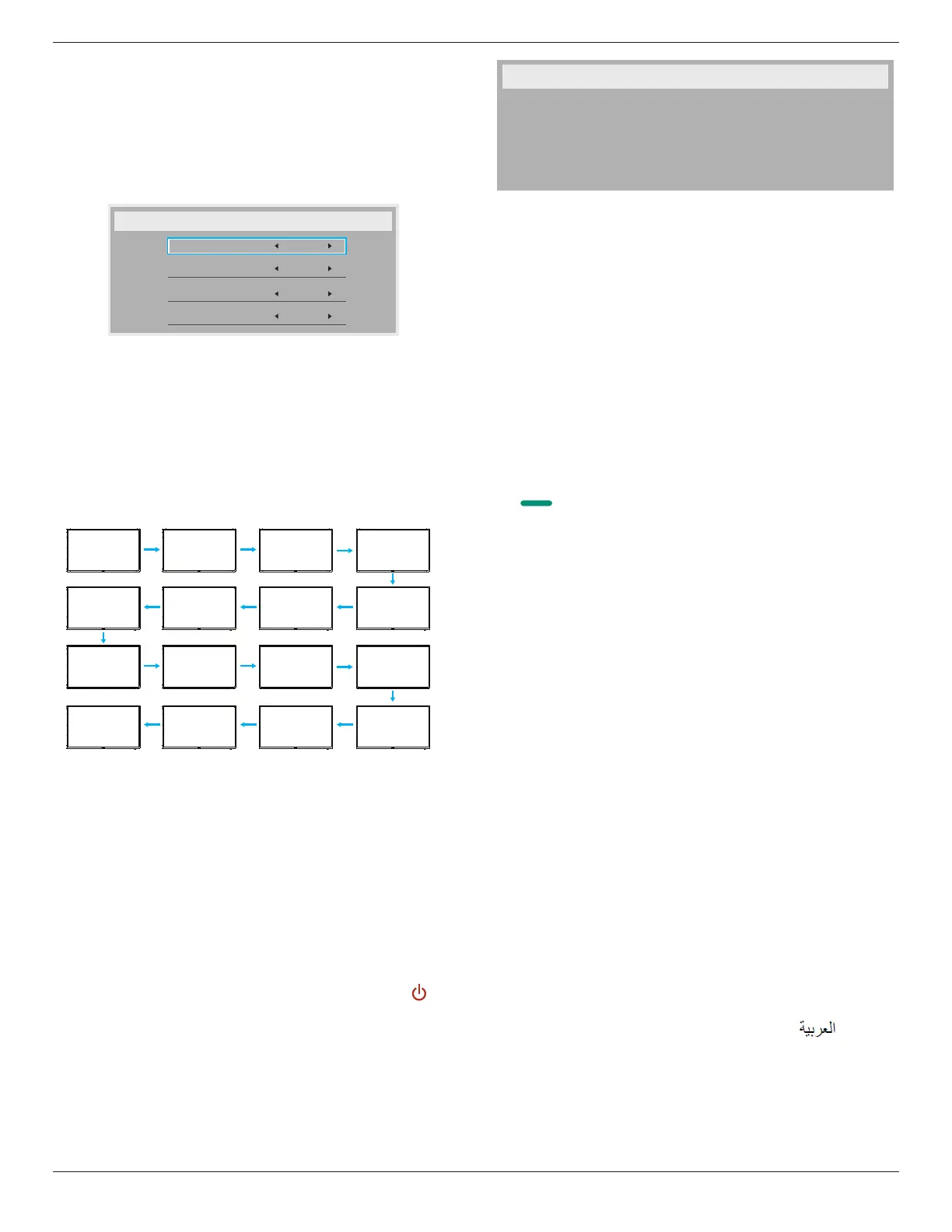
The{Auto ID}setupfunctionenablessettingup{Monitor ID}of
connectedmachineaccordingto{Tiling matrix}settings.
Example:Tilingmatrixsetsas4
1 2
5 6
3 4
7 8
9 10 11 12
13
14 15
16
• {Auto ID}
Theoptionare:{Start}/{End}.Thedefaultis{End}.
• SwitchtoStartoptiontosetupIDsofmachinesbackward
fromcurrentone.
• Oncethesetupiscompleted,theoptionexitstoEnd
automatically.
• Tousethisfunction,serialconnectallmachineswithRS-232
cableandsettheirControlportstoRS-232too.
Heat status
Thisfunctionallowsyoutocheckthethermalstatusatanytime.
• Atemperature-warningmessagewillbeshownonthescreenifthe
temperaturereaches97°C(207°F).Allkeyfunctionsexcept[ ]key
willthenbedisabled.
• Oncethetemperaturereaches98°C(208°F),thedisplaypowerwill
beshutdownautomatically.
Monitor information
Showsinformationaboutyourdisplay,includingmodelnumber,serial
number,operatinghoursandsoftwareversion.
Monitor information
Model name
Serial no
Operation hours
SW Version
32BDL4050D
CNCA123456789
46H45M
V0.300
DP version
DisplayPortsupportmode.
Theoptionsare:
• {DP 1.1}(Default):DP1.1singlestream(clonemode)
• {DP 1.2 SST}:DP1.2Singlestream(clonemode)
• {DP 1.2 MST}:DP1.2Multi-Stream
*NOTE:
TheDPversionmustbesetthesameforalldaisychaindisplays.
Window selection
Selectthewindowforadjustingsetting.Theselectedwindowwillbe
highlightgreenborder.
WindowselectionwillsettoMainafterpoweron.
Theoptionsare:
• {Main}(Default),{PIP}
• [ ]
HotkeyforWindowselectionfunction.
Rotation
SettherotationofMain/Sub/OSD
AutoRotate: Off/On Default: Off
OSDRotate: Landscape/Portrait Default: Landscape
ImageRotate:
All: Off/On Default: Off
Main: Off/On Default: Off
Sub: Off/On Default: Off
AutoRotate:{Off},{On}whenvalueisOn,automaticallydetectwhether
thePDrotation,OffissetbyOSD.
OSDRotate:{Off},{On}whenvalueison,OSDrotate90°,Offis
restored.
All:{Off},{On}whenvalueison,allWindowscreenrotate90°,Offthe
referencesetindividualwindow.
Main:{Off},{On}whenvalueisonn,Mainwindowscreenrotate90°,Off
isrestored.
Sub:{Off},{On}whenvalueison,Sub1Windowscreenrotate90°,Offis
restored.
*WhentheMain/Subsourceisthesame,rotationisgivenpriorityto
withSub.
*NotsuuporedDe-Interlacingfunctioninrotationmode.
Language
SelectthelanguageusedintheOSDmenu.
Theoptionsare:English/Deutsch/
简体中文
/Français/Italiano/Español/
Pyccкий/Polski/Türkçe/
繁體中文
/
日本語
/Português/ /Danish/
Svenska/Suomi/Norsk/Nederlands.
Conguration2 reset
ResetallsettingsinConguration2menutothefactorypresetvalues.








 To Next Page