Mechanical Instructions
EN 10 Q529.1E LA4.
4.3 Assy/Panel Removal VE8 Styling
4.3.1 Rear Cover
Warning: Disconnect the mains power cord before removing
the rear cover.
Note: It is necessity to release the fixation screws from the
stand before removing the rear cover.
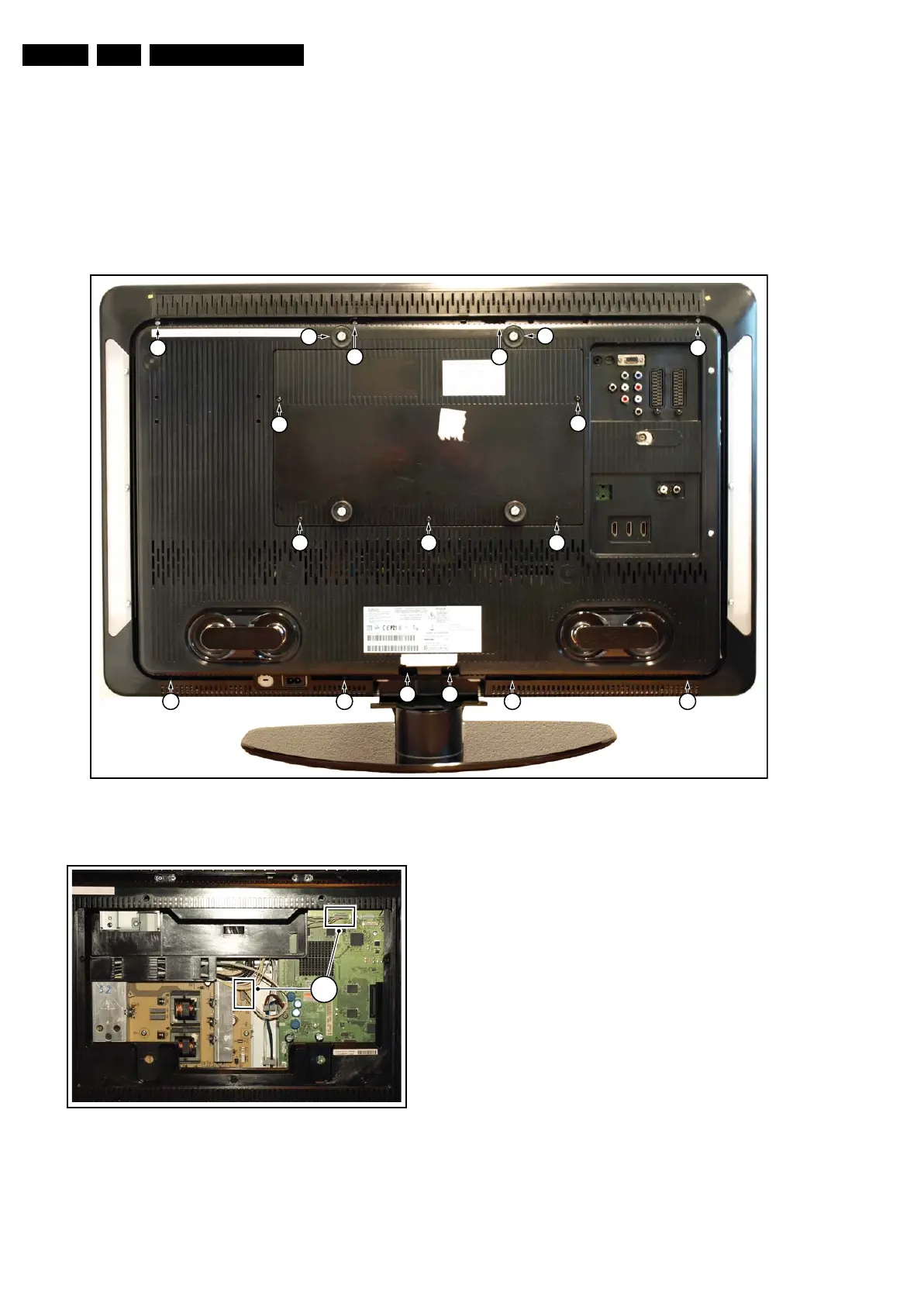
Refer to next figures for details.
1. Remove the mushrooms [1].
2. Remove the fixation screws [2] from the hatch and lift the
hatch from the rear cover.
3. Unplug the connectors [3].
4. Remove the fixation screws from the stand. Please note
that the set is now mechanically not secured and may be
unstable.
5. Remove the fixation screws [5] that secure the rear cover.
6. Lift the rear cover from the TV. Make sure that wires and
flat foils are not damaged while lifting the rear cover from
the set.
Figure 4-4 Rear Cover
Figure 4-5 Hatch
I_17660_106.eps
130308
1
1
5
5 5
5
555
2
2
222
4 4
5
I_17660_107.eps
130308
3



 To Next Page